JavaScript is not currently enabled, but is required for full CodeSonar manual search and browse functionality.
If you are viewing this file in your hub's Web GUI, enable JavaScript in your browser: you will also need it for GUI functionality.
If you opened this file directly from disk, your browser may be directly suppressing JavaScript functionality: certain browsers perform this suppression on local files (but not files delivered by web servers) for security reasons.
| CodeSonar® 9.2p0 | CONFIDENTIAL | CodeSecure Inc |
This section contains descriptions for all page types in the CodeSonar Web GUI.
Important Note: the CodeSonar Web GUI makes extensive use of JavaScript. Make sure JavaScript is enabled in your web browser.
Most users will access the GUI pages through a standard web browser.
You can also use the codesonar get command to download an individual GUI page from the command line:
where:
| [-o path/to/outfilename] | specifies that the downloaded content should be saved to file
path/to/outfilename. If this option is not specified, the requested content will be saved in your working directory as filename. |
|---|---|
| [-t timeout_seconds] | specifies the maximum time (in seconds) the request is allowed to take. |
| [-follow-redirect] | specifies that the command should follow any redirects from the specified url. |
| url |
must have one of the following forms
http://host:port/path/to/filename http://host:port/path/to/filename?query_string https://host:port/path/to/filename https://host:port/path/to/filename?query_string |
| [-auth authtype], [-hubuser username], [-hubpwfile pwfile], [-hubbearerfile bearerfile], [-hubcert certfile], [-hubkey privatekeyfile] |
specify how CodeSonar should attempt to authenticate this command. For details, see Hub Authentication: Authenticated codesonar Subcommands. |
The CodeSonar HTTP API allows you to construct HTTP queries to access and download warnings, analyses, and other hub content. HTTP API documentation is served directly by the hub, and cannot be accessed via a file:// URL. To view, start a hub (if one is not already running), then open the following URL.
Where http://host:port is your hub homepage URL (for HTTPS hubs, the URL will start with https://).
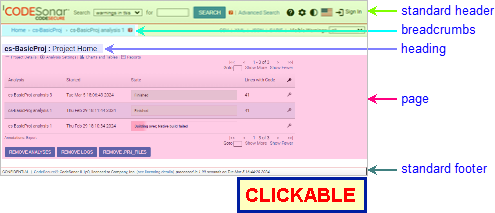
The pages in the CodeSonar GUI conform to a standard layout, as shown below.
| standard header |
The standard header contains the CodeSecure CodeSonar logo and
the following components:
|
|---|---|
| breadcrumbs | A set of links showing the navigation path to the current page. To return to any point in the path, click on the corresponding link. |
| page heading | Gives the page type and the entity (warning, analysis, or project) that is the subject of the page, if any. |
| page contents | Depend on the page type, see the list below. |
| standard footer | The standard page footer contains the name of the CodeSonar license holder and the time at which the page was generated. For full details, see The Standard Footer, below. |
The following annotated screenshot fragment shows the different parts of the standard header.
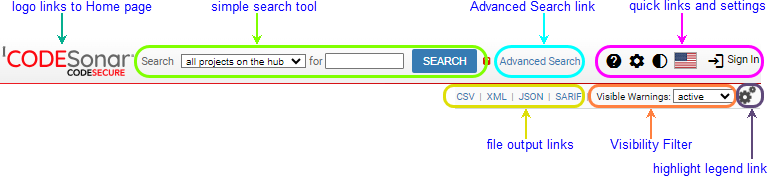
| link to home page | Click the CodeSonar logo to navigate to the hub Home page. | |||||||||||||||||||||||||||||||||||||||||||
|---|---|---|---|---|---|---|---|---|---|---|---|---|---|---|---|---|---|---|---|---|---|---|---|---|---|---|---|---|---|---|---|---|---|---|---|---|---|---|---|---|---|---|---|---|
| simple search tool |
To search for warnings:
See the CodeSonar search language documentation for more information on the search languages. Note in particular that you may get unexpected results if you search for a string without realizing that it has a special interpretation in the applicable search language. The special cases are described in the notes on 'word' searches. |
|||||||||||||||||||||||||||||||||||||||||||
| Advanced Search link | Click to navigate to the Advanced Search page. | |||||||||||||||||||||||||||||||||||||||||||
| quick links and settings | 
|
|||||||||||||||||||||||||||||||||||||||||||
 manual link manual link |
Link to the title page of this manual. | |||||||||||||||||||||||||||||||||||||||||||
 Settings link Settings link |
Link to the GUI Settings page. | |||||||||||||||||||||||||||||||||||||||||||
 light/dark mode selector light/dark mode selector |
This controls the color scheme for the Web GUI display. There are two options: Light (dark text on light background) and Dark (light text on dark background). The default color theme for the hub is specified on the Content tab of the Settings page. |
|||||||||||||||||||||||||||||||||||||||||||
| language selector |
This controls the (human) language in which warning report
annotations are rendered. GUI links to warning class documentation will navigate to documentation in the appropriate language (where available). There are currently two available languages:
|
|||||||||||||||||||||||||||||||||||||||||||
| Sign In or Sign Out | Appearance depends on whether or not a user is currently signed in. | |||||||||||||||||||||||||||||||||||||||||||
| file output links |
If file output is available
for the current page, one link for each available output
format. Depending on your browser configuration, selecting a
link will have one of the following results:
|
|||||||||||||||||||||||||||||||||||||||||||
| Visibility Filter selector |
Allows you to
specify which elements the CodeSonar GUI will display.
The visibility filter domain is one of {Warnings, Files, Procedures, Code, Metrics, Analyses, Projects, Warning Categories, Users}, depending on the current context. The page type properties table below shows the visibility filter applied for each page type. The options available in any Visible Elements selector correspond to the names of those saved searches in the Elements domain for which you hold NAMEDSEARCH_EXISTS. Your settings in each selector are preserved through all your CodeSonar GUI navigation, and applied on the relevant GUI page types, until you change the settings. Default visibility settings are managed on a per-user basis.
CodeSonar ships with the following visibility filters. The all visibility filter in each domain will always be available to all users; the others are governed by NAMEDSEARCH_EXISTS settings.
If no visibility filter applies to the page you are currently viewing, no selector will be displayed. |
|||||||||||||||||||||||||||||||||||||||||||
| Highlight Legend Link | [Source Listing and Warning Report only] To view the highlight legend, click and select show highlight legend from the menu that pops up. | |||||||||||||||||||||||||||||||||||||||||||
The following annotated screenshot fragment shows the different parts of the standard footer.
Permission Note. If you do not have G_HUB_METADATA permission, your page footer will display the CodeSecure web link only. It will not display any hub metadata, license-related notifications, or hub alert notifications.

| CodeSecure web link | Links to the CodeSecure website. |
|---|---|
| CodeSonar version | Specifies the version of CodeSonar that the hub is running. |
| licensee | The entity to whom this copy of CodeSonar is licensed. |
| licensing details link |
Click to navigate to the License Utilization page.
If the hub is currently nearing licensed limits, a note will appear in this footer. |
| page processing time and generation timestamp | The time that it took to generate the page, and the date and time at which it was generated. |
License-related notifications, if any, are displayed immediately above the footer. There are several license notification types.
Other hub-related alerts, if any, are also displayed immediately above the footer.
| Home Page | The home page for CodeSonar. Lists all projects and project trees that are children of the root project tree, with links to further information for each. |
|---|---|
| Account Editor | Allows the Administrator to edit the account settings for any ordinary user, and to delete user accounts. |
| Advanced Search | Perform a search by specifying the desired contents of one or more warning report fields. |
| Analysis | Information about a single run of the CodeSonar analysis, including the warnings issued, files analyzed, and procedures encountered. |
| Analysis Cloud | View information about the hub's analysis cloud register, modify process limits for launch daemons in the register. |
| Analysis Cloud Active Jobs | View information about analysis processes that are currently cloud-associated with launch daemons in the hub's analysis cloud register, broken down according to the analyses that the processes are attached to. |
| Analysis Search Results | View the results of an analysis search, navigate to individual Analysis pages. |
| Authentication Services | View and configure third-party authentication services for the hub. |
| Bulk Add Users | Create new user accounts in bulk. |
| Chart | Display a chart of hub information specified by the user. |
| Chart Table | Display chart information in tabular form. |
| Code Search Results | View the results of a search for token occurrences in source code, navigate to corresponding lines in source files. |
| Configure HTTPS | Enable/disable HTTPS; configure the hub's server certificate and client authentication certificate. |
| Create Account | Create a new hub user account. |
| Edit Authentication Service | View and modify the configuration for a hub authentication service. |
| Explore Callers | Interactively explore the possible execution paths to a warning or code location |
| File Search Results | View the result of a file search, navigate to individual source files. |
| Global Role-Permissions | View and edit the global role-permission assignments for each role on the hub. |
| Launchd Group | The main information page for a CodeSonar launchd group, including a table of its child launch daemons and launchd groups. |
| License Utilization | View current utilization of licensed CodeSonar resources: enabled users, anonymous sessions, user sessions, and license units. |
| Logs | View logs from the different phases of the CodeSonar build/analysis: |
| Manage Findings | Add and delete Finding values. |
| Manage Priorities | Add and delete Priority values. |
| Manage States | Add and delete State values. |
| Manage Warning Processors | Add and remove warning processors. |
| Management Report Template Editor | Create and modify templates for management reports. |
| Metric Report | View a user-specified subset of the metric values for analyzed projects. |
| Metric Report Creation | Specify contents for a new metric report. |
| Procedure Search Results | View the results of a procedure search, navigate to individual procedure definitions. |
| Project | The main information page for a CodeSonar project. |
| Project Tree | The main information page for a CodeSonar project tree, including a table of its child projects and project trees with links to further information for each. |
| Project Search Results | View the results of a project search, navigate to Analysis pages for the most recent analysis of each project. |
| Python Console | Interactive Python interpreter providing programmatic access to the program representation information generated by the analysis. |
| Resource Role-Permissions | View and edit the role-permission assignments for each role on the hub with respect to a single securable resource: a project tree, project, analysis, launchd group, launch daemon, named search, saved chart, warning processor, report template, or role. |
| Role Ancestors | View the set of ancestor roles for a role; edit the set of parent roles; edit the role name and description. |
| Role Users | View the set of directly and indirectly assigned users for a role; edit direct user assignments; edit the role name and description. |
| Roles | View all roles on the hub; delete roles; add new roles. |
| Saved Searches | View saved searches for each search domain; delete saved searches. |
| Search Callers | Search the paths to a warning or code location, and view the results. |
| Security Dashboard | View security suggestions for the hub; link to security functionality. |
| Settings [including Admin Settings] |
View and change settings for your own hub user account and for the hub. |
| Sign In | Sign in to the hub, create a new hub user account, or reset a forgotten password. |
| Sign Out | Sign out of the hub. |
| Source Listing | A code listing for a single source file. Includes comments indicating warning locations, and source coloring and hyperlinking. |
| SQL Console | Direct SQL interaction with the hub database, both reading and writing. |
| Tainted Value | Describes propagation of taint to a specific occurrence of a specific token along a specific path. |
| Undefined Functions Report | Lists the undefined functions encountered. |
| User Certificates | Manage the TLS certificates for a single hub user account. |
| User Roles | View the set of directly and indirectly assigned roles for a user; edit direct assignments. |
| User Search Results | View the results of a search, navigate to relevant account editor pages, save a named search. |
| User Sessions | Manage the sessions belonging to a single hub user account. |
| Usernames | List all user accounts on the hub; navigate to their account editor pages. |
| Users | List all user accounts on the hub; navigate to their account editor pages; set the default template user. |
| Warning Category Search Results | View and refine the results of a search, save a named search. |
| Warning Cluster | List the representative instances of all warnings in a specific cluster; navigate to their warning reports. |
| Warning Report, Extended Warning Report |
Full information about a single warning that has been issued by one or more CodeSonar analysis runs. |
| Warning Search Results | View and refine the results of a search, navigate to relevant warning reports, save a named search. |
Each page type has certain properties.
| Output Formats | Alternative output formats available for the page type, if any. For full details, see Output File Formats. |
|---|---|
| Annotation Import/Export | Pages of some types provide functionality for exporting warning annotations. A subset of these pages also provide functionality for importing annotations. For full details, see Importing and Exporting Annotations. |
| Visibility Filter | The domain of the visibility filter on the page type, if any. |
| Permission Requirements |
Pages have differing permission
requirements, which are detailed in the individual GUI
reference pages for each page type.
|
The following table summarizes these properties (other than permissions) for all page types.
| Page Type | URL/URL scheme (based at http://hub_location) |
Output Formats | Annotation Import/Export | Visibility Filter applied |
|---|---|---|---|---|
| Home Page | /index.html | CSV, JSON, XML | import (*), export | Visible Projects |
| Account Editor | /user/user_id.html | none | none | none |
| Admin Settings | /admin_settings.html | none | none | none |
| Advanced Search | /adv_search.html | none | none | none |
| Analysis Cloud | /manage_launchd.html | CSV, JSON, XML | none | none |
| Analysis Cloud Active Jobs | /analysis_slaves.html | CSV, JSON, XML | none | none |
| Analysis Role-Permissions | /analysis/analysis_id-permissions.html | CSV, JSON, XML | none | none |
| Analysis Search Results | /analysis_search.html | CSV, JSON, XML | none | Visible Analyses |
| Analysis: Files Tab | /analysis/analysis_id-files.html | CSV, JSON, XML | none | Visible Files |
| Analysis: Procedures Tab | /analysis/analysis_id-procedures.html | CSV, JSON, XML | none | Visible Procedures |
| Analysis: Warnings Tab | /analysis/analysis_id.html | CSV, JSON, SARIF, XML | export | Visible Warnings |
| Authentication Services | /auth_services.html | CSV, JSON, XML | none | none |
| Bulk Add Users | /bulk_add_users.html | none | none | none |
| Chart | /chart.html | none | none | Visible Warnings or none, depending on the chart domain |
| Chart Table | /chart_table.html | CSV, JSON, XML | none | Visible Warnings or none, depending on the chart domain |
| Code Search Results | /code_search.html | CSV, JSON, XML | none | Visible Code |
| Configure HTTPS | /configure_https.html | none | none | none |
| Create Account | /create_account.html | none | none | none |
| Edit Authentication Service | /authservice/auth_service_id.html | none | none | none |
| Explore Callers | /contexts/explore/explore/[...] | none | none | none |
| Extended Warning Report | /warninginstance/warning_instance_id.html /warningreport/warning_group_id.html |
SARIF, XML, text | none | Visible Warnings |
| File Search Results | /file_search.html | CSV, JSON, XML | none | Visible Files |
| Global Role-Permissions | /global-permissions.html | CSV, JSON, XML | none | none |
| Hub Commands | /command/[...] | none | none | none |
| Launch Daemon Role-Permissions | /launchdaemon/launchd_id-permissions.html | CSV, JSON, XML | none | none |
| Launchd Group | /launchdaemongroup/ldgroup_id.html | CSV, JSON, XML | none | none |
| Launchd Group Role-Permissions | /launchdaemongroup/ldgroup_id-permissions.html | CSV, JSON, XML | none | none |
| License Utilization | /lines.html | CSV, JSON, XML | none | none |
| Log: Analysis | /analysis/analysis_id-ad_log[stream][tailnum].html | XML, text | none | none |
| Log: Build | /analysis/analysis_id-native_log[stream][tailnum].html | XML, text | none | none |
| Log: Native Compilation Details | /spawncsmessage/compilation_id.html | XML, text | none | none |
| Log: Parse | /analysis/analysis_id-parse_log[stream][showall][tailnum].html | XML, text | none | none |
| Log: Parse Details | /frontendrun/parse_id.html | XML, text | none | none |
| Manage Findings | /findings.html | CSV, JSON, XML | none | none |
| Manage Priorities | /priorities.html | CSV, JSON, XML | none | none |
| Manage States | /states.html | CSV, JSON, XML | none | none |
| Manage Warning Processors | /manage_processors.html | none | none | none |
| Management Report Template Editor | /report/template/index.html | JSON | none | none |
| Metric Report | /metric_search.html | CSV, JSON, XML | none | Visible Metrics |
| Metric Report Creation | /metrics/analysis_id.html | CSV, JSON, XML | none | none |
| Named Search Role-Permissions | /namedsearch/search_id-permissions.html | CSV, JSON, XML | none | none |
| Procedure Search Results | /proc_search.html | CSV, JSON, XML | none | Visible Procedures |
| Project | /project/project_id.html | CSV, JSON, XML | import (*), export | Visible Analyses |
| Project Role-Permissions | /project/project_id-permissions.html | CSV, JSON, XML | none | none |
| Project Search Results | /project_search.html | CSV, XML | none | Visible Projects |
| Project Tree | /projecttree/ptree_id.html | CSV, JSON, XML | none | Visible Projects |
| Project Tree Role-Permissions | /projecttree/ptree_id-permissions.html | CSV, JSON, XML | none | none |
| Python Console | /analysis/analysis_id-python.html | none | none | none |
| Report Template Role-Permissions | /reporttemplate/template_id-permissions.html | CSV, JSON, XML | none | none |
| Role (Resource) Role-Permissions | /role/role_id-permissions.html | CSV, JSON, XML | none | none |
| Role Ancestors | /role/role_id-ancestors.html | CSV, JSON, XML | none | none |
| Role Users | /role/role_id.html | CSV, JSON, XML | none | none |
| Roles | /roles.html | CSV, JSON, XML | none | none |
| SQL Console | /sql.html | CSV, JSON, XML | none | none |
| Saved Chart Role-Permissions | /savedchart/schart_id-permissions.html | CSV, JSON, XML | none | none |
| Saved Searches | /saved_searches.html | CSV, JSON, XML | none | none |
| Search Callers | /contexts/explore/search/[...] | none | none | none |
| Security Dashboard | /security_dashboard.html | none | none | none |
| Settings | /settings.html | none | none | none |
| Side By Side Source Listing | /analysis_id/path_idsidebyside.html /analysis_id/path_idsidebysidebody.html |
none | none | none |
| Sign In | /sign_in.html | none | none | none |
| Source Listing | /analysis/analysis_id-filefile_instance_id.html | XML, text | none | Visible Warnings |
| Tainted Value | /taintpath/[...] | XML, text | none | Visible Warnings |
| Undefined Functions Report | /undef_funcs.html /alert/alertid.html |
CSV, JSON, XML, text | none | none |
| User Certificates | /user/user_id-certs.html | CSV, JSON, XML | none | none |
| User Roles | /user/user_id-roles.html | CSV, JSON, XML | none | none |
| User Search Results | /user_search.html | CSV, JSON, XML | none | Visible Users |
| User Sessions | /user/user_id-sessions.html | CSV, JSON, XML | none | none |
| Usernames | /usernames.html | CSV, JSON, XML | none | Visible Users |
| Users | /users.html | CSV, JSON, XML | none | Visible Users |
| Warning Category Search Results | /category_search.html | CSV, JSON, XML | none | Visible Categories |
| Warning Cluster | /analysis/analysis_id-warningclusterclusterhash.html | CSV, JSON, XML | export | none |
| Warning Processor Role-Permissions | /warningprocessor/wproc_id-permissions.html | CSV, JSON, XML | none | none |
| Warning Report | /warninginstance/warning_instance_id.html /warningreport/warning_group_id.html |
SARIF, XML, text | none | Visible Warnings |
| Warning Search Results | /search.html | CSV, JSON, SARIF, XML | export | Visible Warnings |
(*) Import functionality is only available on one page type, with the type depending on the hub's setting for warning group sharing.
Given the HTML URL for a particular page, there are two ways to obtain the URL for another supported output format:
| Desired output format | Replace .html file extension with |
|---|---|
| XML | .xml |
| CSV | .csv |
| JSON | .json |
| SARIF | .sarif |
| text | .txt |
All parts of the CodeSonar GUI make heavy use of JavaScript, as does this manual. If JavaScript is not enabled by default in your browser, you will need to enable it.
Browser-specific help links:
To report problems with this documentation, please visit https://support.codesecure.com/.
 English
(en)
English
(en) Japanese (ja)
 When no user is currently
signed in, there is a link to the GUI
When no user is currently
signed in, there is a link to the GUI  Otherwise, there is an icon labeled with the name of the
signed-in user. Click to pop up a Sign Out link, then click
the link to
Otherwise, there is an icon labeled with the name of the
signed-in user. Click to pop up a Sign Out link, then click
the link to