JavaScript is not currently enabled, but is required for full CodeSonar manual search and browse functionality.
If you are viewing this file in your hub's Web GUI, enable JavaScript in your browser: you will also need it for GUI functionality.
If you opened this file directly from disk, your browser may be directly suppressing JavaScript functionality: certain browsers perform this suppression on local files (but not files delivered by web servers) for security reasons.
| CodeSonar® 9.2p0 | CONFIDENTIAL | CodeSecure Inc |
A Build Log page contains a transcription of the interleaved stdout and stderr messages issued by the observed command that the CodeSonar project was based on.
The build log is only populated by command line builds. Projects built with the Windows build wizard will have empty build logs.
| From any log page: | Click show logs (on the Finished line) to expand the list of logs, then click one of the links on the build line. If the logs for the analysis have been deleted, the show logs link will not be active. | ||||||||
|---|---|---|---|---|---|---|---|---|---|
| From Analysis: |
Expand the Analysis Details
section, then click one of the links on the Logs
build line. If the logs for the analysis have been
deleted, the
Logs section will contain a "logs have been
deleted" notification instead of a table of links. If the normal software build failed (and logs have not been deleted) the Analysis page will have two additional links to the Build Log:
|
||||||||
| From Source Listing: | Expand the File Details section, click show logs (on the Finished line) to expand the list of logs, then click one of the links on the build line. If the logs for the analysis have been deleted, the show logs link will not be active. | ||||||||
| by URL: |
The URL depends on the log
view required:
|
| Output formats | XML (log_basic.xsd), text | ||
|---|---|---|---|
| Visibility Filter Applied | none | ||
| RBAC Permissions Needed |
|
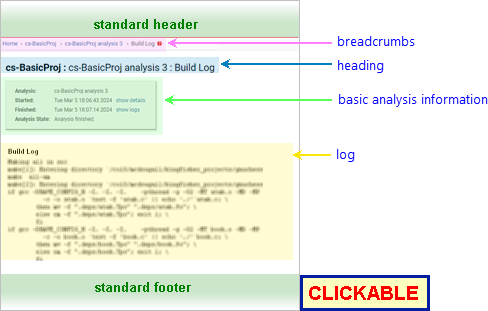
The following annotated screenshot shows the various parts of a Build Log page.
| Standard Header | See GUI Reference: Standard Header. | ||||||||||||
|---|---|---|---|---|---|---|---|---|---|---|---|---|---|
| Breadcrumbs |
Home > [Other_ProjectTree_Ancestors >]
Project_Name > Analysis_Name > Build
Log where
|
||||||||||||
| Page Heading | Project_Name : Analysis_Name : Build Log | ||||||||||||
| Basic Analysis Information |
A table of basic information about the analysis:
|
||||||||||||
| Log |
Zero or more lines of text, representing a transcription of the
interleaved stdout and
stderr messages issued by the
build command observed by CodeSonar.
If logs for this analysis have been deleted, a deletion notification will be displayed instead. |
||||||||||||
| Standard Footer | See GUI Reference: Standard Footer. |
| view the analysis parse or analysis log or see a different view of the build log | Click show logs, then select the desired log and view from the list of links. |
|---|
To report problems with this documentation, please visit https://support.codesecure.com/.

