JavaScript is not currently enabled, but is required for full
CodeSonar manual search and browse functionality.
If you are viewing this file in your hub's Web GUI, enable
JavaScript in your browser: you will also need it for GUI
functionality.
If you opened this file directly from disk, your browser may be
directly suppressing JavaScript functionality: certain browsers
perform this suppression on local files (but not files delivered by
web servers) for security reasons.
-
If you access the manual through the hub's Web GUI, the
functionality will not be suppressed because the hub is a web
server.
-
Alternatively, your browser may allow you to explicitly
disable the security setting that suppresses functionality. See
the CodeSonar
FAQ for more information.
GUI Reference: Warning Report Annotations
Central to each Warning
Report is an annotated code excerpt.
Annotations that CodeSonar considers particularly important are
displayed by default. The remainder are hidden until you specify
that they should be displayed.
When CodeSonar is considering a particular execution scenario,
background
highlighting and control flow
annotations indicate the code that is executed in that
scenario.
Warning Reports have
annotations at program points that are particularly relevant to the
warning, along with annotations for locations in the code excerpt
that are important for reasons unrelated to the warning.
- Every warning has a warning description
box explaining why the warning was issued.
- If the warning depends on one or more values used by the
program, there are data annotations
at code locations where something important happens to the values
(such as assignment, modification, or passing as a parameter).
- For some warning classes, CodeSonar considers a particular
execution scenario. Control flow
annotations describe the control flow in that scenario, and
often are important for understanding the warning.
- If Show other warnings is
selected in the Options menu, an
other warning annotation is
displayed for every warning associated with a location in the
excerpt. The warning's class and ID link to the corresponding
warning report page.

- If the excerpt includes a code location at which a parse error
occurred, a parse error annotation is
displayed at that location. Parse error annotations are always
displayed: they cannot be hidden.

If an annotation refers to a variable that doesn't seem to
appear in the code, this usually means the variable appears in a
macro. Macro names have special MACRONAME coloring, and can be
expanded to show their definitions.
Every warning report has a warning description box at the location
in the code excerpt where the warning was issued. The warning
description box summarizes the issue and the reason or reasons that
it has arisen, with links to the code locations and annotations that
are especially important.
The following annotated screenshot fragment shows the various
parts of a warning description box and its context.
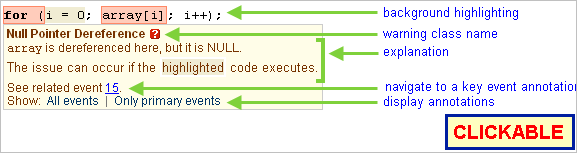
| background highlighting
|
The description box is displayed at the location where the
warning was issued; the code at this location will therefore
generally have background
highlighting. |
| warning class name
|
The box heading is the name of the warning's class. |
| explanation
|
The main part of the description box explains why the warning
was issued. Some elements of the explanation are links, or
otherwise interactive:
|
| See
related event(s)
|
If there are annotated events that directly affect any of the
factors in the explanation, their event
numbers are listed here. Click any number to navigate to the
corresponding annotation, expanding it if necessary. |
Show All events
| Only primary events |
Click All events to expand all
data annotations and all
control flow annotations.
Click Only primary events
to expand the data annotations that CodeSonar has determined
are especially important. If you have selected Show control events by default, every
control flow annotation in the report will also be
expanded.
|
Data
annotations describe the impact of execution events that are
relevant to the warning.
The locations of all data annotations are marked in the left
margin (to the left of the page markers, if any) with a small
triangular graphic:  . Click a graphic to view
the corresponding textual annotation. If the textual annotation is
already displayed, the graphic will be greyed out.
. Click a graphic to view
the corresponding textual annotation. If the textual annotation is
already displayed, the graphic will be greyed out.
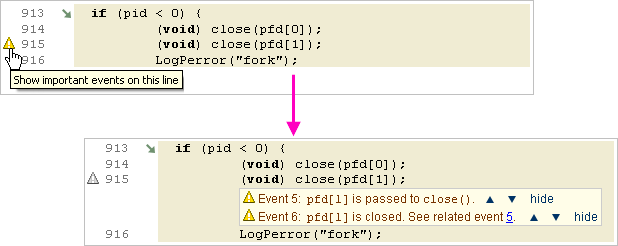
Typical data annotations include:
- Noting that a particular assignment will ultimately lead to the
warning being triggered.
- Specifying the value an important variable contains.
- Showing how values important to the warning are passed into,
and returned from, function calls.
All annotation messages are numbered: Event <n>. For warnings associated
with specific execution paths the numbering reflects the sequence of
events: Event <n> occurs after Event <n-1>
and before Event <n+1>. For warnings not associated with
specific execution paths the numbering reflects the order of
compilation.
The text in annotation messages has some of the same features as
that in the warning description
box:
Annotation messages also offer the following functionality.

|
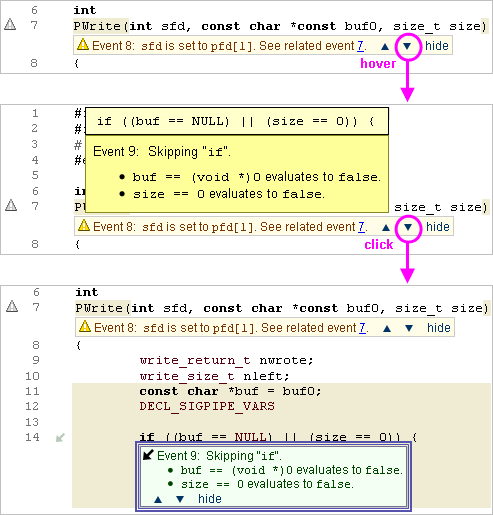
Provides access to the next annotation. From the last
annotation in the report, provides access to the warning description box)
- Hover to see a preview of the next annotation.
- If it is associated with a code line that is
currently visible in your browser window, the preview
will pop up at the annotated line. (If the annotation is
already displayed, it will be highlighted.)
- Otherwise, the preview will pop up directly above or
below the annotation you are currently viewing. In this
case, the preview will include the relevant code line for
context.
- Click to navigate to the next annotation, displaying it
if it is not already displayed.
|

|
Provides access to the previous annotation in the same
ways. (This option is not available for Event 1.) |
| hide
|
Hide the current annotation. |
To re-open a hidden annotation for Event
<n>:
- Click the associated triangular graphic , or
- click in Event
<n-1> or in Event
<n+1>, or
- click All events in the
warning description box (or, if it is a
primary event, Only primary
events).
There are two kinds of control flow annotation.
Graphical
annotations showing control flow direction are located at the
left edge of the lines they describe (to the right of the line
numbers, if any). Their interpretations are as follows.

|
if statements: the
condition evaluates to "false" and so the if clause is not executed (and the
else clause, if any, is
executed).
while and for loops: condition evaluates to
"false" the first time it is checked and so the loop
body is never executed. |

|
if statements: the
condition evaluates to "true" and so the if clause is executed (and the else clause, if any, is not).
while and for loops: the condition evaluates to
"true" and execution enters the loop body (and the loop
does not subsequently exit normally). |

|
while and for loops: the loop body executed one or
more times and then the loop exited normally.
switch and goto statements: always annotated with
this symbol. |

|
Denotes a location where control flow could not be
determined. In particular, used to annotate uses of undefined
functions. |
Click a graphic to view the corresponding textual annotation. If
the textual annotation is already displayed, the graphic will be
displayed in a lighter color.

Textual
annotations provide detail about the direction of control flow
and the evaluation of any conditions, along with navigation
functionality.
- The control flow direction is spelled out.
- The evaluation of the condition (if any) is explained. When
short-circuiting takes place, the annotations show how evaluation
proceeds up to and including the last sub-expression to be
evaluated.
- Control flow annotations follow the same numbering and navigation scheme as data
annotations.
Note: Control flow annotations inside a loop body
describe the control flow events that occur the last time the
loop body is executed. If the warning is issued within the loop body,
the execution is only described up to the warning location.