
JavaScript is not currently enabled, but is required for full CodeSonar manual search and browse functionality.
If you are viewing this file in your hub's Web GUI, enable JavaScript in your browser: you will also need it for GUI functionality.
If you opened this file directly from disk, your browser may be directly suppressing JavaScript functionality: certain browsers perform this suppression on local files (but not files delivered by web servers) for security reasons.
| CodeSonar® 9.2p0 | CONFIDENTIAL | CodeSecure Inc |
List the representative instances of all warnings in a specific cluster, navigate to their warning reports.
Important Note: the CodeSonar Web GUI makes extensive use of JavaScript. Make sure JavaScript is enabled in your web browser.
The Warning Cluster page can be reached in any of the following ways.
| From Warning Report: | Click view all related in the cluster
notification (above the Change Warnings form). Note that a cluster notification will only be present if the warning belongs to a non-singleton cluster). |
|---|---|
| By URL: |
http://hub_location/analysis/analysis_id-warningclusterclusterhash.html |
| Output formats | CSV, JSON, XML (warningcluster.xsd) | ||||
|---|---|---|---|---|---|
| Visibility Filter Applied | none | ||||
| RBAC Permissions Needed |
|
The following annotated screenshot shows the various parts of a Warning Cluster page.
| Standard Header | See GUI Reference: Standard Header. | ||||||||||||||
|---|---|---|---|---|---|---|---|---|---|---|---|---|---|---|---|
| Breadcrumbs |
Home > [Other_ProjectTree_Ancestors >]
Project_Name > Analysis_Name >
Warning Cluster Cluster_Hash where
|
||||||||||||||
| Page Heading | Project_Name : Analysis_Name : Warning Cluster Cluster_Hash | ||||||||||||||
| Cluster Information |
Basic properties of the cluster. All instances in the cluster
have these properties — other than File and Procedure — in
common. The File and Procedure displayed are those of the
cluster
representative.
If you navigated to the Warning Cluster page from a Warning Report or Extended Warning Report, this section will also provide a link back to that page. |
||||||||||||||
| Table of representative instances |
A table listing all representative
instances in the cluster.
The available table columns are as follows. Columns displayed by default are marked with an asterisk (*).
|
||||||||||||||
| Annotation Export link | See Importing and Exporting Annotations for full details. | ||||||||||||||
| Change Multiple Warnings button | Click to access the Change Multiple Warnings functionality. | ||||||||||||||
| Standard Footer | See GUI Reference: Standard Footer. |
The Warning Cluster page offers two mechanisms for editing the properties of one or more of the listed warnings.
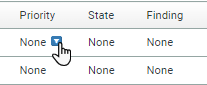
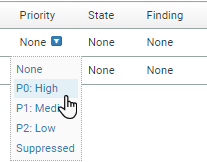
To change the Priority, State, Finding, or Owner of a single warning:

| view a warning report | To see the full report for any of the warnings in the table, click the corresponding line in the table. The Warning Report will belong to a browse sequence for which the Warning Cluster page is the establishing page. |
|---|---|
| view the analysis build , parse, or analysis log | Click show logs in the Cluster Information section, then select the desired log from the list of links. |
To report problems with this documentation, please visit https://support.codesecure.com/.