JavaScript is not currently enabled, but is required for full
CodeSonar manual search and browse functionality.
If you are viewing this file in your hub's Web GUI, enable
JavaScript in your browser: you will also need it for GUI
functionality.
If you opened this file directly from disk, your browser may be
directly suppressing JavaScript functionality: certain browsers
perform this suppression on local files (but not files delivered by
web servers) for security reasons.
-
If you access the manual through the hub's Web GUI, the
functionality will not be suppressed because the hub is a web
server.
-
Alternatively, your browser may allow you to explicitly
disable the security setting that suppresses functionality. See
the CodeSonar
FAQ for more information.
A code listing for a single source file . The listing
is enhanced with hyperlinking, syntax highlighting, and
annotations.
For projects that have undergone multiple analysis runs, source
listings are generally only available for files from the most
recent analysis. For full details, see Source Files:
Availability.
Source Listing pages are available for all available source
files, independent of the language or languages involved.
The Source Listing page for a file can be reached in any of the
following ways.
| From Analysis: |
- Click any line in the Files
tab.
- Click any line in the Procedures tab (navigates to the
corresponding procedure definition within the listing).
|
| From Explore
Callers |
Click  or or  next to Go to Definition in the pop-up menu for a
call tree node (navigates to the corresponding procedure
definition within the listing). next to Go to Definition in the pop-up menu for a
call tree node (navigates to the corresponding procedure
definition within the listing). |
| From File
Search Results: |
Click any line in the result table. |
Information
Window
(on any applicable page) |
Click or next to any file
name/line number link. |
| From Metric
Report: |
Click any line in any procedure-, file-, or
compilation-unit-granularity result table. |
| From Procedure Search
Results: |
Click any line in the result table (navigates to the
corresponding procedure definition within the listing). |
| From Search
Callers results |
Click Go to
definition in the pop-up menu for a procedure name
in the result table and select the |
From Source Listing
(within a file browse
sequence) |
Click the <Prev (or
Next>) browse sequence navigation link to navigate to
the Source Listing for the previous (or next) warning in the
sequence. |
| From Warning Report: |
Click any of the following.
- The file name (wherever it appears).
- Any line number in the code excerpt.
|
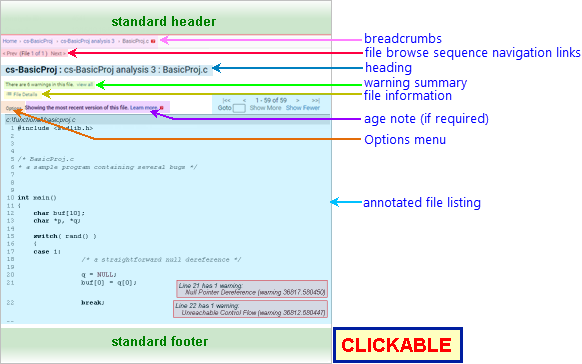
The following annotated screenshot shows the various parts of a
Source Listing page.
| Standard Header |
See GUI Reference: Standard
Header. The highlight legend
is available. |
| Breadcrumbs
|
Home > [Other_ProjectTree_Ancestors >]
Project_Name > Analysis_Name >
File_Name
where
- Home links to the GUI
Home page
- Together with the Home
link (corresponding to the root
project tree), Other_ProjectTree_Ancestors
represents the project tree ancestors
of the analyzed project as a >-separated sequence of
project tree names. Each name links to the corresponding
Project Tree page.
- Project_Name is
the name of the project to which the file belongs, and links
to the corresponding Project
page.
- Analysis_Name is
the name of the most recent analysis of Project_Name,
and links to the corresponding Analysis page.
- File_Name is the
basename of the file.
|
| Browse Sequence Navigation Links
|
< Prev (File numw of
numtotal) Next >
Provide navigation within the current file browse sequence. If the
Source Listing does not belong to a browse
sequence, these links are not shown. For full details, see
Warning and File
Browse Sequences: Navigating Browse Sequences. |
| Page
Heading
|
Project_Name : Analysis_Name :
File_Name |
| Warning Summary
|
A sentence specifying how many warnings were issued in this
file.
- The number is sensitive to the Visible Warnings
setting.
- Click view all to
navigate to a warning search results
page listing the warnings.
- If there is exactly one warning in the file, the link
is simply view.
- If there are no warnings in the file, no link is
provided.
|
| File Information Options
|
There is one information section: File Details. It is hidden by default. |
| |
File Details
|
Click for general details about the file.

| Lines |
The Total Lines.
Click show details to
see other line count metrics (when calculated): Blank Lines, Lines With Code,
Code
Lines, Lines
with Comments, Comment Lines,
Mixed Lines.

|
| Compilation Unit |
The Compilation
Unit Path for the file instance.
If SEND_HOOK_LOG_TO_HUB=Yes and
SEND_PARSE_LOG_TO_HUB=Yes, you can
click on the path to navigate to the corresponding Parse Details Log.
Otherwise, it is not a link. |
| Project
Description
|
(if any) |
| Analysis
|
|
| Analysis
Description
|
(if any) |
| Started
|
click show details to
view the analysis Username,
Machine,
and Address.

|
| Finished
|
click show logs for
links to the analysis Build
Log, CodeSonar Parse
Log, and CodeSonar
Analysis Log.

If logs for this analysis have been deleted, a
"logs have been deleted" notification will be
displayed instead of the table of links. (Logs can be
deleted from the Analysis
page.)
|
| Analysis
State
|
A progress bar if the CodeSonar analysis is still
running; "Analysis finished" if the analysis has
completed. |
|
| Age Note
|
If you have tried to obtain a listing for a file associated
with an old analysis of the project, CodeSonar will notify you
that only the most recently analyzed version of the file is
available, then display this newest version. As a reminder in
this case, a note is displayed above the annotated listing:

This most recent version is likely to be useful if the file
has not changed, or only changed slightly, However, if the file
has changed significantly then the most recent version may be
misleading. For more information, see Source Files:
Availability.
|
|
|
To open the Options menu, click Options at the top left of the listing.
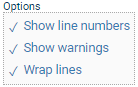
The options are as follows.
- Show line numbers. When
selected, line numbers will be displayed at the left of the
listing. When deselected, no line numbers are displayed.
- Show warnings. When
selected, CodeSonar will display annotations at locations where warnings
were issued (if any). This setting is not persistent: it is
always re-selected when you navigate away from the page.
- Wrap lines. When
selected, code lines will wrap to fit the browser window, as
will all annotation text. When deselected, no wrapping will
occur and it may be necessary to scroll across to see all
code and annotations.
With the exception of Show
warnings, CodeSonar will remember your settings and
apply them to all source listings. If you are logged in, the
settings will be associated with your username and will still
be applied the next time you log in. Otherwise, they will be
applied for the remainder of your user session.
|
| Annotated File Listing
|
A pageable view of the file, with syntax highlighting and
annotations added by CodeSonar to mark important locations in
the code.
Information about the current page and navigation controls
for viewing other pages are displayed at the top and bottom of
the listing.
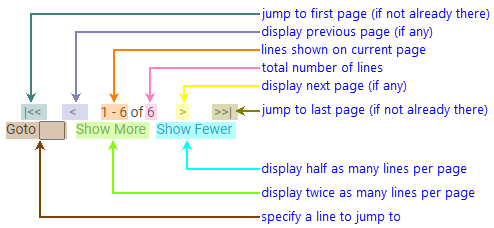
For file pagination:
- The default number of lines displayed is 1000.
- When a Goto line is specified, 25% of the
displayed lines will be before that line and 75% after.
- Next and Prev pages have 25% overlap with
the originating page.
The listing contains the following features.
|
| Standard Footer |
See GUI Reference: Standard
Footer. |