
JavaScript is not currently enabled, but is required for full CodeSonar manual search and browse functionality.
If you are viewing this file in your hub's Web GUI, enable JavaScript in your browser: you will also need it for GUI functionality.
If you opened this file directly from disk, your browser may be directly suppressing JavaScript functionality: certain browsers perform this suppression on local files (but not files delivered by web servers) for security reasons.
| CodeSonar® 9.2p0 | CONFIDENTIAL | CodeSecure Inc |
An analysis describes a single CodeSonar analysis run.
Analyses are securable resources. The various ANALYSIS_* permissions control access to analysis information, including information about warnings issued by an analysis. For a given role R and analysis A, role R may have one or more of these permissions directly assigned to A, resource-inherited from the project P that was analyzed by A, resource-inherited from a project tree that contains P, or any combination of these.
There are several kinds of information associated with an analysis.
The build and analysis pass through a number of states. These can be grouped into three distinct intervals.
| build (B) | Observe the execution of the regular software build (C, C++) or another specified command (other languages) to collect necessary information about the project; store the collected information in the project build directory. | ||||
| analyze (A) |
Construct and analyze the CodeSonar project, store the
collected information in the project
analysis directory. The analyze interval can be subdivided into parse mode and analysis mode.
|
||||
| daemon mode (D) | Service requests from the hub for information stored in the project analysis directory (such as source file listings). |
The analyze (A) and daemon mode (D) intervals can be local-managed or remote-managed. The build interval always runs locally.
Both local-managed and remote-managed analyses can be parallel and distributed.
Both analyze (A) and daemon mode (D) intervals can be local-managed or remote-managed. The build (B) interval always runs locally.
| local-managed | All intervals are managed by a launch daemon running with the
same system user, hub user, machine, and installation that were
used for the build interval. In particular, the machine is the
one on which the CodeSonar build/analysis was invoked. By default, both the analyze interval and the daemon mode interval are local-managed. |
|---|---|
| remote-managed | The analyze/daemon mode interval is managed by a launch daemon specified when the build/analysis is invoked. This can be any launch daemon connected to the hub from any machine. If the analyze interval is remote-managed then the daemon mode interval must also be remote-managed, but can use a different launch daemon to the one used in the analyze interval. |
Note that analysis management (local vs remote) is distinct from analysis master requesting policy (also divided into "local" and "remote" cases).

| analyze: local-managed |
This is the default.
Offline analyses are always local-managed. |
||||||
|---|---|---|---|---|---|---|---|
| analyze: remote-managed |
If the analysis command specifies a remote launch daemon
analysis-launchd, the analyze interval is managed
remotely.
|
||||||
| daemon mode management |
When the analysis transitions to daemon mode, behavior depends
on whether or not the build/analysis specifies a separate remote launch
daemon archive-launchd to be used in daemon mode.
|
||||||
For a step-by-step example, see Task: Set Up and Perform a Remote-Managed Analysis.
This section describes each of the properties of an analysis. The full list of properties is (in alphabetical order):
| Name ( Search Language Field Name, if any) |
Description | |||||||||||||
|---|---|---|---|---|---|---|---|---|---|---|---|---|---|---|
| Analysis ( analysis) |
A short descriptive name for the analysis, which can be edited
by the user. When the analysis is started, CodeSonar will
determine a name as follows.
|
|||||||||||||
| Analysis
ID ( aid) |
A unique numeric identifier for the analysis. | |||||||||||||
| Analysis
Description ( adesc) |
A user-specified string containing a description for the analysis. | |||||||||||||
| Protected? ( protected) |
A user controlled setting: "true" if the analysis is protected from auto-deletion, "false" otherwise. By default, set to "false". | |||||||||||||
| Modified |
The date and time at which the analysis was last modified. This
will be the most recent of:
|
|||||||||||||
| Started ( started) |
The date and time at which the analysis started. | |||||||||||||
| LinkingStarted |
The date and time at which the analysis reached the Linking analysis state. | |||||||||||||
| Finished ( finished) |
The date and time at which the analysis finished. | |||||||||||||
| Analysis State | The current state of the analysis process. A table of the possible values and their meanings is given below. | |||||||||||||
| Analysis Project |
The project analyzed by
the analysis. The GUI and analysis search language provide direct access to several Analysis Project properties.
|
|||||||||||||
| Analysis Launch Daemon |
The launch daemon
that manages hub communications for the CodeSonar analyze
interval. For distributed
analyses, this is the launch daemon associated with the
master
process.
The GUI and analysis search language provide direct access to several Analysis Launch Daemon properties.
|
|||||||||||||
| Build Machine |
The machine on which the CodeSonar project was built.
|
|||||||||||||
| Most
Recent? ( mostrecent) |
"True" if this is the analysis of Analysis Project with the most recent Started timestamp, "false" otherwise. | |||||||||||||
| Dry Run? ( dryrun) |
"True" if the analysis was a dry run,
"false" otherwise.
A dry run generates obtain line count and parse error information for a project without running the CodeSonar analysis (and thus without consuming licensed lines). The results of a dry run are presented in an Analysis page. To perform a dry run, set DRY_RUN=Yes in the project configuration file and then run the build/analysis. |
|||||||||||||
| Logs Present? | "False" if the analysis logs have been deleted from the hub, "true" otherwise. | |||||||||||||
| Analysis
Directory ( prjfiles) |
The project analysis directory is the location where
CodeSonar stores the internal representation (IR) and other
information for a CodeSonar project once it has been finalized.
The CodeSonar analysis operates on the files in this directory.
The relationship between the Build Directory and the Analysis Directory depends on whether the analyze interval is local-managed or remote-managed, as does the analysis directory path.
When the analysis transitions to daemon mode, there are two possibilities.
Once the analysis has transitioned to daemon mode, you can relocate the Analysis Directory at any time by manually copying it (along with the sibling .prj file) to a new location, then using the codesonar relocate command to inform the hub of the move. The GUI and analysis search language provide direct access to several Analysis Directory properties.
|
|||||||||||||
| Build Directory |
The project build directory is the location where
CodeSonar places all internal representation (IR) information
and other files accumulated as it builds the CodeSonar project
that will subsequently be analyzed.
|
|||||||||||||
| Parent Analysis ID | If the analysis is incremental, the Analysis ID of the parent analysis. | |||||||||||||
| Warning Count ( warningcount) |
The number of warnings issued. | |||||||||||||
| File Count ( filecount) |
The number of files analyzed. | |||||||||||||
| Current Processes |
If the analysis is running in parallel mode with a remote-requesting
master, the master periodically reports information about
its currently-attached slaves to the hub as a set of pairs
{ ( D, n) }
where
|
|||||||||||||
| User-Assigned Properties | ||||||||||||||
Zero or more arbitrary (key,value) pairs
associated with the analysis by a user.
|
||||||||||||||
| Analysis-Granularity Metrics | ||||||||||||||
The CodeSonar analysis computes analysis-granularity metrics,
and stores them with other analysis information on the hub.
|
||||||||||||||
The CodeSonar build/analysis traverses a program's internal representation in five phases.
We use the term analysis traversals to refer collectively to the serial depth-first phase, parallel depth-first phase, pointer analysis phase, and bottom up phase. (The drop traversal is considered to be part of building the project, rather than analyzing it.)
When CodeSonar runs in incremental mode, there is a drop phase before the analysis traversals begin. The drop traversal visits IR elements that existed in the previous analysis of the project but will not exist in the current analysis. During this phase, CodeSonar...
The first analysis traversal is depth-first over the entire program structure. We call this the serial depth-first phase because it visits each compilation unit in turn, in contrast to the parallel depth-first phase that follows.

Portions of the analysis that reason heavily about whole-program properties are performed in this phase.
During this phase, CodeSonar...
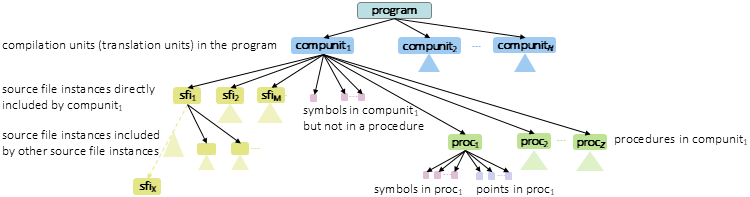
Within siblings in this graph, the traversal order is as follows.
The second analysis traversal is depth-first over each compilation unit, but different compilation units may be processed in parallel (when enabled).
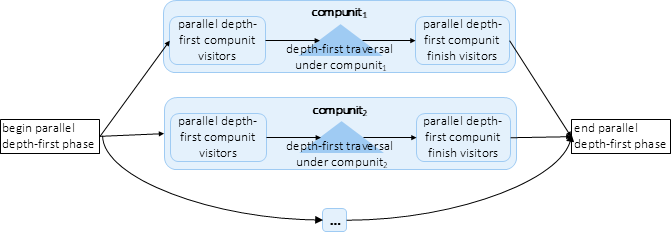
This parallel depth-first traversal is faster than the serial depth-first traversal in the previous phase, but does not straightfowardly support reasoning about whole-program properties. It is most suitable for analysis tasks that require reasoning about properties whose scope is a single compilation unit or smaller (e.g. a point or procedure).
During this phase, CodeSonar...
Within siblings in this graph, the traversal order is as follows.
If pointer analysis is enabled (with TAINT_HIGHLIGHTING=Yes, FUNCTION_POINTER_RESOLUTION=Yes, or both), CodeSonar will perform a series of pointer analysis "passes". Each pass consists of bottom-up traversal over the program call graph followed by a top-down traversal over the program call graph, and refines the set of points-to facts known to the analysis. The number of passes is bounded by the value of MAX_POINTER_ANALYSIS_PASSES.

The final traversal is bottom-up over the program call graph (which may have been refined during the pointer analysis phase): procedures that are more deeply nested in the call graph are traversed before procedures that are less deeply nested.
During this phase, CodeSonar...

The possible Analysis State values are shown, in order of appearance, in the following table. Some states describe analysis phases that are very brief, so you are unlikely to see them in the GUI unless something is wrong with the analysis.
As described above, the states can be grouped into three distinct intervals:
| build (B) | Parallelism will mirror the parallelism in the command
that CodeSonar is observing. (For C and C++ code, this means that it will mirror the parallelism in your regular software build). |
| analyze (A) |
The degree of parallelism depends on the settings of PARSE_SLAVES and ANALYSIS_SLAVES:
|
| daemon mode (D) | The degree of parallelism depends on the setting of DAEMON_SLAVES. |
States marked with * only occur in incremental analyses.
| State | Interval | Parallelizable? | Notes |
|---|---|---|---|
| Initialized | - | - | The CodeSonar build/analysis has been invoked, but the regular software build command has not yet been executed. |
| Building | B | YES | Command line
build: the regular build is still running. Windows build wizard: the wizard is still recording, and will remain so until the user clicks Finalize. |
| Building over; | - | - | There are two cases:
|
| Stalled | - | - | A problem has occurred: look at the Analysis Log. |
| Linking | A | no | Recorded translations are being parsed and parsing results are being linked into the CodeSonar project. |
| Removing Obsolete Translation Units * | A | YES | Removing obsolete translation units. |
| Parsing Translation Units | A | YES | The parse mode phase. |
| Getting Models | A | no | CodeSonar is loading all applicable library models. |
| Comparing Compilations * | A | no | The drop traversal phase: CodeSonar is determining which parts of the parent project can be retained, and which must be dropped or replaced. |
| Resolving Names | A | no | - |
| Indexing Source Files | A | no | - |
| Updating Old Variables * | A | no | - |
| Computing Call Graph | A | no | - |
| Updating Variable Maps * | A | no | - |
| Building Procedures | A | no | - |
| Updating Variables | A | no | - |
| Building Undefined Procedures | A | no | - |
| Updating Program Points | A | no | - |
| Compacting Program Points | A | no | - |
| Demangling Names | A | no | - |
| Updating Callers | A | no | - |
| Finalizing Linkage | A | no | - |
| Dropping Compilations * | A | no | - |
| Indexing Cross References | A | no | - |
| Acquiring License Key | - | - | CodeSonar is waiting for an available seat. If your analysis remains in this state for an extended period of time, you may be exceeding the concurrent analyses limit defined in your license. |
| Pruning Summaries * | A | no | - |
| Garbage Collecting * | A | no | - |
| Enumerating Languages | A | no | - |
| Adjusting Call Graph | A | no | - |
| Building Procedure List | A | no | - |
| Removing Old Source Files * | A | no | - |
| Computing Reachable Procedures | A | no | - |
| Analyzing Translation Units Serially | A | no | Corresponds to serial depth-first analysis phase. |
| Topologically Sorting Procedures | A | no | - |
| Analyzing Translation Units | A | YES | Corresponds to parallel depth-first analysis phase. |
| Analyzing Pointers | A | YES | - |
| Computing Visualization Data | A | no | - |
| Analyzing | A | YES | Corresponds to bottom-up traversal. |
| Refining Warnings | A | YES | CodeSonar is applying decision procedure refinement to warning paths. This aims to filter out some warnings that cannot occur in practice. |
| Finished | D | YES | The analysis has finished successfully. The analysis process is either transitioning to daemon mode, running in daemon mode after successful transition, or ended. |
Analysis information is available in the CodeSonar GUI as follows.
| Analysis | Full information about a single analysis, including warnings issued, files analyzed, and procedures encountered. |
|---|---|
| Analysis Cloud Active Jobs | Provides information about distributed analysis processes that are currently cloud-associated with launch daemons in the hub's analysis cloud register, broken down according to the analyses that the processes are attached to. |
| Analysis Role-Permissions | View and modify role-permissions for a single analysis. |
| Analysis Search Results | A table with one line for each analysis that matches the search conditions. |
| Metric Report Create | Create a metric report for an analysis. |
| Project | A table with one row for each analysis in a single project. |
The CodeSonar GUI provides several mechanisms for manually deleting one or more analyses.
| GUI Page Type | Analysis Deletion Functionality |
|---|---|
| Analysis | |
| Project |
|
| Home, Project Tree |
|
In addition, the analysis auto-deletion functionality allows users to specify hub-wide or project-wide criteria for automatically deleting old analyses or analysis logs (including functionality for protecting individual analyses from deletion).
For a step-by-step example, see Task: Remove an Analysis.
To report problems with this documentation, please visit https://support.codesecure.com/.