JavaScript is not currently enabled, but is required for full
CodeSonar manual search and browse functionality.
If you are viewing this file in your hub's Web GUI, enable
JavaScript in your browser: you will also need it for GUI
functionality.
If you opened this file directly from disk, your browser may be
directly suppressing JavaScript functionality: certain browsers
perform this suppression on local files (but not files delivered by
web servers) for security reasons.
-
If you access the manual through the hub's Web GUI, the
functionality will not be suppressed because the hub is a web
server.
-
Alternatively, your browser may allow you to explicitly
disable the security setting that suppresses functionality. See
the CodeSonar
FAQ for more information.
Distributed Analysis
This section describes the distributed analysis capability in
CodeSonar.
Distributed analysis is available for C/C++ only.
For all parallel CodeSonar analyses, the
master process can accept any manually-started slave process,
regardless of the process location or owner, provided that the slave
process has access to the address on which the master process
is listening (and that the other conditions for accepting a
manually-started slave process are met). In this sense, all
parallel analyses can be distributed across multiple machines if the
listening address for the master permits it.
CodeSonar also provides a mechanism for automatically distributing
slaves across multiple machines. We say a parse master, analysis
master, or daemon master that engages this mechanism is
remote-requesting, and one that does not is
local-requesting.
The master process is not required to have the same requesting
policy (local-requesting vs remote-requesting) in both parse mode and
analysis mode, or in both analysis mode and daemon mode. For example,
your organization might provide a pool Pp of machines that are
designated solely for parsing CodeSonar projects and a separate pool
Pa designated for the remaining analysis phases: in this case,
you could set up a remote-requesting analysis master to take
advantage of pool Pp for the parse phase, then transition to
pool Pa for the remaining analysis phases, then transition to
a local-requesting daemon master.
Analysis master (or daemon master) requesting policy
(local-requesting vs remote-requesting, as described above) is distinct from analysis
management (local-managed vs
remote-managed):
- Requesting policy concerns the mechanism that the
master process uses to acquire new slaves.
- Management concerns the identity of the analysis launch daemon
that controls the master process, and the consequent location of
the project
analysis directory.
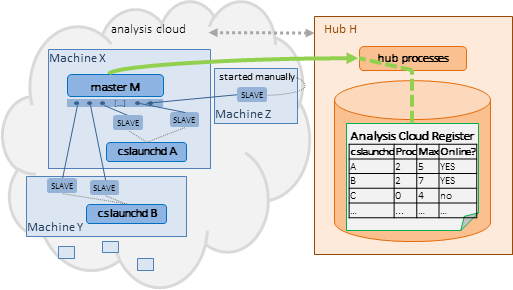
Every hub maintains an analysis cloud register with one
entry for every unique CodeSonar launch daemon that has ever communicated with
the hub. It uses this register to maintain a record of distributed
analysis capacity, and to determine which launch daemons may be
requested to start additional slaves
on behalf of remote-requesting
masters.
The Analysis Cloud
page in the hub's web GUI shows the
current state of the analysis cloud register, and allows users to
adjust process limits.
Terminology
We use the following terminology.
| [machine, sysuser, hubuser,
installation, (key)] tuple
|
CodeSonar's distributed analysis infrastructure uses this
identifying property
tuple for two purposes.
- To uniquely identify CodeSonar launch daemon instances. The launch
daemon key permits multiple distinct launch daemons that do
not differ in the other properties.
- To determine association
between parse/analysis/daemon slave processes and launch
daemon instances.
The launch daemon key does not have an analog in slave
processes and is not part of the determination: we cite the
tuple as "[machine, sysuser, hubuser, installation,
*]" when discussing association.
|
| S
cloud-associated with D
|
A parse/analysis/daemon slave process S is cloud-associated
with a CodeSonar launch daemon D if
S may have been started:
Once S is running, CodeSonar does not distinguish between these
cases.
In general, multiple slave processes can be cloud-associated
with a given launch daemon.
|
Analysis Cloud Register Contents
Each analysis cloud register entry records the properties of a single launch
daemon associated with the hub. For distributed analyses, the
following properties are of particular importance.
Updating the Analysis Cloud Register
The hub automatically updates the analysis cloud register when
a launch daemon connects to the hub,
when the hub loses contact with a
remote-requesting master, and when triggered by a remote-requesting master.
| launch daemon connects
|
When a CodeSonar launch daemon D starts and connects to the
hub, the hub updates the analysis cloud register as follows.
- If there is already an analysis cloud register entry for
D (that is, an entry with the same [machine,
sysuser, hubuser, installation, key] tuple), its values
are updated as follows.
- Otherwise, a new entry for D is added to the hub's
analysis cloud register, with initial values as follows.
|
| contact with analysis master lost
|
If the hub loses contact with a remote-requesting master M, it updates
all current process
contributions from M for all launch daemons to be empty. |
| analysis master triggers update
|
Each remote-requesting master
M will trigger updates to the analysis cloud register in the
following situations.
In these cases, the procedure is as follows.
- M sends the hub a list of all its slave processes, citing
the identifying tuple for each.
- The hub uses this list to update all current process
contributions from M.
- For each launch daemon D in the analysis cloud
register, M's current process contribution for D is
updated to the set of slaves in the list that are
cloud-associated with D.
Note that this takes place whether D is online or offline.
- If a slave process in the list is not
cloud-associated with any launch daemon in the analysis
cloud register, its presence on the list has no effect on
the register.
|
Users can manually update analysis cloud register process limits from the Analysis Cloud page.
The procedure for automatically adding new slaves to a remote-requesting master can be broken down
into four steps:
It is also possible to manually start distributed slaves for both
remote-requesting and local-requesting masters.
|
Suppose we have some remote-requesting master M, which can
be any of the following.
- A parse master that is constructing a CodeSonar project
and sending progress data to hub H.
- An analysis master that is performing an analysis and
sending results to hub H
- A daemon master that is servicing requests from H after
the project has been analyzed.
M will automatically request a set of additional slave
processes from H if:
- there is pending work, and
- no slaves have been started in the past 5 seconds.
As part of the request protocol, M will trigger an update to the analysis cloud
register on H.
|

|
|
To satisfy the request from M, hub H proceeds as
follows.
- Identifies the set of
registered CodeSonar launch daemons that
- are currently online,
and
- have the same protocol
version as M, and
- have not reached their process limit (this includes all
daemons whose process limit is "auto"), and
- are in the set of acceptable launch daemons
for M, as specified by the REMOTE_<phase>_SLAVES_LAUNCHDS
configuration parameter:
The default in all modes is that all launch daemons are
acceptable.
- To each launch daemon in this set, H sends a request to
start a new slave for M.
|

|
|
Each CodeSonar launch daemon that receives one of these
requests attempts to start a new slave for M.
If a slave cannot communicate
with the address on
which M is listening, it will fail to start.
- This can be caused by a firewall applied to the master
machine, the slave machine, or both. If you wish to permit
communication in this case, you will need to adjust the
firewall accordingly.
|

|
|
For each new slave process S:
- S attempts to connect to master M.
- M checks whether the following conditions for accepting S
are satisfied:
- If conditions for accepting S are met:
- M accepts S.
- M triggers an update to
the analysis cloud register on H.
|

|
|
An analysis slave process for M can be manually started on
any machine that has access to the address on which M is
listening. See Parallelism in CodeSonar:
Manually Started Slaves for details, noting the security issues
entailed.
- The slave process S attempts to connect to master M.
- M checks whether the following conditions for accepting S
are satisfied:
- If conditions for accepting S are met:
- M accepts S.
- If M is remote-requesting, it triggers an update to the analysis
cloud register on H (otherwise it does not).
Otherwise, M disconnects S, which then exits.
Note that a manually started slave process will not be
cloud-associated with a launch
daemon in the analysis cloud register if there is no launch
daemon with the same [machine, sysuser,
hubuser, installation, *] tuple as the slave, or if the
master is local-requesting.
|
|
A remote-requesting master M will only accept a slave S if every
CodeSonar
plug-in in the set of plug-ins for
M is also in the set of plug-ins for
S. (Note that it is acceptable for S to have additional plug-ins
beyond this set.)
If two plug-ins have the same name, CodeSonar considers them to be
"the same" plug-in for the sake of this determination. This
can cause problems if they are not in fact the same. If the set of
plug-ins for the analysis master includes any plug-ins that have
different implementations on other machines in the analysis cloud, we
recommend running a local-requesting
analysis.
The set of plug-ins for the master process is the set of P such
that:
- The general
template or general
project configuration file for the analysis contains a rule of
one of the following forms and the corresponding file exists
on the master machine.
or
- One of the following exists on the master machine (C++, Python,
and C plug-ins only).
- master_installation_dir/codesonar/plugins/P_plugin.dll
(or .so)
- master_installation_dir/codesonar/plugins/P.plugin.py
(or .pyc)
The set of plug-ins for an analysis slave or daemon slave is the
set of P such that:
- The general
template or general
project configuration file for the analysis contains a rule of
one of the following forms and the specified file exists on
the slave machine.
or
- One of the following exists on the slave machine (C++, Python,
and C plug-ins only).
- slave_installation_dir/codesonar/plugins/P_plugin.dll
(or .so)
- slave_installation_dir/codesonar/plugins/P.plugin.py
(or .pyc)
Authentication between the various entities involved in a
distributed analysis takes place as follows.
| launch daemon → hub |
Every launch daemon must provide authentication when
connecting to a hub, either directly
or using a launch
daemon token.
Launch daemons trust the hub they are told to use, unless the
connection uses HTTPS and certificate problems are detected. |
| master → hub |
The master must provide authentication when connecting to a
hub, either directly
or using an analysis
token.
Masters trust the hub they are told to use, unless the connection
uses HTTPS and certificate problems are detected. |
| slave ↔ master |
The slave and master perform mutual
authentication when the slave connects to the master. |
If you are running two or more distributed analyses at the same
time, you may wish to consider is whether or not you want all
analyses to share the entire analysis cloud.
Sharing the entire analysis cloud reduces your configuration
effort, but means that all analyses will use the same computing
resources. To balance the needs of different analyses, or different
groups of analyses, you may wish to make only a specific subset of
the analysis cloud available to each analysis.
- The various launch daemon subsets do not have to be disjoint.
For example, you might decide that launch daemons running on
machines with multiple processors and a large amount of RAM will be
made available to all distributed analyses but those running on
less-powerful machines will only be made available to analyses of a
specific project. (See CodeSonar System Requirements:
CPU and Disk for per-analysis requirements).
- You can divide up the analysis cloud on whatever basis makes
the most sense for your organization. For example, you might decide
to do one (or more) of the the following.
- Allocate separate launch daemons to each project.
- Use different launch daemon sets for different analysis
needs. For example, you could have one set for brief, frequent
analyses and a different set for large, deep analyses.
- Allocate separate launch daemon sets for different analysis
phases. For example, you might designate one pool of machines
Pp for parsing CodeSonar projects and a separate pool
Pa for the remaining analysis phases. Launch daemons on
machines in Pp can be allocated to the parse mode phase,
and launch daemons on machines in Pa can be allocated to
the analysis mode phase. You might also designate a third pool
of machines to handle daemon mode interactions.
- If the organization has multiple geographic locations, have
the projects at each location use launch daemons on machines at
the same location in order to reduce latency.
- To specify the set of launch daemons that may contribute to an
analysis of a project, add the following settings to the general
project configuration file.
- You can also specify the set of launch daemons that may
contribute slaves after the analysis has transitioned to daemon mode,
using general
project configuration file parameter settings analogous to
those governing analysis mode:
A second issue, though not one that is unique to distributed
analyses, is whether or not you want to run two or more analyses at
the same time with their respective analysis masters on the same
machine. In some cases, you may wish to ensure that the different
analysis masters run on differnt machines.
If you want the analysis master to run on a specific machine M,
you have two options.
- Invoke the analysis from M as a local-managed
analysis.
- Invoke the analysis as a remote-managed
analysis, using -remote ld (or the equivalent) to
specify a remote analysis launch daemon ld that is running on M.
In this case you can invoke the analysis from any machine capable
of handling the build
phase.
CodeSonar SaaS Note. With CodeSonar SaaS, you will
generally perform remote-managed analyses using the launch daemons
provided in your hub's
saas launchd group, rather than performing CodeSonar
analyses on machines within your organization and managing your own
launch daemons. With this typical CodeSonar SaaS usage, you will not
need to perform additional load balancing procedures.
The following GUI pages provide distributed analysis
information.