JavaScript is not currently enabled, but is required for full
CodeSonar manual search and browse functionality.
If you are viewing this file in your hub's Web GUI, enable
JavaScript in your browser: you will also need it for GUI
functionality.
If you opened this file directly from disk, your browser may be
directly suppressing JavaScript functionality: certain browsers
perform this suppression on local files (but not files delivered by
web servers) for security reasons.
-
If you access the manual through the hub's Web GUI, the
functionality will not be suppressed because the hub is a web
server.
-
Alternatively, your browser may allow you to explicitly
disable the security setting that suppresses functionality. See
the CodeSonar
FAQ for more information.
Each warning has an associated
Score, intended to suggest
a review order for warnings: warnings with a higher Score value
before warnings with a lower Score value.
Score is based on several factors, including the severity of
the problem being warned about and the likelihood that the
warning represents a true positive.
You can view warning Score values in tables of warnings (in
Analysis: Warnings
Tab, Warning Cluster, or
Warning Search
Results).
For more information, see Warnings: Instances and
Groups: Score.
There are several possibilities.
- You may not have specified the search conditions you
intended to specify. The simple search tool at the top
of your Search
Results page will contain a reproduction of your search
conditions: if necessary, you can edit these and click
Search Warnings to search
again. You may wish to consult the documentation on the
warning
search language or Advanced Search page.
- Your Visible
Warnings setting may be too restrictive. Try viewing the
Search Results page
with Visible Warnings set to all.
- If you are searching for a specific value in a
user-editable field such as Owner, another
user may have changed the field value.
CodeSonar
normalizes user-specified search expressions
into equivalent expressions that conform to a standard format.
This makes it easier to identify and remove redundant conditions,
which in turn improves search speeds.
For example, if you search with warning search
language expression
A!=B & class:C
CodeSonar will normalize it to the equivalent expression
-A=B class:C
Annotation encoding problems may occur in certain hubs that
have been directly or gradually upgraded from CodeSonar 6.0 hub
(or earlier) to CodeSonar 6.1 (or later).
CodeSonar 6.1 introduced UTF8 encoding for all hub
annotations. Hubs with ASCII-only annotations will have their
annotations automatically transcoded to UTF8 as part of the
upgrade from (or past) CodeSonar 6.0. For hubs whose annotations
used other encodings, perform the steps for
Updating Hub Annotation Encoding to ensure all hub
annotations are fully transcoded to UTF8
There are several possibilities.
- The vulnerability belongs to a warning
class that is not currently enabled.
To enable checking for a particular warning class, follow the
instructions on the individual warning class documentation
page. Overview information about default enabling status and
links to individual pages are provided in the following
sections: C and
C++ Warning Classes, Java Warning
Classes, C# Warning
Classes.
- CodeSonar reported the warning to the hub, but you
can't see it because of your current Visible Warnings
setting.
Try setting Visible Warnings to all. This will
ensure that you see all instances of each warning group
(instead of just the representative
instance), and that you see warnings whose user-modifiable
properties have been set to exclude them from the active filter (for example, warnings
whose Priority is
Suppressed).
-
CodeSonar issued the warning, but it was discarded before
it reached the hub.
There are two main cases.
- One of the configuration files
used by your project specifies a WARNING_FILTER discard rule that matches
this warning.
Resolution in this case will depend on your
organization's needs: if you decide you no longer want
to discard the warning, you will need to adjust your
WARNING_FILTER settings (either
refine the existing WARNING_FILTER discard rule,
or add a subsequent WARNING_FILTER allow rule to
specifically allow the warning of interest. If you choose
the latter technique, it is important that the new
WARNING_FILTER
allow rule occur after the relevant
WARNING_FILTER
discard in the configuration file.
- The warning was discarded by a warning
processor installed on your hub.
To investigate this possibility, first check the Manage Warning
Processors page to determine whether your hub has any
installed warning processors. If so, determine whether any
of the installed processors include functionality for
discarding warnings. If one or more of the installed
processors are discarding warnings, determine the
conditions under which warnings are discarded and determine
whether or not you want to modify these conditions to
account for the vulnerability you are interested in.
-
The vulnerability of interest occurs after a crashing
vulnerability, but requires the same conditions that
would cause the crash.
If CodeSonar encounters a crashing vulnerability on some
path, it will determine that execution can only proceed past
that point if the conditions that caused the crash do not
hold. Any subsequent vulnerabilities on the path that require
the same conditions that were required for the crash will
therefore not trigger a warning, because execution could not
have gotten that far if those conditions held. For example,
consider the following code fragment.
#include <stddef.h>
void deref(int *ptr){
*ptr;
*ptr;
}
void test(void){
deref(NULL);
}
For more information, see Crashing and Non-Crashing
Vulnerabilities.
- The vulnerability occurs in code that your compiler does
not include in your underlying software project.
There are several situations in which code can appear in source
files but not be part of the project compiled from those source
files. For example, it may be removed by the preprocessor, or
by compiler optimizations that remove certain kinds of unused
code. Code that is not reflected in your underlying compiled
project will also not be included in the underlying
representation generated by CodeSonar, so will not trigger any
warnings.
For more information, see Warnings: Internal
Representation (IR) Influence.
- CodeSonar needs increased analysis resources to detect
the vulnerability. See Performing a More
Thorough Analysis for information on configuration
parameter settings that will make additional resources
available to the analysis.
- If none of the above are applicable to your situation,
contact CodeSecure support. We may be able to suggest additional
configuration settings or other techniques to ensure that the
analysis detects your vulnerability. If the vulnerability is a
false negative — a real vulnerability that CodeSonar did
not detect — we are very interested in using that information
to improve the analysis.
On legacy operating systems, you may not be able to run a
build/analysis that uses IPv6 to communicate with the hub. On
these machines, the CodeSonar build/analysis will fail unless you
specify it should only use IPv4 for communication.
To do this, set environment variable GT_DISABLE_IPV6 to 1 in your build/analysis environment.
Windows note: if you are running the build/analysis as a
service, set GT_DISABLE_IPV6
using the control panel rather than in your command environment:
services are not part of the process tree. You may need to
restart your machine for this change to take effect.
This issue can occur with
remote-managed
analysis and daemon mode only.
As part of the data and control transfer for a remote-managed
analysis, CodeSonar estimates the the final size of the analysis
directory. The error message shown here is issued when the
estimated size is greater than the entire space quota for the
specified launch daemon.
There are three options for resolution.
This issue can occur with
remote-managed
analysis.
As part of the data and control transfer for a remote-managed
analysis, CodeSonar estimates the the final size of the analysis
directory. The error message shown here is issued when the
specified remote launch daemon cannot accommodate a directory of
this estimated size because of other remote analysis directories
also managed by the same launch daemon.
There are four options for resolution.
This issue can occur with
remote-managed
analysis.
The error message shown here is displayed when the specified
remote launch daemon has no more room in its home directory
and so cannot accommodate any more remote analyses.
There are three options for resolution.
This can occur if you are using a reverse proxy (such as NGINX)
whose configuration is preventing communication between the
analysis and the hub. For information on configuring your reverse
proxy to work with CodeSonar, see
Task: Use CodeSonar with a
Reverse Proxy.
The analysis has requested slaves but none have connected, so the
analysis cannot proceed. This can occur for a number of different
reasons: the best way to find out what is causing the problem in
this case, and how to resolve it, is to look at the corresponding
alert in the CodeSonar GUI.
- Navigate to the relevant Analysis page.
- Click on the Analysis Stuck (No Slaves) alert.
A new page will open with detailed information about what has
occurred along with resolution advice.
In general, a launch daemon D can only contribute to an
analysis if all of the following are true.
- D is running and connected to the same hub as the analysis
(that is, its Status shown as
Online in the hub's
Analysis Cloud
page).
- The Process Limit
("Max Processes") for D is non-zero. This can be
viewed and modified in the Analysis Cloud page.
- If Max Processes is auto, the launch daemon machine must also
have enough free memory to start another analysis
process.
- If Max Processes is a positive integer N, the launch daemon must also have
fewer than N Current
Processes.
- D is able to connect to the analysis master machine over
TCP.
- It is a problem if a firewall or Network Address
Translation (NAT) is blocking the connection.
- If you are using a reverse proxy, make sure it is
configured to to allow CodeSonar to work correctly: see
Use CodeSonar with
a Reverse Proxy.
- The configuration settings for the analysis master include
a REMOTE_ANALYSIS_SLAVES_LAUNCHDS rule
that matches D.
- The analysis owner has LAUNCHD_START_SLAVE permission on
D.
Out-of-memory (OOM) problems can occur if system resource
limits are too low. In particular, you might encounter OOM
problems when analyzing projects with large amounts of Java or C#
code, such as AOSP projects.
You can use ulimit if you
need to increase system resource limits. We recommend the
following ulimit arguments.
- -n 1024
- -d unlimited
- -s unlimited
You may prefer to use very high concrete values in place of
unlimited: choose limits at
which you prefer the analysis to fail rather than use more
resources.
For detailed information about ulimit consult the documentation (such as
man pages) for your local
system.
Depending on your system resources, your resolution can involve
one or both of the following.
- Increase the MEMORY_PER_PARSE_PROCESS
setting.
Parse slave memory requirements can vary wildly and there is no
upper bound, so you may need to experiment with various
settings to find the right one for your current project.
- Decrease the number of parse slaves.
The number of parse slaves that can be automatically started or
manually attached is limited by PARSE_SLAVES and MAX_PARSE_SLAVES (except for automatically
started parse slaves in a local-requesting
analysis, which are limited by PARSE_SLAVES only). For details, see Parallelism: Slave
Processes.
If you have multiple installations of CodeSonar on a machine and
want to change which installation is used for building, install
the device driver from the installation you wish to use. This
must be performed by a user with (Windows) Administrator
privileges.
hookcs.exe --uninstall --install
(The
hookcs.exe executable is
located in
%CSONAR%/bin. If this directory
is not in your PATH, you will need to specify the path to
hookcs.exe in your command.)
The CodeSonar hub is a web server that manages CodeSonar analysis
results.
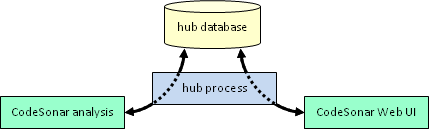
For complete information, see The
CodeSonar Hub.
This can occur if you performed an analysis and then upgraded
CodeSonar on the analysis machine, removing the previous
CodeSonar installation.
Source Listing information is
kept in the
analysis directory and recovered via the
launch daemon when there is a
request for the information: if the launch daemon cannot be
restarted because it has been uninstalled, you will not be able
to view the Source Listing page.
In this case, reanalyze the project with the upgraded
CodeSonar installation to get access to Source Listing pages.
If you want to avoid reanalysis after future upgrades, install
each new version of CodeSonar in a new directory and do not
uninstall the previous version.
The CodeSonar hub is a homegrown, pure-Python web server, based
in part on
CherryPy.
This depends on the type of firewall you have and your system
privilege level.
- If a "personal firewall" is running on the hub
machine (this is particularly likely for Windows users), you
may be able to set up a firewall rule allowing access to and
from the CodeSonar hub.
- Make sure your rule is as restrictive as possible while
still permitting access to the necessary users. For
example, the rule should not permit the entire internet to
access the hub.
- Depending on your firewall type, the rule might need to
specify one or more pieces of information about the
software you are permitting.
- For port, specify the hub port.
- For program, executable, or similar,
specify the full path to codesonar/bin/cshub[.exe]
in the CodeSonar installation directory. (If the
machine has multiple CodeSonar installations, specify
the one that is being used to run the hub.)
- The following links provide firewall-specific
instructions for some common personal firewall products.
- If the firewall is system-wide, or if you don't have
sufficient privileges to allow access through the firewall on
your machine, consult your local systems administrator.
- In some cases, setting up an ssh tunnel is
the best solution.
There are four main possibilities.
To check whether a hub is running at location
host:
port, use a web browser to open the URL
http://host:port
If a hub is running at
host:
port, the Web GUI
Home page will be displayed.
The recommended and supported mechanism is to use a
satellite hub, as follows.
- Start the primary
hub on the machine where you want to store the hub
database.
- Start a
satellite hub on the machine where you want your users to
access the hub.
- Instruct your users to access the satellite hub location for all their hub
interactions, including analyses and uses of the CodeSonar Web
GUI.
- Inform the hub administrator of the primary hub location:
some
administrative tasks can only be performed on the primary
hub.
The use of a database cluster that is not managed by the
CodeSonar hub is neither supported nor recommended.
- If you have database concerns that a satellite hub does not
seem to resolve, contact CodeSecure support for assistance.
- The hub database must be a PostgreSQL database. If you wish
to experiment with the unsupported use of your own PostgreSQL
database in place of the standard CodeSonar hub database, we
have provided an outline
of the process.
The two most frequent reasons are:
(Note that
satellite
hubs do not have their own hub databases, so starting a
satellite hub will not cause PostgreSQL to start.)
On legacy operating systems, you may not be able to run a hub
that uses IPv6. On these machines, you will not be able to start
a hub unless you specify it should only use IPv4.
To do this, set environment variable GT_DISABLE_IPV6 to 1 in the environment in which you are
starting the hub. If you
are using the configuration
tool to start the hub, this is the environment in which you
are running the configuration tool.
Windows note: if you are running the hub as a service, set
GT_DISABLE_IPV6 using the
control panel rather than in your command environment: services
are not part of the process tree. You may need to restart your
machine for this change to take effect.
This problem can arise when you are trying to
start a hub as a
Windows service. There are
several possibilities.
- The username or password you entered in the services
authentication dialog was incorrect. In this case, you can
resolve the problem by re-issuing the codesonar command that tried to start the
hub, and entering the correct username and password in the
services authentication dialog.
- The password for the account under which you want to run
the service is the empty string: services can't be run by
accounts with empty passwords. Either change the account
password to be non-empty, or use a different account that has a
non-empty password.
- The account under which you want to run the service does
not have the "Log on as a service" right. Either
follow the instructions provided by Microsoft to add
the "Log on as a service" right to the account, or
use a different account that already has that right.
This problem arises when you try to start a hub whose hub directory is located inside
the CodeSonar installation directory. For security reasons,
CodeSonar will not start a hub in this case.
To start a hub, specify a different hub directory: one located
outside the CodeSonar installation directory.
This error indicates that the Windows user account that owns your
hub service (that is, the Windows user account whose credentials
you used to authenticate the hub service) does not have the
required
full control of the specified hub directory.
To resolve this, either:
- change the permissions of this Windows user account to
include full control of the hub directory, or
- change the
hub service owner to a different Windows user account.
If the Windows account that owns your hub service (that is, the
Windows user account whose credentials you used to authenticate
the hub service) requires 2FA or some other interactive
authentication mechanism, the service will not be able to restart
automatically.
To resolve this, change the hub service
owner to a different Windows user account that does not have
these requirements (for example, a system account).
There are three possible cases.
CodeSonar may prompt you for user name and password when you
run the hub-info command. If so,
enter the username and password for Administrator (or another hub user account
with G_HUB_INFO permission).
Work through the following steps to see if any of them
apply.
-
Was there an error message when you tried to start the
hub?
If so, the error message may provide enough information to
resolve the problem. Two common error messages are covered by
individual FAQ entries:
- Did PostgreSQL fail to start when you tried to start the
hub?
If so, see Why won't PostgreSQL
start when I try to start a hub?.
- Are you using a legacy operating system?
If so, the problem may be that you cannot run a hub that uses
IPv6. See How do I specify that my hub
should only use IPv4?
If you have been using your hub for some time, the hub database
may need to be vacuumed.
This functionality is only available to users with
G_HUB_VACUUM permission (such as
Administrator, or any other user with the
special
Administrator role).
- Go to the Other Links tab
of the Settings
page.
- Click the Vacuum Database
link.
CodeSonar will display a dialog warning that vacuuming will
take a long time and asking for confirmation.
- Click Vacuum Database in
the dialog to perform the vacuum full operation
(described in the PostgreSQL documentation), or Cancel to close the dialog without
vacuuming the database.
It may also be useful to increase the limit on the number of
hub processes.
This functionality is only available to users with G_ADMINISTER_HTTP_SETTINGS permission
(such as Administrator, or any other user with the
special
Administrator role).
- [Windows hubs only] If your hub is running on a Windows
system, you will need to increase the size of the "desktop
heap" in order to accommodate additional hub processes.
- Follow the instructions in the MSDN blog on Desktop Heap Overview to edit the
registry and increase the size of the noninteractive
desktop heap.
- Start by adding 30kB for each additional process you
want to run (some systems may require more, others
less).
- Go to the HTTP tab of
the Settings
page.
- Increase the Max Processes
Setting
- Click the Update
button.
Run
codesonar hub-info interface:port
or
codesonar hub-info path/to/hubdir
CodeSonar may prompt you for user name and password when you
run the hub-info command. If so,
enter the username and password for Administrator (or another hub user account
with G_HUB_INFO permission).
If a hub is running with the location/directory you specified,
CodeSonar will print a
table of hub information. If the values in the table are as
you expected, the hub should be running correctly.
Hub settings can be changed from various tabs of the
Settings page.
Many web browsers (along with other HTTPS clients such as the
analysis) are configured to issue warnings when they access sites
with self-signed certificates. If you have configured the hub to
use a self-signed hub server certificate or client authentication
certificate, it will fit this description.
See Browser
Warnings and Self-Signed Certificates for more information
about this issue and how to resolve it.
This message appears to notify you that
full licensed
hub functionality will not be available to your current GUI
session because a licensed session limit has been exceeded. There
are two situations in which this message may appear.
This reduced functionality persists for the entire session. If
a licensed slot becomes available, you can claim it by starting a
new session.
- To start a new user session, sign out and then sign back in.
- To start a new anonymous session, visit the hub sign-out
URL http://hub_location/sign_out
.html, then visit any regular
GUI page (such as the home page
http://hub_location/).
If the problem is that there is no license at all, you will
also have a "No valid
license found" notification. Both notifications will go
away once you have configured a license and started a new session
that claims a licensed session slot.
This message appears when the hub does not have a suitable
license key
configured. Full licensed
hub functionality will not be available to any user of this
hub until a suitable license key is configured.
You can resolve this by configuring a license key: click the
configure the CodeSonar license link to navigate to the
License
Utilization page, then follow the instructions on that page
to obtain an unsigned license key, have it signed, and install
it. For detailed instructions, see Installation: Hub Setup: Hub
License Key.
This message indicates that the hub is having difficulty
interacting with the license key correctly. For example, this can
occur if there is a network failure, or if a user deletes or
replaces the license key lock file (perhaps because an automated
job is deleting temporary directories). If heartbeat failure
persists for too long, full licensed
hub functionality will become unavailable until license key
access is restored.
If you are not sure what is causing the problems, open the
hub processes
log and look for messages that include the string
'license'.
The message will go away when you restart the hub.
This message appears when at least one licensed resource
(other than anonymous or user
session slots) has utilization above 90%, but no licensed
resource is yet above 100%. It is informative only: the goal is
to provide hub administrators with advance warning that they may
need to increase one or more licensed limits. There is no effect
on full licensed hub functionality.
If the hub license key is upgraded to increase limits so that
utilization for all resources is below 90%, the notification will
go away.
If the hub license key is not upgraded and utilization of one
or more resources reaches 100% of the licensed limit, the 90%
notification will be replaced by the "One or more licensed resources
has been [completely] exhausted." notification.
This message appears if the hub runs out of processes for
servicing HTTP connections.
If you have sufficient capacity on the hub machine, increase
the Max
Processes setting to address this problem. If your Max
Processes setting is already as high as the hub machine can
accommodate, you may need to move the hub to a
machine with more processing power or introduce one or more
satellite hubs to
distribute the hub load.
The message will go away when you restart the hub.
This message appears if the hub runs out of idle processes for
servicing HTTP connections. When this happens, some incoming
requests are delayed while new processes are started to service
them.
- In some cases, you can resolve the problem by increasing
the Min
Idle Processes setting.
- In other cases the limiting factor is the Max Processes
setting. If the number of idle processes is below the threshold
specified by Min Idle Processes but the total number of
processes is equal to Max Processes the hub will not start any
new processes, and increasing Min Idle Processes will not have
any effect in this case. If you have sufficient capacity on the
hub machine, increase the Max Processes
setting to address this problem. If your Max Processes
setting is already as high as the hub machine can accommodate,
you may need to move the hub to
a machine with more processing power or introduce one or more
satellite hubs to
distribute the hub load.
The message will go away when you restart the hub.
There was an internal exception in the hub. Consult the
hub log for more
information. If necessary, contact CodeSecure support for
assistance.
The message will go away when you restart the hub.
For security reasons, certain browsers suppress functionality
in local files (but not in files delivered by web servers). For
these browsers, the manual is configured to use an HTML-only rendering when files are opened
directly from disk.
If the manual is flickering when you open a manual page from
disk, it is likely that you are using one of these browsers but
the HTML-only rendering is not being used for some reason. You
have three options in this case.
- Always access the CodeSonar manual through links in the
Web GUI - not directly from disk.
Accessing the manual through the GUI utilizes the CodeSonar
hub: a web server.
- Explicitly disable JavaScript for viewing the manual. The
manual will fall back to the HTML-only rendering.
- [Firefox only] Explicitly disable the security setting that
suppresses functionality in local files, as follows.
- Open about:config.
- Locate the security.fileuri.strict_origin_policy
setting.
- Set it to false
Certain browsers suppress functionality in local files (but
not in files delivered by web servers). For these browsers, the
manual is configured to use an HTML-only rendering when files are
opened directly from disk.
The HTML-only version is less attractive, but provides all the
same navigation and content as the full version.
The previous FAQ section describes
your options for viewing manual content on Chrome and other such
browsers.
A successful search should return either a list of appropriate
search results, or "No Topics Found". If the manual
search feature stalls while displaying a progress bar and never
displays expected results, this may indicate that your browser is
caching stale search information, for example because it was used
with an earlier version of CodeSonar that was subsequently
upgraded.
Perform a browser hard refresh to clear old search information
from the browser cache and restore proper search functionality.
The following table contains the hard refresh commands for
supported platforms and browsers.
| Platform |
Browser |
Command |
| Windows/Linux |
Chrome, Firefox, Edge |
Control+F5 |
| MacOS |
Safari |
Option+Command+E |
| MacOS |
Chrome, Firefox |
Command+Shift+R |
The MS libc command line encoding is a way of encoding a list
of strings as a single string. By convention, it is the encoding
used by most programs on Microsoft Windows for converting command
lines to lists of arguments (argv) and vice versa. CodeSonar
applies the MS libc rules for parsing command-line arguments to convert
configuration values using this encoding into lists of
strings.
Note in particular the interpretation of backslash characters
followed by a quotation mark. Where configuration file variables
are described as using MS libc command line encoding, this
applies on all systems (not just Windows).
The following table contains examples of string encoding:
| Raw String |
Encoding |
| plain |
plain |
| another arg |
"another arg" |
| " |
\" |
| \" |
\\\" |
| -DFOO="HELLO TO THE\nWORLD" |
"-DFOO=\"HELLO TO THE\nWORLD\"" |
| \" lovely |
"\\\" lovely" |
| \ |
\ |
| \\ |
\\ |
| \\" |
\\\\\" |
| (empty string)
|
"" |
| (string consisting of single space)
|
" " |
Yes, with the following caveats.
- We do not recommend running CodeSonar analyses inside
Docker unless the software being analyzed is normally built
inside Docker
- We do not recommend running a CodeSonar hub inside Docker
unless you are familiar with using Docker and have a compelling
reason to run your hub inside it.
For more information, see Using
CodeSonar With Continuous Integration Tools: Running CodeSonar in
Docker.