JavaScript is not currently enabled, but is required for full CodeSonar manual search and browse functionality.
If you are viewing this file in your hub's Web GUI, enable JavaScript in your browser: you will also need it for GUI functionality.
If you opened this file directly from disk, your browser may be directly suppressing JavaScript functionality: certain browsers perform this suppression on local files (but not files delivered by web servers) for security reasons.
| CodeSonar® 9.2p0 | CONFIDENTIAL | CodeSecure Inc |
CodeSonar issues alerts when certain problems arise with the build/analysis. There are three alert levels: red, yellow, and blue.
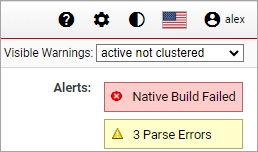
If alerts have been issued, alert messages are displayed on the Analysis page. Click on an alert message to display full information about the problem and how to resolve it.
CodeSonar issues alerts when certain problems arise with the build/analysis.
If alerts have been issued, alert messages are displayed on the
Analysis page, as shown in the screenshot fragment below.
Click on an alert message to view detailed information about the
alert.
There are three levels of alert:
We provide summary information about the alert types here; full information is provided in the Web GUI when you click an alert message.
 Red Alerts
A red alert indicates a severe problem. In some cases, the build/analysis will not run to completion until the problem is resolved.
| num Parse Errors | num parse errors were encountered, and num ≥ 200 (otherwise, would be a yellow alert), or the CodeSonar front end crashed. Click the alert message to view the CodeSonar Parse Error Log. |
|---|---|
| Bad File System | The project was built on a file system that is potentially not capable of running CodeSonar correctly and efficiently. Click the alert message for full information about the problem. |
| Native Build Failed | The observed command that the CodeSonar project was based on exited with failure. Click the alert message to view the Build Log. |
| num Bad Configuration File Settings | There are num problems with configuration file settings. Click the alert message for full information about the problems. |
| num Bad Extension Constructs | The project incorporates custom checks that a user implemented with the Extension API constructs, and one or more of the extension constructs is used incorrectly. Click the alert message for a list of the incorrect constructs and their locations in the source code. |
| num Failed Analysis Tasks | There were num cases where a unit of work in the
analysis was attempted UNIT_OF_WORK_RETRIES+1 times and failed every
time. This may indicate that the analysis is consistently crashing on one or more procedures. The analysis log is likely to contain additional information about the problem |
| Analysis Stuck (No Slaves) | The analysis has requested slaves but none have connected, so the analysis cannot proceed. This can occur for a number of different reasons: click the alert message for information about what is causing the problem in this case, and how to resolve it. |
| Analysis Stalled | The analysis has abruptly disconnected from the hub while running. It may indicate that the computer running the analysis was turned off, the analysis was killed, the analysis crashed, etc. |
| Missing Debug Information | [Java] One or more classes were compiled without debugging information. In consequence the bytecode locations for some warnings will probably be incorrectly translated into source locations, so those warnings will be reported at the wrong locations. |
| num Missing Source Files |
[Java and C# only]
|
| Miscellaneous Error [for C and C++ compilation units] |
One of a variety of errors: click on the alert message for more information. |
| Miscellaneous Error [for Java compilation units] |
One of the following.
|
| Miscellaneous Error [for C# compilation units] |
One of a variety of errors: click on the alert message for more information. |
| No Entry Point | CodeSonar could not find the program's main function, so no analysis occurred. |
 Yellow Alerts
A yellow alert indicates a less severe problem that may cause analysis results to be incomplete.
| num Dropped Warnings | num results entries in imported SARIF files could not
be converted to CodeSonar warning
instances. Click the alert message to view information about each dropped instance: the warning class and the reason the warning was dropped. |
|---|---|
| num Parse Errors | num parse errors were encountered, and num < 200 (otherwise, would be a red alert). Click the alert message to view the CodeSonar Parse Error Log. |
| num Unexpected Reachability Conditions | One or more of the configured threshold conditions for reachability analysis has been violated. These thresholds are established by parameters: |
| Android Manifest Issue |
One of the following conditions was encountered.
|
| Duplicated Component | [Java and C# compilation units only] The analyzed artifacts
include two or more components (for example, classes) with the
same fully-qualified name. The analysis will include the first component encountered with each name, and ignore any others. |
| Invalid Component | [Java and C# compilation units only] CodeSonar was not able to extract analyzable code from one of the analyzed artifacts. |
| Native Component |
[Java and C# compilation units only] The analyzed artifacts
include one or more components (for example, classes) written
in native code: typically C or C++.
|
| Incremental Parent Analysis Absent | The analysis was performed in incremental mode, but its parent analysis is not present on the hub. |
| Multiple Versions of Source File | The analysis contains multiple source file instances with the
same path but different contents. Click the alert message for more information, including the file path. |
 Blue Alerts
Blue alerts are discretionary and informational. Use discretion to determine whether action is warranted.
| num Undefined Functions | CodeSonar did not encounter definitions (function bodies) for
some functions that are called in the project. Click the alert message to view the Undefined Functions Report for the analysis. |
|---|---|
| Missing Classes | Code for some classes was not submitted for analysis, but those classes are referenced in the code. |
| No Warnings Enabled | All Java or C# warning classes are disabled, and this might be unintentional. |
| Reduced Warning Detail | A warning
instance derived from an imported SARIF file will be
displayed with reduced detail. Click the alert message for information about the cause and consequences. |
To report problems with this documentation, please visit https://support.codesecure.com/.