
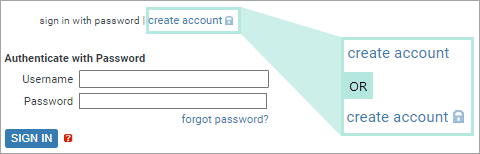
- YES: the hub is configured to prevent anonymous users from
creating new accounts.
You will not be able to create your own account: ask a hub administrator or other privileged user to create an account for you. - NO: you will be able to create a new account. Go on to the next step.
The Create Account tab will open.
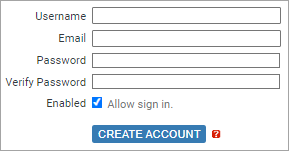
Usernames must be at least one character long, and are case sensitive (so that international character sets can be accommodated).
Under default hub settings, the following minimum password requirements apply.
- Minimum length: 12 characters
- Minimum number of character classes (e.g. 'upper case', 'lower case', 'digit'): 3
Being assigned the Enabled role is sufficient to guarantee that the new user account will have G_SIGN_IN permission, but note the following.
- The account will also need access to an available authentication method. See Hub Authentication: Authentication and Authorization for details.
- If an administrator has added further role-permissions to the Enabled role, those will also apply.
| If all goes well: |
The new account will be created.
If the new account has G_SIGN_IN and G_SIGN_IN_PASSWORD permissions (this will depend on the permissions assigned to the default template user's roles, and on whether or not you selected Enabled), you will be signed in under that account. If the new account does not have G_SIGN_IN and G_SIGN_IN_PASSWORD permissions CodeSonar will print a warning message explaining that the new user cannot sign in. |
|---|---|
| Otherwise: |
If there is a problem with any of the information provided,
CodeSonar will print a warning message instead of creating
the new account. At this point, the options are:
|