JavaScript is not currently enabled, but is required for full
CodeSonar manual search and browse functionality.
If you are viewing this file in your hub's Web GUI, enable
JavaScript in your browser: you will also need it for GUI
functionality.
If you opened this file directly from disk, your browser may be
directly suppressing JavaScript functionality: certain browsers
perform this suppression on local files (but not files delivered by
web servers) for security reasons.
-
If you access the manual through the hub's Web GUI, the
functionality will not be suppressed because the hub is a web
server.
-
Alternatively, your browser may allow you to explicitly
disable the security setting that suppresses functionality. See
the CodeSonar
FAQ for more information.
Source File
CodeSonar stores file instance information every time a source
file is analyzed.
Individual source files are not securable resources. The ability
to view source file information and contents is controlled by the
ANALYSIS_READ permission. If a role has ANALYSIS_READ permission for a particular
analysis, all source files
instances analyzed by that analysis are covered.
There are several issues that arise when we
treat "a source file" as a single entity.
- The contents of a file can change over time.
- Programmers may use preprocessor directives or other mechanisms
to change the availability of different parts of a file.
CodeSonar addresses these issues by treating every compilation of
a source file as a compilation of a unique source file
instance, and storing separate information about each instance.
(Note that the licensing system does not count lines for each
individual instance, so this approach does not inflate your line
usage.)
We use the following terminology.
| file instance
|
A unique instance of a source file, representing the state
and contents for a single compilation of the file. |
| representative file instance
|
A designated file instance for each source file in an analysis,
selected by CodeSonar.
Representative file instances are used for several
purposes.
- Built-in and derived file-granularity metrics for an
analysis are computed from the representative file instances
for that analysis.
- A Source
Listing page for file f displays the
representative instance of f from the most recent
analysis, if available.
- When your CodeSonar license includes a limit on Lines
With Code, the representative instance of each file
(across all analyses and projects where it appears) with the
most Lines With Code is counted.
|
| compilation unit
|
The file instance or set of instances compiled when the
compiler is called on a file - the "root instance"
(on which the compiler is called directly) plus all the
instances included or recursively included by the root
instance.
|
CodeSonar stores the following information about each analyzed
file instance.
The full list of properties is (in alphabetical order):
| |
Name
( Search
Language Field Name, if
any) |
Description |
| |
Instance Analysis
|
The analysis in which
the instance was analyzed. The GUI and file search
language provide direct access to several Instance Analysis
properties:
(For other properties of the analysis, refer to the
corresponding Analysis
page or issue an SQL
query.)
|
Language
( language) |
The name of the file's programming language. |
| Compilation Unit
|
The instance at the root of the include tree that contains
this instance. |
| Compilation Unit Path
|
The File Path value for the instance
in Compilation Unit. |
Directory
( directory) |
The directory in which the file is located. |
File
( file) |
The file name (basename). |
File Path
( path) |
The full directory path to the file (combines Directory and File). |
| ID
|
A unique numerical identifier for the file instance. |
| Metrics
|
|
File-granularity metrics are computed on the representative file instance for
each source file in the analyzed project, and stored with other
analysis information on the hub.
Compilation-unit-granularity metrics are computed for each
compilation unit in the
analyzed project, and stored with other analysis information on
the hub.
- Users can create custom metric
classes with compilation unit granularity, but CodeSonar
does not ship with any.
Note: if the analysis is
still in progress, values of metrics will change as they are
computed. Once the analysis reaches the Analyzing state,
computation has finished and the final values are
displayed.
|
Source file information is available in the CodeSonar GUI as
follows.
| Source
Listing
|
Full information about a single source file. |
| Analysis
|
Warnings tab:
Each entry in the table contains some information about the file
in which the warning was issued. Files tab: A table with one row
for every file analyzed by a given analysis. |
| Metric
Report
|
Displays file-granularity metrics as specified for the
report. |
| Warning Report
|
Contains some information about the file in which the warning
was issued. |
Source file information is also available programmatically through
the Plug-In API: API Description: Source
Files.
When a source file is analyzed, its properties (as listed above) are submitted to the
hub and stored with the rest of the analysis information. However,
for space reasons, the file listing is not submitted to the
hub. Instead, the analysis stores all analyzed source files in the
project analysis directory (pfilesname.prj_files/).
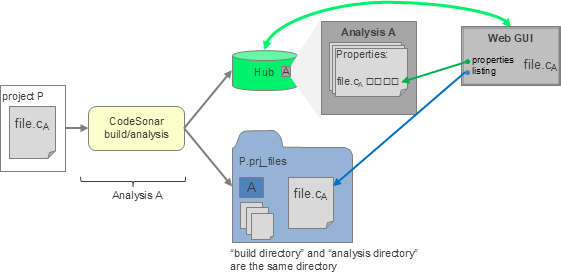
- For local-managed
analyses, the CodeSonar build directory and analysis directory are
the same directory.
If there are multiple analyses of the same project with the same
build directory, the build directory and thus the analysis
directory are reused.
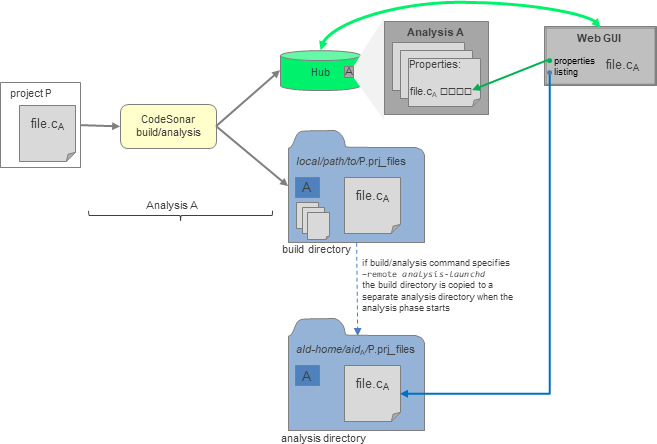
- For remote-managed
analyses, the CodeSonar build directory is copied to a separate
analysis directory at the beginning of the analysis phase.
There can be multiple analyses of the same build directory, but
the analysis directory for each of these analyses will be
distinct. In particular, the parent directory for each analysis
directory is named with the analysis ID.
When an analysis A is local-managed, its build directory and
analysis directory are the same directory. If there is a subsequent
analysis B with the same build/analysis directory, the previous files
will be overwritten and the hub will only be able to interact with
source files for analysis B.
When an analysis A is remote-managed, its analysis directory is
always unique and cannot be affected by future analyses. When such an
analysis transitions to daemon mode, the hub will be able to interact
with the source files for analysis A even if there have been
subsequent analyses of the same project.
If you want to take advantage of this behavior, specify the -remote or -remote-archive option in your build/analysis
command.
The remainder of this page details various scenarios for
local-managed analysis information.
Source File Information Availability for Local-Managed
Analyses
The remainder of this page details various scenarios for
local-managed analysis information.
These scenarios are not applicable for remote-managed analyses
(including those that are remote-managed only after transition to
daemon mode),
because each remote-managed analysis has its own distinct analysis
directory and so its files are always available unless the analysis
is deleted from the hub.
- If you do not
branch any analysis, remove any analysis
from the hub, or restore any project analysis directory
from backup, each project analysis directory contains the source
files from the most recent analysis of the project.

- File properties from all analyses
of all projects are available on the hub. File properties
displayed in File
Search Results, Metric Report, and the
Analysis: Files tab
are always precisely those initially stored for the specified
analysis.
- Source
Listings for the most recent analysis of each project can
be viewed in the web GUI: the hub will request them from the
analysis daemon, which will obtain them from the project
analysis directory. If you try to open a Source Listing for a file
from an older analysis, CodeSonar will display a notification
message and then display the most recently analyzed version of
the file (if it exists).
- To re-analyze a project without removing older versions of its
source files, make
a new analysis branch. Each analysis branch has its own project
analysis directory, so source files in other project analysis
directories are not removed.

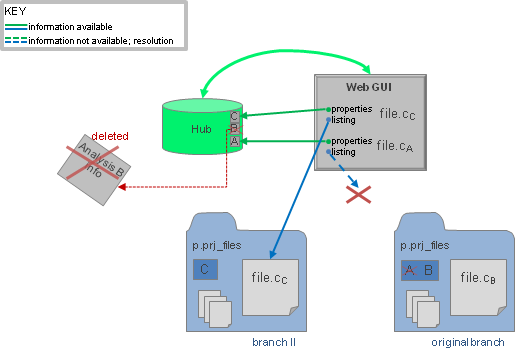
- If an analysis is removed from the hub,
all file properties associated with the
analysis are deleted from the hub database and source listing links
for that analysis are no longer valid. Deleting the analysis whose
information is currently stored in the project analysis directory
thus means that Source
Listings for those files cannot be accessed.
- If a project analysis directory is restored from backup,
Source Listings will
reflect the restored files.
