JavaScript is not currently enabled, but is required for full CodeSonar manual search and browse functionality.
If you are viewing this file in your hub's Web GUI, enable JavaScript in your browser: you will also need it for GUI functionality.
If you opened this file directly from disk, your browser may be directly suppressing JavaScript functionality: certain browsers perform this suppression on local files (but not files delivered by web servers) for security reasons.
| CodeSonar® 9.2p0 | CONFIDENTIAL | CodeSecure Inc |
Generating CodeSonar results from your software project involves two steps:
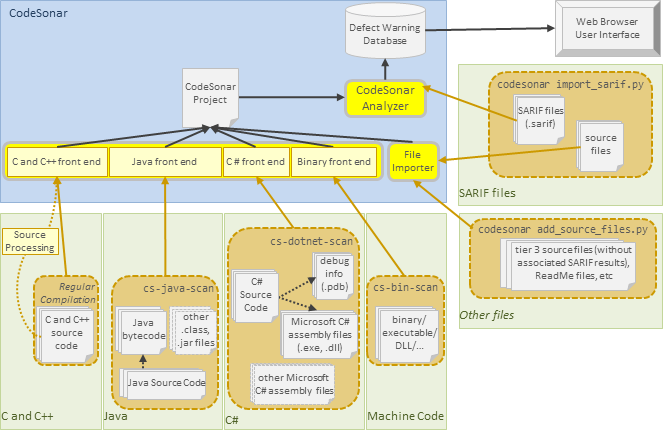
The following diagram provides an overview of the build and analysis process. The inputs and mechanisms used in the building step depend on the language or combination of languages used in the underlying project.
The steps of the build process are as follows.
| 1. Observe | The user instructs CodeSonar to observe the execution of a specified command. The remaining steps will refer to this command as <observed_command>. | ||||||||||||||||||
|---|---|---|---|---|---|---|---|---|---|---|---|---|---|---|---|---|---|---|---|
| 2. Execute | <observed_command> is executed. | ||||||||||||||||||
| 3. Recognize |
CodeSonar recognizes relevant calls within
<observed_command> as it executes.
"Relevant calls" are invocations of any of the following, in any combination.
|
||||||||||||||||||
| 4. Update |
Each time CodeSonar recognizes one of these invocations, the
appropriate language-specific front end or importer updates the
project definition to incorporate the relevant information.
Once <observed_command> terminates, CodeSonar finishes building the project. |
While source code is rich in information, it does not provide a complete picture of the software as it will be executed: computers don't execute source code directly, so the effects of the build process must also be taken into account. Basing the CodeSonar analysis on your normal software build means that the analyzed project will reflect the software resulting from that build.
In general, we recommend accomplishing this as follows.
CodeSonar accounts for the influence of the build system in different ways for different languages, as shown in the following table. The table is organized by language tier: see Language Tiers, below, for more information.
| Language | The CodeSonar-facing build must include... | CodeSonar will... | |||||||||||||||||||
|---|---|---|---|---|---|---|---|---|---|---|---|---|---|---|---|---|---|---|---|---|---|
| Tier 1: CodeSonar has a language-specific front end and produces highly detailed IR (C, C++) | |||||||||||||||||||||
| C and C++ |
... all C and C++ compilations that take place in the normal
software build.
Note: for projects that contain only C and C++ code, it is sufficient to have CodeSonar observe your normal software build directly. You don't need a separate CodeSonar-facing build. |
...recognize C and C++ compiler calls and update the CodeSonar project to incorporate the C/C++ source files compiled in those calls, with compiler-specific behavior and the effects of compiler flags taken into account. | |||||||||||||||||||
| Tier 2: CodeSonar has a language-specific front end and produces less-detailed IR (Java, C#) | |||||||||||||||||||||
| Java |
...one or more cs-java-scan
invocations, identifying the Java bytecode files produced by
your normal build, and the Java source files they were built
from.
|
...update the CodeSonar project to incorporate the Java source
and bytecode files identified in those invocations.
Incorporating the Java bytecode means that the CodeSonar project directly reflects what will be executed by the JVM. |
|||||||||||||||||||
| C# |
...one or more codesonar cs-dotnet-scan invocations,
identifying the assembly (.exe, .dll) files produced by your normal build,
and the C# source (.cs) files
they were built from.
|
...update the CodeSonar project to incorporate the C# source
and assembly files identified in those invocations.
Incorporating the Microsoft C# assembly means that the CodeSonar project directly reflects what will be executed. Note that CodeSonar C# projects can be built and analyzed on Windows machines only, although results can be submitted to a hub on any platform. |
|||||||||||||||||||
| Kotlin when targeting the JVM |
..one or more cs-java-scan
invocations, identifying the Java bytecode files produced by
your normal build, and the Kotlin source files they were built
from.
Note that Kotlin code only receives tier 2 treatment when it
is analyzed with cs-java-scan. |
...update the CodeSonar project to incorporate the Kotlin source and Java bytecode files identified in those invocations. | |||||||||||||||||||
| Tier 3: CodeSonar has no language-specific front end, and produces file-level IR only (all other languages) | |||||||||||||||||||||
| Go, Kotlin, Python, Rust, JavaScript, TypeScript |
...one or more invocations of the corresponding tier 3
subcommand, identifying the source files of interest.
The tier 3 subcommands are wrappers that handle both invoking a third party analysis tool and importing the resulting SARIF into the CodeSonar project along with the specified source files. The following table summarizes the available tier 3 subcommands.
Important: tier 3 subcommands are not language-specific front ends. The source and SARIF files are imported using the same functionality that is used when you invoke codesonar import_sarif.py directly. Kotlin note. Kotlin code receives tier 3 treatment when analyzed with codesonar kotlin_scan.py, but receives tier 2 treatment when analyzed with cs-java-scan. |
...update the CodeSonar project to incorporate the files identified in those invocations. | |||||||||||||||||||
| Any language not in tier 1 or tier
2 (including Go, Kotlin, Python, Rust, JavaScript, TypeScript) |
|
...update the CodeSonar project to incorporate the files identified in those invocations. | |||||||||||||||||||
Once your CodeSonar-facing build has accounted for the various components in the regular software project, it can optionally invoke codesonar import_sarif.py one or more times to add results from third-party analysis tools invoked on any of those components.
In the context of building and analyzing a CodeSonar project, programming languages can be divided into three tiers.
| Tier 1 | C, C++ CodeSonar has a language-specific front end, and produces highly detailed internal representation (IR). |
|---|---|
| Tier 2 | Java, C# CodeSonar has a language-specific front end, and produces less-detailed IR. |
| Tier 3 | all other languages, including Go, Kotlin, Python, Rust, JavaScript, TypeScript CodeSonar has no language-specific front end, and produces file-level IR only. (Note: tier 3 subcommands such as codesonar python_scan.py are not language-specific front ends.) |
Functionality consequences for the different tiers are described in the following table.
| Language Tier | |||||||||||||||
|---|---|---|---|---|---|---|---|---|---|---|---|---|---|---|---|
| Tier 1 (C, C++) |
Tier 2 (Java, C#) |
Tier
3 (all other languages) |
|||||||||||||
| Include component via... | ...language-specific mechanism (see table above). | ...language-specific mechanism (see table above). |
|
||||||||||||
| CodeSonar analysis checks | Applied. | Applied. | Applied only if they rely solely on file-level information (such as file name). | ||||||||||||
| IR produced | Highly detailed IR, including symbols, CFGs, and ASTs along with all IR for tier 2. | Procedures, cross-references, and file-level IR. | File-level IR only. | ||||||||||||
| Plug-In API | IR can be traversed and inspected by plug-ins. | IR can be traversed and inspected by plug-ins. | Plug-ins that make use of IR information other than file-level IR will not be applied to tier 3 components. | ||||||||||||
| Code Coloring and Interaction | Applied. | Applied. | Not applied. | ||||||||||||
| Extension API | Available (C and C++ only). Extension API directives in the component will be incorporated into the CodeSonar project. | Not available. CodeSonar will not recognize or interpret Extension API directives that are present in tier 2 components. | Not available. CodeSonar will not recognize or interpret Extension API directives that are present in tier 3 components. | ||||||||||||
When you use codesonar import_sarif.py or codesonar add_source_files.py to add source files (or files of other types) to a CodeSonar project, those files are treated as tier 3 components. This is the case even if a given file is actually in a language that is in tier 1 or tier 2.
If a project component uses a tier 1 or tier 2 language, we therefore strongly recommend using the standard CodeSonar mechanism for adding information about that component to the CodeSonar project. This allows you to take advantage of all the functionality that depends on the resulting internal representation (IR).
The following sections explain how to build and analyze a project.
| General | |
|---|---|
| Language-Specific |
|
| Results from other tools |
The CodeSonar analysis interacts with the hub through a launch daemon that
If you have specified an analysis launch daemon with -remote analysis-launchd, it must already be running.
Otherwise, the analysis will use a launch daemon whose Machine, System User, Hub User, and Installation match those that were used to invoke the analysis command. If such a launch daemon is not already running, CodeSonar will start one when you execute the analysis, failing if the Hub User does not have sufficient permissions.
In certain special cases, the analysis does not require a launch daemon. CodeSonar will not start a launch daemon in these cases.
CodeSonar permissions apply to the CodeSonar build/analysis as follows.
Note also that a new analysis cannot be started if the hub is in an unlicensed state, unless it is a dry run (DRY_RUN=Yes).
The permissions required to perform a CodeSonar build/analysis depend on whether or not the project already exists.
Analysis
tokens.
Once the build/analysis is authorized, the
authorization persists until the analysis finishes running. To manage
this persistent authorization, CodeSonar stores a special analysis
token in the analysis
directory.
The permissions assigned when you perform a CodeSonar build/analysis depend on whether or not the project already exists.
There are initially no other role-permissions applied to the new elements. To adjust role-permissions for an element, use the corresponding Resource Role-Permissions page.
To report problems with this documentation, please visit https://support.codesecure.com/.