JavaScript is not currently enabled, but is required for full CodeSonar manual search and browse functionality.
If you are viewing this file in your hub's Web GUI, enable JavaScript in your browser: you will also need it for GUI functionality.
If you opened this file directly from disk, your browser may be directly suppressing JavaScript functionality: certain browsers perform this suppression on local files (but not files delivered by web servers) for security reasons.
| CodeSonar® 9.2p0 | CONFIDENTIAL | CodeSecure Inc |
The cs-java-scan command can be used to analyze both Java components and Kotlin components that target the JVM.
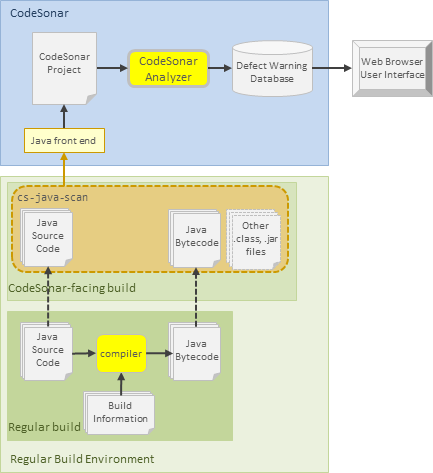
A CodeSonar build using cs-java-scan is performed after the normal build. It uses both the Java or Kotlin source files and the files produced by the build. This is significantly different from the way in which CodeSonar builds a C/C++ project, which involves observing the actual normal-build process. With cs-java-scan, the CodeSonar build collects the Java bytecode files produced by a normal build, along with the corresponding Java or Kotlin source code for any parts of the project for which warnings are required. The bytecode files are then analyzed, and analysis results are sent to a hub database, from which they can be viewed with an ordinary web browser.
Incrementality is not supported: Java and Kotlin (and the Java and Kotlin parts of mixed projects) will always be completely rebuilt and reanalyzed when you perform a CodeSonar analysis.
AOSP note: if you are analyzing the Android Open Source Project (AOSP), you can use the codesonar cs_android.py subcommand. This provides functionality for partitioning sources and artifacts into groups and producing an appropriate cs-java-scan invocation for each group. See codesonar cs_android.py : Prepare and Analyze the Android Open Source Project for full details.
Important Note: CodeSonar will only report warnings for those parts of the project for which the Java bytecode is specified with -include-artifacts or -include-sourceless-artifacts. In most cases the corresponding source code must also be available, and specified with -include-sources.
An overview and further links about building and analyzing CodeSonar projects from software in other languages are provided in section Building.
CodeSonar Java analysis is available on 64-bit Windows and Linux only.
The CodeSonar Java analysis is suitable for Java source and binaries targeting the following.The cs-java-scan command can be used to analyze both Java and Kotlin components.
Note that cs-java-scan does not invoke the Kotlin detekt analyzer. If you also want detekt results for your Kotlin code, include the corresponding codesonar kotlin_scan.py invocations in your CodeSonar-facing build.
The following diagram shows the CodeSonar build and analysis process for Java projects (and Kotlin projects targeting the JVM)
The steps of the build and analysis process are described in Building: Overview. For projects based on Java code, the steps manifest as follows.
| 1. Observe |
The user instructs CodeSonar to observe an
operation or collection of operations that includes one or more
invocations of the form
cs-java-scan -include-artifacts patternA
-include-sources patternS [remaining-options]
or
cs-java-scan -include-sourceless-artifacts pattern
[remaining-options]
|
|---|---|
| 2. Execute |
The designated operation or operations are executed.
Important: Only invocations of cs-java-scan that take place during this execution will be represented in the project. |
| 3. Recognize | CodeSonar will recognize invocations of cs-java-scan. |
| 4. Update |
Each time it recognizes an invocation of cs-java-scan, CodeSonar updates the
project definition to incorporate the files specified by that
invocation.
The files included in the project can be divided into sources and artifacts.
|
Once it has finished building the project, CodeSonar can run the analysis. If you use the analyze command, the analysis will run (and send its results to the hub) after the build has finished.
The degree of parallelism in the analysis will depend on the setting of ANALYSIS_SLAVES. Additional parallelism can be achieved by executing multiple cs-java-scan commands in parallel for various smaller pieces of a project.
As described in Command Line Build/Analysis: Command, the general form of the usual CodeSonar build/analysis command is
The command element is described below; the other parts of the command line are discussed in Command Line Build/Analysis: Elements.
To build a Java project, CodeSonar observes the execution of a
command of one of the following forms.
For Kotlin projects, we recommend using the -include-artifacts,-include-sources form only (not the
-include-sourceless-artifacts form).
There are therefore two general forms of the CodeSonar build/analysis command when utilizing cs-java-scan:
where remaining-options is any combination of include options, exclude options, and other options.
AOSP note: If you are analyzing the Android Open Source Project, you can use the cs_android.py subcommand. This provides functionality for partitioning your sources and artifacts into groups and producing an appropriate cs-java-scan invocation for each group. See codesonar cs_android.py : Prepare and Analyze the Android Open Source Project for full details.
Wildcard patterns follow the rules of the Java Spring-Framework AntPathMatcher class. In particular:
A pattern that matches a directory is considered to match all files in that directory with the appropriate suffixes:
This section describes the available options for cs-java-scan, all of which can be added using configuration file settings.
As described in section Build and Analysis for Java Projects, there are two general forms of the CodeSonar build/analysis command with a cs-java-scan command element:
Where remaining-options is any combination of include options, exclude options, and other options.
The relative ordering of include and exclude options is important:
You can specify cs-java-scan options using the following configuration file parameters.
| JAVA_FLAGS_APPEND | Specifies options to append to the list passed to cs-java-scan. |
|---|---|
| JAVA_FLAGS_PREPEND | Specifies options to prepend to the list passed to cs-java-scan. |
The following table lists all options understood by cs-java-scan.
| Option | Default Value | Description | Can Specify More Than Once? | Applicable to Kotlin analysis? |
|---|---|---|---|---|
Include OptionsThese specify files to include in the CodeSonar project. |
||||
| -include-sources <pattern> | none |
The project should include all source files (.java and .kt) whose filename matches <pattern>. If there are no such files in the file system, the analysis will terminate unless -no-abort-unmatched-pattern is specified. This supersedes any previous exclusion of any of these files with -exclude-sources, but may in turn be superseded by a subsequent occurrence of -exclude-sources. Source files are not analyzed directly. Instead, they are used to present the warnings identified in the bytecode files specified with -include-artifacts. |
yes | yes |
| -include-artifacts <pattern> | none |
The project should include all ordinary artifacts whose filename
matches <pattern>. If there are no such files in the file system, the analysis will terminate unless -no-abort-unmatched-pattern is specified. This supersedes any previous exclusion of any of these files with -exclude-artifacts, but may in turn be superseded by a subsequent occurrence of -exclude-artifacts. The source code corresponding to an ordinary artifact must also be available and specified with -include-sources, unless one or more sourceless artifacts are also specified. |
yes | yes |
| -include-sourceless-artifacts <pattern> | none |
The project should include all sourceless artifacts whose filename
matches <pattern>. If there are no such files in the file system, the analysis will terminate unless -no-abort-unmatched-pattern is specified. This supersedes any previous exclusion of any of these files with -exclude-sourceless-artifacts, but may in turn be superseded by a subsequent occurrence of -exclude-artifacts. |
yes | not recommended |
| -include-libraries <pattern> | none |
The project should include all libraries whose filename matches <pattern>. If there are no such files in the file system, the analysis will terminate unless -no-abort-unmatched-pattern is specified. This supersedes any previous exclusion of any of these files with -exclude-libraries, but may in turn be superseded by a subsequent occurrence of -exclude-libraries. |
yes | yes |
| -include-signatures <pattern> | none |
The project should include all signatures from all artifacts whose filename
matches <pattern>. If there are no such files in the file system, the analysis will terminate unless -no-abort-unmatched-pattern is specified. This supersedes any previous exclusion of any of these files with -exclude-signatures, but may in turn be superseded by a subsequent occurrence of -exclude-signatures. |
yes | yes |
Exclude OptionsThese specify previously-included files that should be excluded from the CodeSonar project. |
||||
| -exclude-sources <pattern> | none |
Removes all files whose filename matches <pattern> from the set of source
files (.java and .kt) accumulated by earlier occurrences of
-include-sources in the cs-java-scan command. If there are no such files in the file system, the analysis will terminate unless -no-abort-unmatched-pattern is specified. Some or all of these source files may be added back by subsequent occurrences of -include-sources. |
yes | yes |
| -exclude-artifacts <pattern> | none |
Removes all files whose filename matches <pattern> from the set of
ordinary artifacts accumulated
by earlier occurrences of -include-artifacts in the cs-java-scan command. If there are no such files in the file system, the analysis will terminate unless -no-abort-unmatched-pattern is specified. Some or all of these ordinary artifacts may be added back by subsequent occurrences of -include-artifacts. |
yes | yes |
| -exclude-sourceless-artifacts <pattern> | none |
Removes all files whose filename matches <pattern> from the set of
sourceless artifacts
accumulated by earlier occurrences of -include-sourceless-artifacts in the
cs-java-scan command. If there are no such files in the file system, the analysis will terminate unless -no-abort-unmatched-pattern is specified. Some or all of these sourceless artifacts may be added back by subsequent occurrences of -include-sourceless-artifacts. |
yes | not recommended |
| -exclude-libraries <pattern> | none |
Removes all files whose filename matches <pattern> from the set of
libraries accumulated by earlier
occurrences of -include-libraries in the cs-java-scan command. If there are no such files in the file system, the analysis will terminate unless -no-abort-unmatched-pattern is specified. Some or all of these libraries may be added back by subsequent occurrences of -include-libraries. |
yes | yes |
| -exclude-signatures <pattern> | none |
Removes all files whose filename matches <pattern> from the set of
signatures accumulated by earlier
occurrences of -include-signatures in the cs-java-scan command. If there are no such files in the file system, the analysis will terminate unless -no-abort-unmatched-pattern is specified. Some or all of these ordinary artifacts may be added back by subsequent occurrences of -include-signatures. |
yes | yes |
Other OptionsThese control other aspects of the Java analysis. |
||||
| -cs-verbosity <level> | 2 | Specifies the verbosity level for diagnostics, as an integer between 0 and 10, with 0 for no diagnostics, 10 for all diagnostics. | no | yes |
| -encoding <encoding> | system default character encoding | Specifies that the character encoding used by Java and Kotlin source files is <encoding>. This should be a supported charset name, as defined by java.nio.charset.Charset.isSupported(). | no | yes |
| -entrypoints <mode> | The value of configuration parameter JAVA_ANALYSIS_ENTRY_POINTS_MODE | Specifies that the runtime environment of the analyzed
application is <mode>: one of {ALL_ENTRIES, ONLY_EXPLICIT_ENTRIES,
ONLY_STANDARD_ENTRIES, LIBRARY, ALL_METHODS}. If specified multiple times, the last value specified is used. |
yes | yes |
| -framework <framework> | The value of configuration parameter JAVA_ANALYSIS_FRAMEWORK | Specifies that the runtime environment of the analyzed
application is <framework> : one of
java1,
java2,
java3,
java4,
java5,
java6,
java7,
java8,
java9,
java10,
java11,
java12,
java13,
java14,
java15,
java16,
java17,
java18,
java19,
java20,
java21,
java22,
androidAPI1,
androidAPI2,
androidAPI3,
androidAPI4,
androidAPI5,
androidAPI6,
androidAPI7,
androidAPI8,
androidAPI9,
androidAPI10,
androidAPI11,
androidAPI12,
androidAPI13,
androidAPI14,
androidAPI15,
androidAPI16,
androidAPI17,
androidAPI18,
androidAPI19,
androidAPI20,
androidAPI21,
androidAPI22,
androidAPI23,
androidAPI24,
androidAPI25,
androidAPI26,
androidAPI27,
androidAPI28,
androidAPI29,
androidAPI30,
androidAPI31,
androidAPI32,
androidAPI33,
androidAPI34,
androidAPI35. If specified multiple times, the last value specified is used. |
yes | yes |
| -import-require-source | Warnings will be submitted to the hub even if there is no corresponding source code. | Specifies that warnings should only be submitted to the hub
if the corresponding source code is available and specified with
-include-sources. Has no effect for libraries and signatures. |
no | yes |
| -java-analysis-memory <num> | The value of configuration parameter JAVA_ANALYSIS_MAX_MEMORY | Specifies that the memory allocated for running the analysis engine is <num>MB. | no | yes |
| -java-launcher-memory <num> | The value of configuration parameter JAVA_LAUNCHER_MEMORY | Specifies that the memory allocated for running the process collecting the files in preparation for the analysis engine is <num>MB. | no | yes |
| -java-source-level <num> | CodeSonar will determine a value for <num> using the maximum class file version of the submitted artifacts. | Specifies the language compliance level to be used in parsing Java source files (.java) is <num>: one of {1.1, 1.2, 1.3, 1.4, 1.5, 1.6, 1.7, 1.8, 9, 10, 11, 12, 13, 14, 15, 16, 17, 18, 19, 20, 21, 22}. | no | yes |
| -no-abort-unmatched-pattern | CodeSonar terminates with an error message if there is an unmatched include or exclude option. | Specifies that the cs-java-scan command should not
terminate if one or more of the specified include or exclude options has a pattern that
doesn't match any files in the file system. Note that the cs-java-scan command will still terminate with no analysis performed if there are no sources or artifacts: see -no-warn-empty-project for more information. |
no | yes |
| -no-warn-empty-project | CodeSonar exits with non-0, and outputs an error message, if there are no sources or artifacts. | Specifies that the cs-java-scan command should exit with 0, and
not output an error message, if there are no sources or
artifacts. Note that cs-java-scan always exits with no analysis performed if there are no sources or artifacts: this option affects only the exit behavior. |
no | yes |
Artifacts are files with the following extensions: .class, .jar, .xml, .sarl, and .properties.
Each artifact included in a particular CodeSonar analysis belongs to one of four categories: ordinary artifacts, sourceless artifacts, libraries, and signatures. The artifact's category determines how the analysis will handle the artifact, as described in the table below.
The following table describes the artifact categories in order of importance.
| Artifact Category | Description | Include with | Exclude with |
|---|---|---|---|
| ordinary artifacts |
Artifacts for which you
If the source code corresponding to an ordinary artifact is available and specified with -include-sources, warnings for that artifact are uploaded to the hub and presented with respect to the source file or files. If source code is not available for one or more ordinary artifacts, behavior depends on the other elements of the containing cs-java-scan command.
|
-include-artifacts | -exclude-artifacts |
| sourceless artifacts |
Artifacts for which you
If the source code corresponding to a sourceless artifact is available and specified with -include-sources, warnings for that artifact are uploaded to the hub and presented with respect to the source file or files. If the source code is not present, the warnings for the sourceless artifact are uploaded to the hub only if -import-require-source is not specified. The warnings in this case are presented with reduced detail, since the relevant source files are not available. |
-include-sourceless-artifacts | -exclude-sourceless-artifacts |
| libraries | Artifacts that you want to include in the CodeSonar analysis, but for which you do not wish to see any warnings. | -include-libraries | -exclude-libraries |
| signatures | Artifacts that you want to include in the CodeSonar analysis but only to the extent of collecting signatures, and for which you do not wish to see any warnings. Including signatures can improve analysis results, but to a lesser extent than including libraries. | -include-signatures | -exclude-signatures |
Some example CodeSonar command lines for building and analyzing Java projects.
Note: Depending on the hub configuration, you may be prompted for hub user account credentials to authenticate and authorize codesonar build and codesonar analyze commands. See Hub Authentication: Authenticated codesonar Subcommands for more information.
The first five examples below are for projects with simple structure.
Build a CodeSonar project based on the classes contained in Example.jar and the source file Example.java, both located in the current working directory.
Build and analyze a CodeSonar project based on the source file /path/to/sources/D.java and class file /path/to/classes/D.class.
Build and analyze a CodeSonar project based on the source files in /path/to/sources and the artifacts in /path/to/classes.
Build and analyze a CodeSonar project based on the Java source files in /path/to/sources and the artifacts in /path/to/classes.
Build and analyze a CodeSonar project based on the source files in /path/to/sources and the .jar file /path/to/Project.jar.
The following examples illustrate more fine-grained control of the analysis.
Build and analyze a CodeSonar project based on the Java source files in /path/to/sources and the artifacts in /path/to/classes, except for the artifacts in /path/to/classes/A.
Build and analyze a CodeSonar project based on the Java source files in /path/to/sources and the artifacts in /path/to/classes, except for the artifacts in /path/to/classes/A that are not in /path/to/classes/A/B.
For the analysis, there is a hierarchy of artifacts: artifacts, sourceless artifacts, libraries, and signatures. For each of these, there is an -include option and an -exclude option.
Build and analyze a CodeSonar project based on the source files in /path/to/sources and the .jar file /path/to/Project.jar, using the type signatures of the classes found inside /path/to/External.jar.
Build and analyze a CodeSonar project based on the full contents of the current directory.
Build and analyze a CodeSonar project based on the full contents of the current directory, excluding classes and directories whose name contains "Test".
cat <<EOF > buildscan.sh
#!/bin/sh
ant
cs-java-scan -include-artifacts foo -include-sources foo &
cs-java-scan -include-artifacts bar -include-sources bar &
wait
EOF
chmod +x buildscan.sh
codesonar analyze foo ./buildscan.sh
Build the project with ant, then run two instances of cs-java-scan in parallel on different parts of the project.
In general, we recommend using the command line CodeSonar build/analysis for Java projects.
However, it is also possible to use the Windows build wizard to observe cs-java-scan invocations.
The most typical alerts related to the Java build/analysis are listed below. For descriptions of all CodeSonar alerts, see Alerts.
| Red Alerts Three important alerts related to the Java build/analysis are num Missing Source Files, Missing Debug Info, and Miscellaneous Error. All are red (severe) alerts, because they indicate that the analysis may not be as complete as intended. |
||
| num Missing Source Files |
This indicates that CodeSonar was unable to find corresponding
source files for num of the classes specified by the
build command, so will not report warnings for those classes.
For each of these classes:
|
|
| Miscellaneous Error | The analysis engine can produce a wide variety of diagnostics, that do not necessarily affect the analysis. These appear in the hub as Miscellaneous Errors. | |
| Missing Debug Info |
This indicates that one or more of the analyzed classes was
compiled without debug information. This affects
CodeSonar's ability to map bytecode to source: warnings
will still be reported, but in some cases the reported
locations will be incorrect.
|
|
| Yellow Alerts Duplicated Component, Invalid Component, and Native Component are all yellow alerts. |
||
| Duplicated Component |
The analyzed artifacts for a single cs-java-scan invocation include
two or more components (for example, classes) with the same
fully-qualified name. The analysis will include the first component encountered with each name, and ignore any others.
|
|
| Invalid Component |
The analyzed artifacts include one or more components (for
example, classes) that CodeSonar was unable to parse.
Check the following.
|
|
| Native Component |
The analyzed artifacts include one or more components (for
example, classes) that are assumed to be implemented in native
code. Native code is typically produced from C or C++ source
code.
|
|
In some cases, you may see a parse error that looks something like the following.
For each analyzed ordinary artifact and sourceless artifact, CodeSonar attempts to identify the corresponding source file. To do this, CodeSonar iterates over those files specified with -include-sources and -exclude-sources whose basenames correspond to that of the artifact, checking each in turn to see if it is the correct match. Iteration finishes either when a match is found, or when the number of source files checked for a particular artifact exceeds the limit specified in environment variable JAVA_JFE_INCLUDESOURCE_LIMIT. The default value for this limit is 100.
If CodeSonar does not find the correct matching source file before reaching the iteration limit, then:
There are two options for resolving this problem.
This option is generally preferable if some of the source files with duplicate basenames are not relevant to your analysis. A more precise set of candidate source files will generally reduce the time spent on matching, and so reduce overall analysis time.
If you have a large number of artifacts with the same basename, there will necessarily be a large number of corresponding source files to iterate through for matching. In this case, you will need to increase the JAVA_JFE_INCLUDESOURCE_LIMIT to a value that allows all your source files to be considered.
This approach imposes additional time costs. Firstly, a higher limit means that more time can be spent on matching and so the overall analysis time is generally increased. Secondly, you will need to spend time investigating or experimenting to determine a suitable JAVA_JFE_INCLUDESOURCE_LIMIT setting. We recommend the following approach.
In some cases, the most convenient solution might be to split your build/analysis across two or more cs-java-scan invocations, each of which covers a smaller set of artifacts and specifies a more precise set of source files. This approach may still require you to increase the JAVA_JFE_INCLUDESOURCE_LIMIT, but typically not to the same extent.
To report problems with this documentation, please visit https://support.codesecure.com/.