JavaScript is not currently enabled, but is required for full
CodeSonar manual search and browse functionality.
If you are viewing this file in your hub's Web GUI, enable
JavaScript in your browser: you will also need it for GUI
functionality.
If you opened this file directly from disk, your browser may be
directly suppressing JavaScript functionality: certain browsers
perform this suppression on local files (but not files delivered by
web servers) for security reasons.
-
If you access the manual through the hub's Web GUI, the
functionality will not be suppressed because the hub is a web
server.
-
Alternatively, your browser may allow you to explicitly
disable the security setting that suppresses functionality. See
the CodeSonar
FAQ for more information.
Build/Analysis Commands
CodeSonar provides the build
and analyze commands so that you
can base a CodeSonar build of your project on whichever build
system you are accustomed to using.
This method can be used for building:
- on Linux systems,
- from a standard Windows command prompt, and
- on a Cygwin command line from within Windows.
The general form of the command line to build and analyze a
CodeSonar project is:
codesonar analyze
/path/to/pfiles-name [-project
[/[ancestors/]]proj-name] [<other_flags>]
[command]
To accumulate components toward a CodeSonar project without
finalizing or analyzing it, use:
codesonar build
/path/to/pfiles-name [-project
[/[ancestors/]]proj-name] [<other_flags>]
command
where:
- /path/to/
- is the path to the project directory, where the project files
will be stored. If no path is specified, project files will be
stored in the working directory.
- pfiles-name
- is used to construct file names for the project files generated
by CodeSonar.
- proj-name
- is the CodeSonar
project name. If -project is
not specified, the project name defaults to pfiles-name.
- [<other_flags>]
- are any other optional CodeSonar build flags used.
- command
-
is the command line identifying the software on which the project
will be based. This varies depending on the language of the
software to be analyzed. See the language-specific project build
documentation for full details.
- For C and C++
projects, command is the command line you would usually
use to build the project. For example:
- For Java,
command invokes cs-java-scan. For example:
- cs-java-scan
-include-artifacts NewClass.jar -include-sources
NewClass.java
Builds a project based on NewClass.jar where the corresponding
source file is NewClass.java and both files are
located in the working directory.
-
make
where the Makefile
might be, for example,
default: NewClass.jar
        cs-java-scan -include-artifacts NewClass.jar -include-sources NewClass.java

mydir/NewClass.jar: NewClass.class
        jar cf NewClass.jar NewClass.class

mydir/NewClass.class: NewClass.java
        javac -g NewClass.java
- For C#,
command invokes cs-dotnet-scan.
- For Go,
command invokes codesonar go_scan.py
- For JavaScript or
TypeScript, command invokes codesonar es_scan.py
- For Kotlin, command invokes one or both of
- For Python,
command invokes codesonar python_scan.py
- For Rust,
command invokes codesonar rust_scan.py
- To import SARIF
files containing analysis results, along with any associated
tier 3 source files, command invokes codesonar import_sarif.py.
- To import files of other types, command
invokes codesonar
add_source_files.py.
Build a CodeSonar project, run the analysis and output the
analysis results to a hub (from
which they can be browsed using the Web
GUI).
codesonar analyze
/path/to/pfiles-name [-project
[/[ancestors/]]proj-name]
[<other_flags>] command
codesonar analyze /path/to/pfiles-name [-project
[/[ancestors/]]proj-name]
[<other_flags>]
[<other_flags>] =
[-foreground]
[-wait] [-clean] [-clean-backend]
[-force-base-hub-analysis]
[-name
analysis-name] [-preset preset-name]
[-no-default-presets]
[-conf-file
extra-conf-path] [-property propkey
propval] [-launchd-group
ldgroup] [-launchd-key ldkey]
[-watch-pid
pid] [-watch-all-pids]
[<authflags>] [-remote
analysis-launchd] [-remote-archive
archive-launchd] [-srcroot basedir]
[[protocol://]host:
port]
[<authflags>]
= [-auth authtype] [-hubuser username] [-hubpwfile pwfile] [-hubbearerfile bearerfile] [-hubcert certfile] [-hubkey privatekeyfile]
Accumulate different components toward a single project without
analyzing the project.
codesonar build
/path/to/pfiles-name [-project
[/[ancestors/]]proj-name]
[<other_flags>] command
[<other_flags>] = [-clean] [-clean-backend]
[-force-base-hub-analysis]
[-name
analysis-name][-preset preset-name]
[-no-default-presets]
[-conf-file
extra-conf-path] [-property propkey
propval] [-launchd-group
ldgroup] [-launchd-key ldkey]
[-watch-pid
pid] [-watch-all-pids]
[<authflags>] [protocol://host:port]
[<authflags>]
= [-auth authtype] [-hubuser username] [-hubpwfile pwfile] [-hubbearerfile bearerfile] [-hubcert certfile] [-hubkey privatekeyfile]
The effects of codesonar build
and codesonar analyze depend on
multiple factors. Suppose the project is named pfiles-name.
- Have any pfiles-name
components already been accumulated?
- Has a project associated with pfiles-name already been analyzed?
- Is incrementality
enabled?
- Is option -clean specified?
- [codesonar analyze only] Is
command specified?
- Does command run
successfully and identify at least one software component (such as
a C or C++ translation unit, or a Java class) for inclusion in the
project?
- (Note: options -clean-backend and -force-base-hub-analysis will also affect
behavior in some cases: for clarity, the descriptions below omit
effects due to these options since they have limited use cases. See
the linked option documentation for details.)
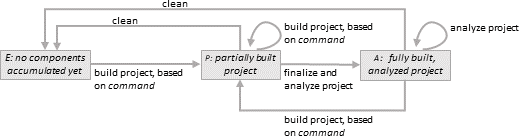
The following diagram provides an overview of the possible states
of a CodeSonar project, and the transitions between these states.
| Project State |
Description |
| Empty (E) |
An empty project is one that has no accumulated
information.
To check if your project is in this state, inspect the project
build directory pfiles-name.prj_files/.
- If the directory does not exist at all, the project is
always considered to be empty.
- Otherwise, the project is considered to be empty if it
contains zero translation units.
There is only one useful operation from this state:
accumulating project information (E→P).
|
| Partially Built (P) |
A partially built project is one for which information about at
least one software component has been accumulated.
To check if your project is in this state, inspect the contents
of the project build directory pfiles-name.prj_files/.
- It will contain a file named
0.*.fe.store.
- It will not contain file pfiles-name.linked
There are three possible operations from this state.
- Clean out the accumulated information and start again
from an empty project (P→E).
- Accumulate more information (P→P).
- Finalize the project and perform the analysis (P→A).
|
| Finalized and Analyzed (A) |
At the end of a successful codesonar
analyze invocation, the project
analysis directory contains a fully built and analyzed
CodeSonar project.
To check if your project is in this state, inspect the contents
of the project build directory pfiles-name.prj_files/.
- It will contain file pfiles-name.linked
There are three possible operations from this state.
- Clean out the accumulated information and start again
from an empty project (A→E).
- Accumulate more information (A→P).
- Reanalyze the same finalized project (A→A).
(For example, because you want to change a configuration file
setting, or adjust the set of applied plug-ins.)
|
The following sections provide detailed information about the
behavior of codesonar build and
codesonar analyze in each of these
states.
The following diagram depicts the effects of codesonar build and codesonar analyze commands invoked when a
CodeSonar project is in its initial, empty state.
Command line elements that do not affect the transitions shown in the
diagram are omitted for clarity. When the project is in an empty
state, this includes the -clean option.
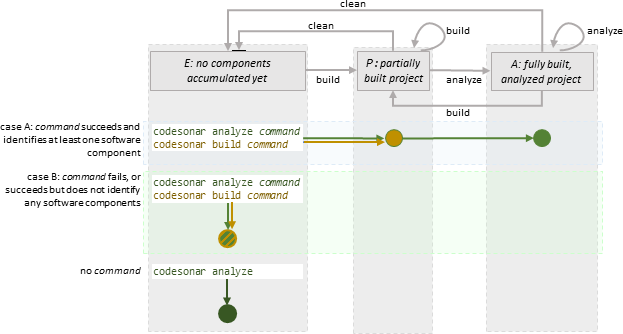
- If command is
successful, codesonar build
command and codesonar analyze command both
start by collecting information about any software components
identified by command and storing this
information in the project build directory (E→P). Once the build
phase is finished:
- codesonar build
command is done.
- codesonar analyze
command continues by finalizing a CodeSonar
project based on the accumulated information in the project
build directory, then analyzing the project (P→A).
- If command
fails, or succeeds but does not identify any software components,
codesonar build
command and codesonar analyze command do
not perform any building or analysis.
- codesonar analyze (no
command) does not perform any building or analysis.
The following diagram depicts the effects of codesonar build and codesonar analyze commands invoked when a
CodeSonar project is in partially built state.
Command line elements that do not affect the transitions shown in the
diagram are omitted for clarity.
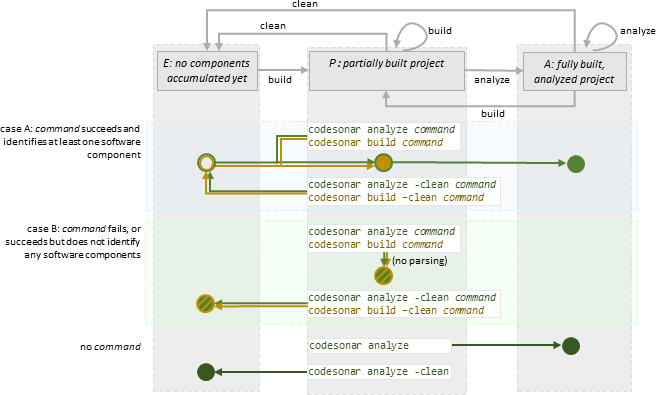
- If command is
successful, behavior depends on whether or not -clean is specified.
-
codesonar build
command and codesonar analyze command
both start by collecting information about any software
components identified by command and adding this
information to the existing partially built project in the
project build directory (P→P). Once the building phase is
finished:
- codesonar build
command is done.
- codesonar analyze
command continues by finalizing a CodeSonar
project based on the accumulated information in the project
build directory, then analyzing the project (P→A).
-
codesonar build -clean
command and codesonar analyze -clean
command both start by removing all previously
accumulated information from the project build directory
(P→E). They then collect information about any software
components identified by command and add this
information to the project build directory (E→P). In
consequence, the only accumulated information in the project
build directory at the end of the building phase is that
arising from command. Once the
building phase is finished:
- codesonar build
command is done.
- codesonar analyze
command continues by finalizing a CodeSonar
project based on the accumulated information in the project
build directory, then analyzing the project (P→A).
- If command
fails, or succeeds but does not identify any software components,
behavior depends on whether or not -clean is specified.
- codesonar build
command and codesonar analyze command
finish without removing (or adding) accumulated project
information.
- codesonar build -clean
command and codesonar analyze -clean
command both remove all accumulated project
information, then finish (P→E).
- If there is no command (codesonar analyze only):
- codesonar analyze
finalizes a CodeSonar project based on the existing contents of
the project build directory, then analyzes the project
(P→A).
- codesonar analyze
-clean removes all accumulated project information, then
finishes (P→E)..
The following diagram depicts the effects of codesonar build and codesonar analyze commands invoked when a
CodeSonar project is in fully built, analyzed state.
Command line elements that do not affect the transitions shown in the
diagram are omitted for clarity.
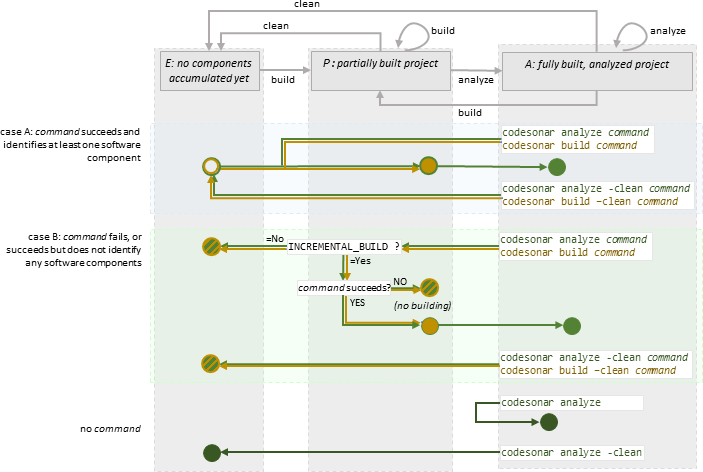
- If command is
successful, behavior depends on whether or not -clean is specified.
-
codesonar build
command and codesonar analyze command
both start by collecting information about any software
components identified by command and adding this
information to the existing contents of the project build
directory. The project build directory is therefore now back
in partially built state (A→P). Once the building phase is
finished:
- codesonar build
command is done.
- codesonar analyze
command continues by finalizing a CodeSonar
project based on the accumulated information in the project
build directory, then analyzing the project (P→A).
-
codesonar build -clean
command and codesonar analyze -clean
command both start by removing all previously
accumulated information from the project build directory
(A→E). They then collect information about any software
components identified by command and add this
information to the project build directory (E→P). In
consequence, the only accumulated components in the project
build directory at the end of the building phase are those
arising from command. Once the
building phase is finished:
- codesonar build
command is done.
- codesonar analyze
command continues by finalizing a CodeSonar
project based on the accumulated information in the project
build directory, then analyzing the project (P→A).
- If command
fails, or succeeds but does not identify any software components,
behavior depends on whether or not -clean is specified. When
-clean is not specified,
behavior also depends on the setting of the INCREMENTAL_BUILD configuration parameter.
-
codesonar build
command and codesonar analyze command
behave as follows.
- INCREMENTAL_BUILD=No :
codesonar build
command and codesonar analyze
command both remove all accumulated project
information, then finish (A→E).
- INCREMENTAL_BUILD=Yes and
command
fails: codesonar build
command and codesonar analyze
command both finish without removing (or
adding) accumulated project information, but the project is
now in partially built state (A→P). codesonar build command
is now done; codesonar
build command finalizes a CodeSonar project
based on the existing contents of the project build
directory, then analyzes the project (P→A).
- INCREMENTAL_BUILD=Yes and
command
succeeds without identifying any tranlation units:
codesonar build
command and codesonar analyze
command both finish without removing (or
adding) accumulated project information, but the project is
now in partially built state (A→P).
- codesonar build -clean
command and codesonar analyze -clean
command both remove all accumulated project
information, then finish (A→E).
- If there is no command (codesonar analyze only):
- codesonar analyze
reanalyzes the finalized project (A→A).
- codesonar analyze
-clean removes all accumulated project information, then
finishes (A→E).