JavaScript is not currently enabled, but is required for full CodeSonar manual search and browse functionality.
If you are viewing this file in your hub's Web GUI, enable JavaScript in your browser: you will also need it for GUI functionality.
If you opened this file directly from disk, your browser may be directly suppressing JavaScript functionality: certain browsers perform this suppression on local files (but not files delivered by web servers) for security reasons.
| CodeSonar® 9.2p0 | CONFIDENTIAL | CodeSecure Inc |
The SARIF Importer loads warning information from a file in Static Analysis Results Interchange Format (SARIF) and adds those warnings to the set of analysis results recorded on the hub.
This can be used to view results from other static analysis tools in CodeSonar.
Static Analysis Results Interchange Format (SARIF) is a format for describing the output of static analysis tools. CodeSonar is capable of importing SARIF files, allowing users to incorporate static analysis results produced by other tools.
The CodeSonar SARIF Importer will load warning information from zero or more SARIF files and add those warnings to the set of analysis results recorded on the hub. The warnings can then be browsed alongside any warnings reported by CodeSonar.
Section SARIF File Requirements (below) describes requirements for file naming, format version, and contents.
For more information about SARIF, including full file format specifications, see Static Analysis Results Interchange Format.
In this section (and throughout this manual), $CSONAR indicates the CodeSonar installation directory.
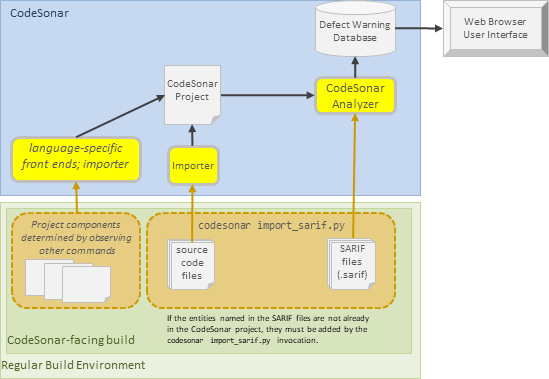
The following diagram provides an overview of a CodeSonar build/analysis process that includes imported SARIF results.
As described in Command Line Build/Analysis: Command, the general form of the usual CodeSonar build/analysis command is
To import one or more SARIF files, command must incorporate one or more invocations of codesonar import_sarif.py.
To add warning information from SARIF files to a project, CodeSonar observes the execution of a command that incorporates one or more invocations of
where:
| [sarif_file ...] |
Is a space-separated list of file paths, representing the SARIF
files to be imported.
|
||||||||||
|---|---|---|---|---|---|---|---|---|---|---|---|
| [--require-source] | Specifies that warnings from the specified SARIF files should
only be imported into the CodeSonar analysis if the corresponding
source files are also present in the project. If --require-source is not specified and the SARIF files contain such warnings, they will be discarded and a message will be added to the analysis log. |
||||||||||
| [-analyzer an3p_name] |
In most cases, a SARIF file will declare the analyzer that
produced the SARIF. CodeSonar uses this information to apply
analyzer-specific transformations to the SARIF so that the
imported warnings contain as much information as possible.
If your SARIF file does not declare the corresponding
third-party analyzer, use this option to inform CodeSonar that
the SARIF was produced by third-party analyzer an3p_name.
Omit this option unless CodeSonar cannot correctly identify the analyzer from the SARIF file. To request support for another third-party analyzer, contact CodeSecure support. |
||||||||||
| [-include-sources
file_pat] [-exclude-sources file_pat] |
Specify a set of source files to be imported into the CodeSonar
project. Use these options to import tier 3 source files that are referred to in the SARIF but are not already present in the CodeSonar project.
file_pat is a recursive glob pattern representing a source file path. It matches all files whose file path matches file_pat. When a single codesonar import_sarif.py invocation contains a combination of -include-sources and -exclude-sources options, the set of imported files is determined by applying the corresponding inclusions and exclusions in the order in which they appear on the command line. Some examples are provided below. Your shell may be configured to expand patterns into file and directory names. If so, make sure you quote the file_pat appropriately to indicate that the shell should pass it through to codesonar import_sarif.py. In most cases, this means using single quotes ('); for Windows cmd, use double quotes ("). If -include-sources is not specified, no source files are imported. Note: If the SARIF refers to tier 1 (C, C++) or tier 2 (Java, C#) files, don't use these options to import them. Instead, use the appropriate language-specific mechanism to include them in the CodeSonar project. |
||||||||||
| [-path-base dir] |
Inform CodeSonar that strictly relative paths in all
specified SARIF files should be interpreted with respect to
dir, where a
strictly relative path is a relative URI that has no
associated uriBaseId.
If -path-base is not specified, strictly relative paths in each SARIF file will be interpreted with respect to the directory containing that file. Important: If you are importing Staticcheck SARIF you must specify -path-baseid. It is not sufficient to specify -path-base alone. |
||||||||||
| [-path-baseid id dir] |
Inform CodeSonar of the path to associate with a uriBaseId used
in the SARIF. This allows CodeSonar to correctly resolve
relative paths in the SARIF which use an unresolvable
uriBaseId. This is important for SARIF documents produced by
analyzers such as Staticcheck.
This option must be specified when importing SARIF produced by Staticcheck. Staticcheck produces a SARIF document which relativizes all source file paths to a common uriBaseId called %SRCROOT%, and does not record the original, absolute base path anywhere in the SARIF document. Without the information provided by this option, CodeSonar will not be able to resolve paths in the SARIF and relate them to components represented in the CodeSonar project. You can specify this option multiple times. You will need to do so if your SARIF file uses multiple variables to represent UriBaseId values. |
||||||||||
| [-source-language lang] |
Specifies that the imported source files (as determined by
-include-sources/-exclude-sources) should be recorded
as having language lang.
If -source-language is not specified, CodeSonar will attempt to determine the language for each file based on its file extension. If it cannot determine a language, the file language will be recorded as "text". The available lang values are:
|
||||||||||
| [-source-max-bytes num] |
Specifies a maximum size of num bytes for imported
source files (as determined by -include-sources/-exclude-sources). Source files
larger than this maximum size will be ignored by the
importer. If -source-max-bytes is not specified, the importer will ignore files larger than 500KB.
|
||||||||||
| [-staticcheck path/to/staticcheck] |
[For use with Staticcheck SARIF only] Specifies the path to the
staticcheck executable that
produced the SARIF file, or one that matches it. If the
executable is in your PATH,
you do not need to specify this option.
When it is importing Staticcheck-generated SARIF files, the SARIF importer needs a list of the rules used by the Staticcheck executable that produced the SARIF.
|
||||||||||
| [-staticcheck-list path/to/list] |
[For use with Staticcheck SARIF only] Provides a file
containing the rules used by the staticcheck executable that produced the
SARIF file. This file should be produced by executing the following command.
staticcheck --list-checks
If you do not specify this option when importing SARIF produced by Staticcheck, the SARIF importer will attempt to invoke Staticcheck with --list-checks to produce the list of rules, and if it cannot do so then the import will fail. You can therefore omit this option if you have specified the -staticcheck option, or if the appropriate staticcheck executable is in your PATH. If you specify both -staticcheck and -staticcheck-list options, the list specified with -staticcheck-list will be used. |
We assume for the sake of these examples that other codesonar import_sarif.py options are not required.
In the typical use case, codesonar import_sarif.py is used to incorporate static analysis results produced by other tools into a CodeSonar project.
The required additions will depend on the languages involved in your project.
| Language | Required Additions |
|---|---|
| C and C++ | none: CodeSonar will recognize C and C++ compiler calls directly and incorporate the source files |
| Java | One or more invocations of codesonar cs-java-scan, identifying the Java source files and artifacts to be incorporated. |
| C# | Add one or more invocations of codesonar cs-dotnet-scan, identifying the C# source files and artifacts to be incorporated. |
| any other language | Identify the files to be incorporated as part of your codesonar import_sarif.py invocation, using the -include-sources and -exclude-sources options. |
For example:
| Build Tool | Regular build command | Example CodeSonar-facing build |
|---|---|---|
| make | make all |
Add a new phony target to the Makefile for the
CodeSonar-facing build. The name can be anything you
choose: you may find it convenient to use csonar_facing or similar.
make csonar_facing
|
| Windows batch file | cmd /c myProj.bat |
Extend the batch file by adding an optional argument along
with a block of operations such that the block is executed
only if the new argument is present and and has an
appropriate value (for example, you might choose
csonar_facing).
The new instruction block should:
cmd /c myProj.bat csonar_facing
|
| (and so forth) For more examples demonstrating how to construct a CodeSonar build/analysis command for various build tools, see Command Line Build/Analysis: Language-Specific Examples and the Basic Tutorial. |
||
| Build Tool | Example CodeSonar-facing build command | Corresponding CodeSonar build/analysis command |
|---|---|---|
| make | make csonar_facing | codesonar analyze myProject make csonar_facing |
| Windows batch file | cmd /c myProj.bat csonar_facing | codesonar analyze myProject cmd /c myProj.bat csonar_facing |
| in general | <csonar_facing_build_cmd> | codesonar analyze <csonar_facing_build_cmd> |
Suppose your software project is written entirely in C, and you have an in-house static analyzer that can produce warnings about issued in C code.
If you use make to manage your
regular software build, your Makefile might look something like the
following.
(If you use another tool to manage your regular build then the
mechanism for expressing the steps and dependencies will be
different, but analogous.)
CC = gcc
.PHONY: all clean houseAnalysis

all: Red Blue houseAnalysis

Red: Red.c
        $(CC) -o Red Red.c

Blue: Blue.c
        $(CC) -o Blue Blue.c

houseAnalysis: Red-analysis.sarif Blue-analysis.sarif

# house_analyzer is the in-house analyzer
# In this example the analysis tool looks at both the source code and the compiled binary,
# but does not observe the compilation process.
Red-analysis.sarif : Red Red.c
        house_analyzer Red Red.c -o Red-analysis.sarif

Blue-analysis.sarif: Blue Blue.c
        house_analyzer Blue Blue.c -o Blue-analysis.sarif

clean:
        rm -f *.o *.exe *~ core
If you build a CodeSonar project based on observing the execution of this Makefile in its original state, CodeSonar will recognize the compiler invocations and incorporate the associated source files into the project. Internal representation (IR) will be produced and the analysis will include checks for all enabled C/C++ warning classes, as for any other C project.
To import the additional analysis results from your in-house static analyzer into the CodeSonar project, do the following.
CC = gcc
.PHONY: all clean houseAnalysis csonar_scan

all: Red Blue houseAnalysis

Red: Red.c
        $(CC) -o Red Red.c

Blue: Blue.c
        $(CC) -o Blue Blue.c

houseAnalysis: Red-analysis.sarif Blue-analysis.sarif

Red-analysis.sarif : Red Red.c
        house_analyzer Red Red.c -o Red-analysis.sarif

Blue-analysis.sarif: Blue Blue.c
        house_analyzer Blue Blue.c -o Blue-analysis.sarif

clean:
        rm -f *.o *.exe *~ core

csonar_scan: all
        codesonar import_sarif.py Red-analysis.sarif Blue-analysis.sarif
For this example, we are assuming that the house_analyzer tool outputs SARIF that conforms to the SARIF file requirements. If it did not, we would need to modify the csonar_scan recipe to include a processing step and then import the processed SARIF files.
A concrete example for this feature is provided in SARIF Importer for CodeSonar:
Example.
For more examples, see Including Tier 3 Components in a
CodeSonar Project, and the individual language examples linked
from that page.
SARIF files must meet the following requirements in order to be used with the SARIF importer.
To report problems with this documentation, please visit https://support.codesecure.com/.