JavaScript is not currently enabled, but is required for full CodeSonar manual search and browse functionality.
If you are viewing this file in your hub's Web GUI, enable JavaScript in your browser: you will also need it for GUI functionality.
If you opened this file directly from disk, your browser may be directly suppressing JavaScript functionality: certain browsers perform this suppression on local files (but not files delivered by web servers) for security reasons.
| CodeSonar® 9.2p0 | CONFIDENTIAL | CodeSecure Inc |
This page describes how to extend your CodeSonar-facing build so that your CodeSonar project includes:
This page describes how to extend your CodeSonar-facing build so that your CodeSonar project includes:
Incorporating JavaScript and TypeScript components follows the standard process for including a tier 3 component. The specializations to that process are summarized in the following table. For detailed instructions, see Including JavaScript and TypeScript Components In Your CodeSonar project, below. We also provide an example Makefile.
| Language Tools | You will need a Node.js installation. |
|---|---|
| Third-Party Analyzer | ESLint and SARIF formatter for ESLint If you are analyzing TypeScript code, you will also need typescript-eslint. |
| Third-Party Analysis Step | You do not need to explicitly invoke ESLint: it is invoked in the codesonar es_scan.py subcommand. |
| Extend CodeSonar-facing Build | Invoke codesonar es_scan.py on your JavaScript and TypeScript source files. This will analyze the files with ESLint, then add the SARIF results and source files to the CodeSonar project. |
Incorporating JavaScript and TypeScript components follows the standard process for including a tier 3 component.
If you have not already set up a CodeSonar-facing build for your regular software project, you will need to create one.
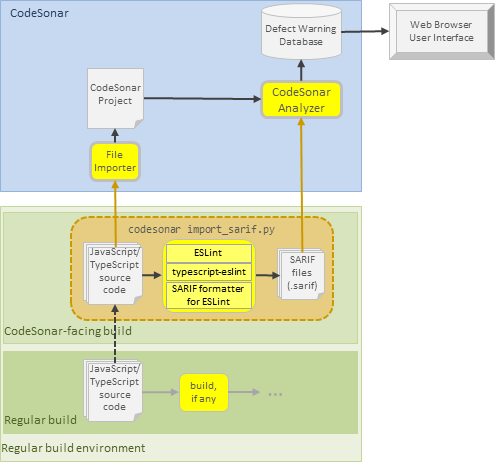
The following diagram illustrates the extended software build described above, and its interactions with the CodeSonar build/analysis.
In this section (and throughout this manual), $CSONAR indicates the CodeSonar installation directory.
When a SARIF file is imported into a CodeSonar project, the SARIF importer determines an associated warning class for each rule object in the SARIF rules, creating this warning class if it does not already exist.
The SARIF importer has special handling for warning classes derived from SARIF produced by ESLint. For more information, see:
To analyze JavaScript and TypeScript source files with ESLint and then add the source files and analysis results to a project, CodeSonar observes the execution of a command that incorporates one or more invocations of codesonar es_scan.py.
where:
| file_or_dir1 [file_or_dir2 ...] |
Each file_or_diri specifies a
file or directory path relative to the rundir directory specified with
-C rundir
or -directory
rundir, or relative to the current working directory
if no rundir is
specified.
|
||||
|---|---|---|---|---|---|
| [-C rundir] [-directory rundir] |
ESLint will be run in rundir. If -C/-directory is not specified,
ESLint will be run in the current working directory.
Any relative file_or_diri arguments are interpreted with respect to rundir. For example:
|
||||
| [-include-sources
file_pat] [-exclude-sources file_pat] |
By default JavaScript and TypeScript source files specified
with file_or_diri
arguments will be analyzed with ESLint and imported into the
CodeSonar project. Use -include-sources and -exclude-sources to adjust this set by adding or removing files. file_pat is a recursive glob pattern representing a source file path. It matches all files whose file path matches file_pat. When a single codesonar es_scan.py invocation contains a combination of -include-sources and -exclude-sources options, the set of analyzed and imported files is determined by applying the corresponding inclusions and exclusions in the order in which they appear on the command line. Note:
|
||||
| [-eslint-cmd cmd] |
Specifies that CodeSonar should invoke ESLint with
cmd:
cmd [... options determined by codesonar
es_scan.py]
If this option is not specified, CodeSonar will invoke ESLint
as follows.
|
||||
| [-ext
replacement_ext_list] [-ext+ additional_ext_list] |
Adjust the set of file extensions used to identify source files
for importing into the CodeSonar analysis. When specifying multiple extensions in replacement_ext_list or additional_ext_list, use a comma (,) for separation. For codesonar es_scan.py, source files are recognized by their file extensions as follows. The default set of recognized file extensions is { .js, .ts, .cjs, .cts, .jsx, .mjs, .mts, .tsx }.
|
||||
| [-X+eslint_options_list] |
The +-separated
list of options and values in eslint_options_list are
passed to the ESLint invocation.
codesonar es_scan.py -X+--no-inline-config+--cache [...
remaining es_scan.py options]
codesonar es_scan.py --X+--no-inline-config -X+--cache
[... remaining es_scan.py options]
|
||||
| [-sarif-output sarif_fname] |
Specifies that the SARIF output from ESLint should be written
to file sarif_fname. The primary use case for this option is in projects for which you wish to retain the SARIF results after the CodeSonar build/analysis has finished. If -sarif-output sarif_fname is not specified, codesonar es_scan.py will use a temporary file for the SARIF output. |
||||
| [-source-max-bytes num] | Specifies a maximum size of num bytes for imported
JavaScript and TypeScript source files: files larger than this
maximum size will be ignored by the importer. If -source-max-bytes is not specified, the importer will ignore files larger than 500KB. |
||||
| [@infile] |
infile is a text file
containing a list of build option entries to be added to the
codesonar es_scan.py
command line.
|
The codesonar es_scan.py subcommand imports JavaScript and Typescript source files into the CodeSonar project using the same mechanism as codesonar import_sarif.py, because CodeSonar does not have a full front end for these languages.
There are several consequences when files are directly imported with codesonar import_sarif.py.
An example Makefile for a JavaScript and TypeScript project is shown below. We also provide an example Makefile for a mixed-language project that has a JavaScript or TypeScript component: see Including Tier 3 Components in a CodeSonar Project: Example Makefile
Note: This Makefile assumes that the JavaScript or TypeScript module has already been initialized and ESLint has already been configured for the module.
The Makefile illustrates a case where the JavaScript/TypeScript component is not compiled. The all dependencies are thus all the .js and .ts source files in the component, and there are no binary targets. If the regular build included a compilation step, the CodeSonar-facing build would be the same as shown here.
JSTS_MODULE=$(SRCDIR)/jsts_component

.PHONY: all clean csonar_facing

all: $(JSTS_MODULE)/index.js $(JSTS_MODULE)/ts_file.ts

# Invoke codesonar es_scan.py to analyze our JavaScript and TypeScript
# source files with ESLint, then import the analysis results and source files into
# the CodeSonar project.
csonar_facing: $(JSTS_MODULE)/index.js $(JSTS_MODULE)/ts_file.ts
	"$(CSONAR)"/codesonar/bin/codesonar es_scan.py index.js ts_file.ts -C $(JSTS_MODULE)

clean:
We have provided a minimal sample project so you can experiment with the example Makefile.
SRCDIR=.
SRCDIR=.
CSONAR=path/to/your/codesonar/installation
# on Windows, typically CSONAR=C:\\Program Files\\CodeSecure\\CodeSonar
The clean target has an empty recipe because codesonar es_scan.py cleans up its own intermediate files.
To report problems with this documentation, please visit https://support.codesecure.com/.