JavaScript is not currently enabled, but is required for full
CodeSonar manual search and browse functionality.
If you are viewing this file in your hub's Web GUI, enable
JavaScript in your browser: you will also need it for GUI
functionality.
If you opened this file directly from disk, your browser may be
directly suppressing JavaScript functionality: certain browsers
perform this suppression on local files (but not files delivered by
web servers) for security reasons.
-
If you access the manual through the hub's Web GUI, the
functionality will not be suppressed because the hub is a web
server.
-
Alternatively, your browser may allow you to explicitly
disable the security setting that suppresses functionality. See
the CodeSonar
FAQ for more information.
Including Python Components in a CodeSonar Project
This page describes how to extend your CodeSonar-facing build so
that your CodeSonar project includes:
- the Python source files involved in your regular software
build, and
- analysis results for those files, produced by the Pylint
analyzer.
We provide built-in subcommand codesonar python_scan.py to simplify
this process.
Important: This feature requires
Pylint 1.7 or later. If Pylint is not already available on your
system, you will need to install and configure it.
This page describes how to extend your CodeSonar-facing build so
that your CodeSonar project includes:
- the Python source files involved in your regular software
build, and
- analysis results for those files, produced by the Pylint
analyzer.
Incorporating Python components follows the standard process for including
a tier 3 component. The specializations to that process are
summarized in the following table. For detailed instructions, see
Including Python Components In Your CodeSonar
project, below. We also provide an example Makefile.
| Language Tools |
You will need a Python installation. |
| Third-Party Analyzer |
Pylint |
| Third-Party Analysis Step |
You do not need to explicitly invoke Pylint: it is invoked in
the codesonar
python_scan.py subcommand. |
| Extend CodeSonar-facing Build |
Invoke codesonar
python_scan.py on your Python source files (.py). This will analyze the files with
Pylint, then add the Pylint SARIF results and the source files to
the CodeSonar project. |
Incorporating Python components follows the standard process for including
a tier 3 component.
- Install any required language tools, such as compilers.
Make sure you have a Python installation.
- Install the third-party analyzer.
This feature requires Pylint 1.7 or later. If Pylint is not already
available on your system, you will need to install and configure it.
The Pylint installation must be in your PATH.
- Install the third-party SARIF converter, if needed.
There is nothing to do for this step: codesonar python_scan.py will take
care of converting the Pylint output to SARIF.
- Extend the regular build to invoke the third-party analyzer (and SARIF converter, if needed).
You do not need a separate analysis step.
- Extend the CodeSonar-facing build.
Extend your CodeSonar-facing build by
adding one or more invocations of codesonar python_scan.py.
All the Python source files must be present before codesonar python_scan.py is invoked.
Different build systems have different mechanisms for specifying
this requirement. For example, you might be able to specify that
the CodeSonar-facing build depends on the Python source
files, or that the CodeSonar-facing build can only take place if
the steps required to produce the Python source files have
already occurred.
If you have not already set up a CodeSonar-facing build for
your regular software project, you will need to create one.
- Perform the CodeSonar build/analysis, observing the entire execution of your CodeSonar-facing build.
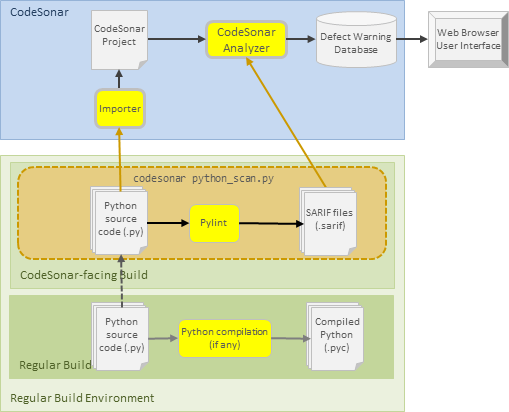
Diagram: including Python components in a CodeSonar project
The following diagram illustrates the extended software build
described above, and its interactions with the CodeSonar
build/analysis.
- The CodeSonar-facing build could include the entire regular
build for a Python component, or any part of that regular build,
but it does not need to.
- If the regular build contains a Python compilation step, that
compilation has no consequences for the CodeSonar-facing
build.
Note
In this section (and throughout
this manual), $CSONAR indicates the
CodeSonar
installation directory.
- If you have defined environment variable CSONAR to the
location of the CodeSonar installation
directory, you can use $CSONAR directly in
your command lines. On Windows systems, use
%CSONAR% in
place of $CSONAR.
- If you don't want to use environment variables,
replace $CSONAR with the
path to your CodeSonar
installation directory before using the command
lines.
When a SARIF file is imported into a CodeSonar project, the
SARIF importer determines an associated warning
class for each rule object in
the SARIF rules, creating this warning class if
it does not already exist.
The SARIF importer has special handling for warning classes
derived from SARIF produced by Pylint. For more information, see
Warning
Classes Corresponding to Pylint Rules.
To analyze Python source files with Pylint and then add the source
files and analysis results to a project, CodeSonar observes the
execution of a command that incorporates one or more
invocations of codesonar
python_scan.py.
codesonar python_scan.py [file_or_dir ...] [-C
rundir, -directory rundir] \
[-include-sources file_pat]
[-exclude-sources file_pat] \
[-Xpylint_options_list]
[-pylint-output pylint_raw_fname] [-sarif-output
sarif_fname] \
[-source-max-bytes num]
[@infile]
where:
| [file_or_dir ...]
|
is a space-separated list of Python module source file or
package directory paths.
- Relative paths are interpreted with respect to the
directory specified with -C/-directory.
- For each file path, that file is analyzed and imported
into the CodeSonar project.
- For each directory path, all .py files in the directory tree rooted
at that directory are analyzed and imported.
The set of files specified with file_or_dir arguments can be
modified with -include-sources and -exclude-sources.
Note: the file_or_dir arguments are
not glob patterns (as used for -include-sources and
-exclude-sources). However, your shell may
expand patterns into file and directory names.
If there are no file_or_dir arguments and no
-include-sources arguments, the codesonar python_scan.py
subcommand will fail.
|
[-C rundir]
[-directory rundir]
|
Pylint will be run in rundir. If -C/-directory is not specified,
Pylint will be run in the current working directory.
Any file_or_dir, -include-sources
file_pat, and -exclude-sources file_pat arguments
are interpreted relative to rundir. For example:
-
codesonar python_scan.py .
Analyze all .py files in
the directory tree rooted at the current working directory.
-
codesonar python_scan.py . -C mymod
Analyze all .py files in
the directory tree rooted at directory mymod.
-
codesonar python_scan.py dirA dirB/dirC -C mymod
Analyze all .py files in
the directory tree rooted at directory mymod/dirA and all .py files in the directory tree rooted
at directory mymod/dirB/dirC
|
[-include-sources
file_pat]
[-exclude-sources file_pat]
|
All Python source files (.py)
indicated by the -C/-directory and file_or_dir argument
combination will be analyzed with Pylint.
By default, this set of Python source files is then imported
into the CodeSonar project. Use -include-sources and -exclude-sources to adjust the
imported set by adding or removing files.
file_pat is
a recursive glob pattern representing a source file path. It
matches all files whose file path matches file_pat. Relative paths
are interpreted with respect to the directory specified with
-C/-directory.
When a single codesonar
python_scan.py invocation contains a combination of
-include-sources and
-exclude-sources
options, the set of imported files is determined by applying
the corresponding inclusions and exclusions in the order in
which they appear on the command line. Some examples are provided
below.
Note:
- Your shell may be configured to expand patterns into file
and directory names. If so, make sure you quote the
file_pat
appropriately to indicate that the shell should pass it
through to codesonar
python_scan.py. In most cases, this means using single
quotes ('); for Windows
cmd, use double quotes
(").
|
| [-Xpylint_options_list]
|
The list of options and values in pylint_options_list
are passed to the Pylint invocation.
-
pylint_options_list can be comma-separated
(,) or
plus-separated (+); use the same character
to introduce the list.
For example, the following are equivalent: both specify
that Pylint should be invoked with --max-line-length 50.
codesonar python_scan.py -X,--max-line-length,50 [...
remaining python_scan.py options]
codesonar python_scan.py -X+--max-line-length+50 [...
remaining python_scan.py options]
- You can specify multiple Pylint options in a single
pylint_options_list; you can also specify
-X multiple times in a
single codesonar
python_scan.py invocation.
For example, the following are equivalent: both specify
that Pylint should be invoked with --max-line-length 50 and
--allow-global-unused-variables
n.
codesonar python_scan.py
-X,--max-line-length,50,--allow-global-unused-variables,n
[... remaining python_scan.py options]
codesonar python_scan.py -X,--max-line-length,50
-X,--allow-global-unused-variables,n [... remaining
python_scan.py options]
Example notes:
|
| [-pylint-output
pylint_raw_fname]
|
Specifies that the raw analysis results from Pylint should be
written to file pylint_raw_fname.
The primary use case for this option is in projects for which
you wish to retain the raw Pylint results after the CodeSonar
build/analysis has finished
If -pylint-output
pylint_raw_fname is not specified, codesonar python_scan.py will use
a temporary file for the raw Pylint results.
|
| [-sarif-output sarif_fname]
|
Specifies that the SARIF output from Pylint should be written
to file sarif_fname.
The primary use case for this option is in projects for which
you wish to retain the SARIF results after the CodeSonar
build/analysis has finished
If -sarif_output
sarif_fname is not specified, codesonar python_scan.py will use
a temporary file for the SARIF output.
|
| [-source-max-bytes num]
|
Specifies a maximum size of num bytes for imported
Python source files: files larger than this maximum size will be
ignored by the importer.
If -source-max-bytes is not
specified, the importer will ignore files larger than 500KB. |
| [@infile]
|
infile is a text file
containing a list of -include-sources file_pat and -exclude-sources
file_pat entries to be added to the codesonar python_scan.py command
line.
- The file must have one entry per line.
- The entries will be added to the command line at the
location where the @infile argument occurred, in the
order in which they appear in infile.
|
When CodeSonar processes a codesonar python_scan.py command, it
does the following.
- Compute the set of source files to be analyzed. This will
contain every source file F.py that matches the specified
combination of -include-sources and -exclude-sources options: those specified
directly on the command line and those present in a file specified
with @infile.
- Execute a single Pylint invocation on this set of files.
- Convert the Pylint results to SARIF.
- Import the SARIF results into the CodeSonar project, along with
every F.py in the set.
- Use Pylint to analyze myfile.py.
When Pylint has finished, import the analysis results and
myfile.py.
codesonar python_scan.py -include-sources myfile.py
- Use Pylint to analyze all files that have names ending in
.py and are located directly in
srcdir/.
When Pylint has finished, import the analysis results and all the
analyzed .py files.
codesonar python_scan.py -include-sources 'srcdir/*.py'
Note that the srcdir/*.py pattern is single-quoted
('srcdir/*.py').
This is so that the shell passes it through to codesonar python_scan.py rather than
attempting to expand it. For Windows cmd, use double quotes instead ("srcdir/*.py").
- Use Pylint to analyze all files that have names ending in
.py and are located in a direct
subdirectory of srcdir/.
When Pylint has finished, import the analysis results and all the
analyzed .py files.
codesonar python_scan.py -include-sources
'srcdir/*/*.py'
- Use Pylint to analyze all files that have names ending in
.py and are located anywhere in
the directory tree rooted at srcdir/.
When Pylint has finished, import the analysis results and all the
analyzed .py files.
codesonar python_scan.py -include-sources
'srcdir/**/*.py'
- Use Pylint to analyze all files that have names ending in
.py and are located anywhere in
the directory tree rooted at srcdir/, unless they are in the directory tree
under srcdir/noinclude/.
When Pylint has finished, import the analysis results and all the
analyzed .py files.
codesonar python_scan.py \
-include-sources
'srcdir/**/*.py' -exclude-sources
'srcdir/noinclude/**/*'
The relative order of -include-sources and -exclude-sources is important: if
-exclude-sources were
first it would be superseded by the subsequent -include-sources and all
.py files under srcdir/ would be imported.
- Use Pylint to analyze all files that are located anywhere in
the directory tree rooted at srcdir/, unless they are in the tree under
srcdir/noinclude/ and not
under a directory named actuallyyes/ in that tree.
When Pylint has finished, import the analysis results and all the
analyzed .py files.
codesonar python_scan.py \
-include-sources
'srcdir/**/*.py' -exclude-sources
'srcdir/noinclude/**' \
-include-sources
'srcdir/noinclude/**/actuallyyes/**/*.py'
The codesonar
python_scan.py subcommand imports Python source files into the
CodeSonar project using the same mechanism as codesonar import_sarif.py, because
CodeSonar does not have a full front end for Python.
There are several consequences when files are directly imported with codesonar import_sarif.py.
- The CodeSonar analysis checks are not applied to Python source files.
- Code Coloring and
Interaction are not applied to Python source files when they
are displayed in the CodeSonar web GUI.
- The Python source files will have file-level
IR only. Plug-ins that
make use of other IR information will not cover these
files.
- The Extension API
is not available for Python source files. CodeSonar will not recognize or
interpret Extension API directives that are present in these
files.
An example Makefile for a Python project is shown below.
We also provide an example Makefile for a mixed-language project that has a Python component:
see Including Tier 3 Components in a CodeSonar Project: Example Makefile
- Unhighlighted rules and targets are those that would be in the
Makefile if it only built the regular project.
- Rules and targets that are highlighted like this have been added to define a
CodeSonar-facing build, which incorporates the Pylint analysis.
The Makefile illustrates a case where the Python component is not
compiled. The all dependencies are
thus all the .py source files in the
component, and there are no .pyc
targets. If the regular build included a Python compilation step, the
CodeSonar-facing build would be the same as shown here.
.PHONY: all clean csonar_facing
all: $(SRCDIR)/python_component.py
csonar_facing: $(SRCDIR)/python_component.py
"$(CSONAR)"/codesonar/bin/codesonar python_scan.py -include-sources "$(SRCDIR)/python_component.py"
clean:
We have provided a minimal sample project so you can experiment
with the example Makefile.
- Sign in to a machine where CodeSonar is installed.
- Select or create a working directory. The working directory
location must be outside both your CodeSonar installation directory
and your hub directory.
- If any of the following are not installed, install them now.
- If your Pylint installation is not in your PATH, add it now.
- Save the example files to the working directory (right-click on
the link and select Save Target As... or equivalent).
- cd to the working
directory.
- Rename the Makefile (this simplifies the CodeSonar analysis
command later).
mv Makefile.Python.txt Makefile
- Edit Makefile to add a setting
for SRCDIR at the top (above the
.PHONY line). If CSONAR isn't defined in your environment,
set that as well.
or
SRCDIR=.
CSONAR=path/to/your/codesonar/installation
- Build and analyze the CodeSonar project. If your hub is at the
default location, your command will be something like:
codesonar analyze PythonExample make csonar_facing
For full codesonar
analyze command details, see Command Line Build/Analysis.
- When the analysis finishes, view the Analysis page in the hub
GUI.
- The Warnings tab shows a warning instance for each Pylint
result. Click any table entry to view the corresponding warning
report.
- The Files tab has an entry for the Python source file
python_component.py. You can
click on the file name to view a source listing: as noted above, there is no additional source
highlighting or navigation.
- There are no entries in the Procedures tab: source files
imported with codesonar
import_sarif.py have file-level internal representation
(IR) only.
Other Targets in the Example Makefile
The clean target has an empty
recipe because codesonar
python_scan.py cleans up its own intermediate files.