JavaScript is not currently enabled, but is required for full CodeSonar manual search and browse functionality.
If you are viewing this file in your hub's Web GUI, enable JavaScript in your browser: you will also need it for GUI functionality.
If you opened this file directly from disk, your browser may be directly suppressing JavaScript functionality: certain browsers perform this suppression on local files (but not files delivered by web servers) for security reasons.
| CodeSonar® 9.2p0 | CONFIDENTIAL | CodeSecure Inc |
The codesonar cs_android.py command is provided to support analyzing Android Open Source Project (AOSP) code. It provides functionality for setting up an AOSP source directory for CodeSonar analysis, analyzing the code in that directory, and cleaning up afterward.
Note: codesonar cs_android.py is not suitable for use with Android App projects.
This page provides a full description of the codesonar cs_android.py command and all its options.
The codesonar cs_android.py command is provided to support analyzing Android Open Source Project (AOSP) code. It provides functionality for setting up an AOSP source directory for CodeSonar analysis, analyzing the code in that directory, and cleaning up afterward.
This is useful for several reasons.
The android_base preset sets various analysis bounds and compiler model mappings to support analyzing the AOSP. We recommend using this preset whenever your CodeSonar build/analysis makes use of codesonar cs_android.py.
cs_android.py is a codesonar Python subcommand.
Note: codesonar
cs_android.py is not suitable for use with Android App
projects. To analyze an Android App project, define a
CodeSonar-facing build
and instruct CodeSonar to observe its execution.
You may need to adjust system settings in order to provide enough resources for AOSP code analysis.
We recommend the following ulimit arguments.
You may prefer to use very high concrete values in place of unlimited: choose limits at which you prefer the analysis to fail rather than use more resources.
For detailed information about ulimit consult the documentation (such as man pages) for your local system.
Your sequence of codesonar cs_android.py commands will depend on the languages you are using.
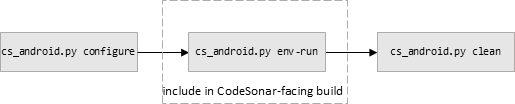
If you are only modifying C/C++ code, typical usage is as follows.
| 1. configure | Configure the AOSP project directory with codesonar cs_android.py configure. |
|---|---|
| 2. env-run | Build the AOSP project with codesonar cs_android.py
env-run. Important: the CodeSonar-facing build must include the codesonar cs_android.py env-run invocation so that it can be observed by CodeSonar and all C/C++ compilations represented in the CodeSonar project. |
| 3. clean | Clean up the changes to the AOSP project directory with codesonar cs_android.py clean. |
If you are only modifying Java code, typical usage is as follows.

| 1. configure | Configure the AOSP project directory with codesonar cs_android.py configure. |
|---|---|
| 2. (regular build) | Build the AOSP project with your regular software build. |
| 3. java-scan | Partition the AOSP project's source and binary files into
related groups; invoke cs-java-scan on each group. The codesonar cs_android.py java-scan command (when used without the -print option) performs both the partitioning and the cs-java-scan invocations. Important: the CodeSonar-facing build must include the codesonar cs_android.py java-scan invocation so that the cs-java-scan invocations that it produces can be observed by CodeSonar and accounted for in the CodeSonar project. |
| 4. clean | Clean up the changes to the AOSP project directory with codesonar cs_android.py clean. |
Several variations on this basic sequence are possible.
If you are modifying both C/C++ and Java code, typical usage is as follows.

| 1. configure | Configure the AOSP project directory with codesonar cs_android.py configure. |
|---|---|
| 2. env-run | Build the AOSP project with codesonar cs_android.py
env-run. Important: the CodeSonar-facing build must include the codesonar cs_android.py env-run invocation so that it can be observed by CodeSonar and all C/C++ compilations represented in the CodeSonar project. |
| 3. java-scan | Partition the AOSP project's source and binary files into
related groups; invoke cs-java-scan on each group. The codesonar cs_android.py java-scan command (when used without the -print option) performs both the partitioning and the cs-java-scan invocations. Important: the CodeSonar-facing build must include the codesonar cs_android.py java-scan invocation so that the cs-java-scan invocations that it produces can be observed by CodeSonar and accounted for in the CodeSonar project. |
| 4. clean | Clean up the changes to the AOSP project directory with codesonar cs_android.py clean. |
If you find that codesonar cs_android.py java-scan does not analyze all of the Java code that you were expecting to analyze, you may need to extract Java artifacts which were archived in the build output directory by the Android build process. Expand the typical sequence shown above to add a java-extract command before the java-scan command in step 3. This will ensure that the archives you specify are extracted.
| configure Configure an AOSP source tree. |
codesonar cs_android.py configure \
[-release relver] [-logfile path/to/logfname] [-verbose]\ root_dir |
|---|---|
| env-run [when analyzing C/C++ components] Execute an Android build command in such a way that CodeSonar can observe it. |
codesonar cs_android.py env-run \
-lunch target [-envsetup path/to/esu_dir] [-shell shellcmd] \ [-source sourcecmd] [-workdir path/to/wdir] \ [-outdir path/to/odir] [-release relver] [-logfile path/to/logfname] [-verbose] \ root_dir build_cmd [build_args] |
| java-extract [when analyzing Java components] Find and extract Java artifacts. |
codesonar cs_android.py java-extract \
[-force] [-name namepat] \ [-outdir path/to/odir] [-release relver] [-logfile path/to/logfname] [-verbose] root_dir |
| java-scan [when analyzing Java components] Partition Java sources/artifacts, invoke cs-java-scan. |
codesonar cs_android.py java-scan \
[-build-system-format bsf_name] [-class-extraction-tolerance tolerance_level] \ [-cs-verbosity num] [-jobs num] [-print] \ [-outdir path/to/odir] [-release relver] [-logfile path/to/logfname] [-verbose] \ root_dir [source_dir1 sourcedir2 ... ] |
| clean Clean up the AOSP project directory. |
codesonar cs_android.py clean \
[-verbose] [-logfile path/to/logfname] \ root_dir |
Configure an AOSP source tree to prepare it for CodeSonar analysis.
This command will make several changes to the AOSP source directory.
These changes are logged: modified/moved files are restored and added files deleted when you clean the directory.
| root_dir | The root directory for the AOSP project. Note that this must be precisely the project's root directory (not a parent or child directory). |
|---|---|
| [-release relver] |
The Android release version.
Default behavior: if not specified, configuration assume you are using Android 11 or later and will proceed with patching on that basis. |
| [-logfile path/to/logfname] | The file to use for logging the operations performed in
configuring the source tree. If you specify a -logfile value here, ensure that you specify the same one for all subsequent steps. Default: root_dir/codesonar.config.log |
| [-verbose] [-v] |
Print more detailed messages while configuring the project directory. |
Execute an Android build command within an "envsetup" environment in such a way that CodeSonar can observe the build and any C/C++ compilations that it performs.
| root_dir | The root directory for the AOSP project. This must be the same directory that you specified for codesonar cs_android.py configure. |
|---|---|
| build_cmd | The build command to execute. Typically, the command name is m. |
| [build_args] | Any arguments to be provided to the specified build_cmd. |
| -lunch target | Execute lunch with target as selection before running build_cmd. |
| [-envsetup path/to/esu_dir] | Specify that envsetup.sh is
located at path/to/esu_dir/envsetup.sh. Default: root_dir/build/envsetup.sh. |
| [-shell shellcmd] | Use the shell invoked with shellcmd. Default: bash |
| [-source sourcecmd] | The command used by the shell (as specified by -shell) to source
environment variables from a script. Default: source. |
| [-workdir
path/to/wdir] [-w path/to/wdir] |
Execute build_cmd in
the directory specified by path/to/wdir. Relative paths are
interpreted with respect to root_dir. Default: the current directory. |
| [-outdir path/to/odir] | Specify that the Android output binaries will be placed at
path/to/odir. Relative
paths are interpreted with respect to root_dir. Default: the value of environment variable OUT_DIR, or root_dir/out if this environment variable is not defined. |
| [-release relver] |
The Android release version.
|
| [-logfile path/to/logfname] | The file to use for logging file changes performed on behalf
of this command. If you specified a -logfile value for codesonar cs_android.py configure, specify the same one here. Default: root_dir/codesonar.config.log |
| [-verbose] [-v] |
Print more detailed messages while building. |
[when analyzing Java components]
Find and extract specified Java archives.
In many cases you will not need a separate java-extract step because the java-scan step performs
all necessary extractions.
One case where you are likely to need a java-extract step (with -force) is when re-analyzing a directory when
the previous analysis did not perform a clean
step.
| root_dir | The root directory for the AOSP project. This must be the same directory that you specified for codesonar cs_android.py configure and any subsequent commands. |
|---|---|
| [-force] [-f] |
Allow extracted files to overwrite existing files. Note that overwritten files are not backed up, and the extracted files will be deleted on cleanup. Default: existing files are not overwritten. |
| [-name namepat] |
Extract archives whose name matches namepat (a Glob pattern). For
example:
-name "*.jar"
Default: extracts all archives named classes.jar. |
| [-outdir path/to/odir] | Specify that the Android output binaries will be placed at
path/to/odir. Relative
paths are interpreted with respect to root_dir. Default: the value of environment variable OUT_DIR, or root_dir/out if this environment variable is not defined. |
| [-release relver] | The Android release version. The specified relver can be either a release number (such as 9)or an Android release tag (such as android-9.0.0_r1). By default, the command will determine the Android version from build outputs. |
| [-logfile path/to/logfname] | The file to use for logging the extractions performed by this
command. If you specified a -logfile value for codesonar cs_android.py configure and any subsequent commands, specify the same one here. Default: root_dir/codesonar.config.log |
| [-verbose] [-v] |
Print more detailed messages while identifying and extracting archives. |
[when analyzing Java components]
Extract Java archives as directed, automatically partition Android
Java sources and artifacts into groups, then invoke cs-java-scan on each group.
| root_dir | The root directory for the AOSP project. This must be the same directory that you specified for codesonar cs_android.py configure and any subsequent commands. |
|---|---|
| [source_dir1 source_dir2 ... ] | Zero or more source directories. Only analyze binaries/artifacts associated with the sources files under those directories. Relative paths are interpreted with respect to root_dir. Default: packages frameworks external |
| [-build-system-format bsf_name] |
The Android build system format name: one of {android.auto, android.mk, android.mk+bp, android.bp}. CodeSonar will use this information to decide how to group source and binary files, as follows.
Default: android.auto |
| [-class-extraction-tolerance max_noops] |
Specifies an upper bound on the number of Java archive
extractions to attempt if all extractions to this point have
been no-ops (indicating that the archives had already been
extracted).
|
| [-cs-verbosity num] | The verbosity level for cs-java-scan: an integer 0 ≤ num ≤ 10 0: no diagnostics 10: all diagnostics. |
| [-jobs
num] [-j num] |
Perform at most num
parallel operations when extracting archives and invoking
cs-java-scan. |
| [-print] |
Print cs-java-scan commands to
stdout instead of executing them. Only the cs-java-scan commands are printed to
stdout (diagnostics are printed to stderr), so you can pipe or
redirect as needed.
This option is provided as a debugging aid. If you specify -print then including the codesonar cs_android.py java-scan command in your CodeSonar-facing build is not sufficient to include the Java components in your CodeSonar project: the CodeSonar-facing build would also need to include a step where the printed commands are executed by a shell program (however, we do not recommend this). |
| [-outdir path/to/odir] | Specify that the Android output binaries will be placed at
path/to/odir. Relative
paths are interpreted with respect to root_dir. Default: the value of environment variable OUT_DIR, or root_dir/out if this environment variable is not defined. |
| [-release relver] |
The Android release version.
By default, the command will determine the Android version from build outputs. |
| [-logfile path/to/logfname] | The file to use for logging the extractions performed by this
command. If you specified a -logfile value for codesonar cs_android.py configure and any subsequent commands, specify the same one here. Default: root_dir/codesonar.config.log |
| [-verbose] [-v] |
Print more detailed messages. |
Delete files that have been created or modified by codesonar cs_android.py.
This command can take several minutes to run. It will print an initial message, but then no further messages as it reads the log and performs the necessary restorations and deletions during deletion: it may appear to have hung, but this is expected behavior and does not require canceling the command.
| root_dir | The root directory for the AOSP project. This must be the same directory that you specified for codesonar cs_android.py configure and any subsequent commands. |
|---|---|
| [-logfile path/to/logfname] |
The file that has been used to log your codesonar cs_android.py commands
to this point. If you specified a -logfile value for codesonar cs_android.py configure and any subsequent commands, specify the same one here. The command will clean up the files listed in this log file,
restoring/deleting as appropriate. Paths in the log file are
relative and interpreted with respect to root_dir. |
| [-verbose] [-v] |
Print more detailed messages while deleting the files. |
Suppose we want to analyze the Android Open Source Project, where:
Then the steps will look something like the following.
This has two important outcomes:
Notes:
CodeSonar will recognize the cs-java-scan invocations and make the corresponding updates to the CodeSonar project.
To report problems with this documentation, please visit https://support.codesecure.com/.