JavaScript is not currently enabled, but is required for full CodeSonar manual search and browse functionality.
If you are viewing this file in your hub's Web GUI, enable JavaScript in your browser: you will also need it for GUI functionality.
If you opened this file directly from disk, your browser may be directly suppressing JavaScript functionality: certain browsers perform this suppression on local files (but not files delivered by web servers) for security reasons.
| CodeSonar® 9.2p0 | CONFIDENTIAL | CodeSecure Inc |
Configuration for the CodeSonar plug-in for Visual Studio takes place at two levels of granularity.
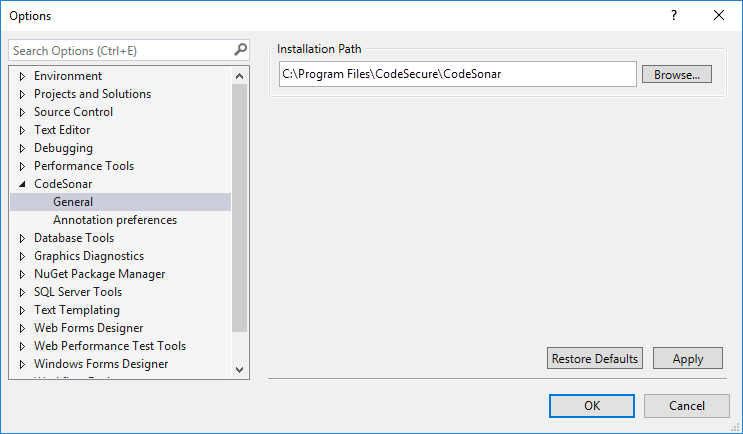
Overall CodeSonar plug-in options are available from the CodeSonar menu in the main Visual Studio menu bar.
To view the CodeSonar plug-in properties:
Visual Studio will display the Options dialog, with the CodeSonar plug-in options selected.
To modify options:
Each project has a set of associated CodeSonar properties, describing the project's analysis mode and current analysis.
To view project properties:
Visual Studio will display the CodeSonar Project Properties dialog for the project.
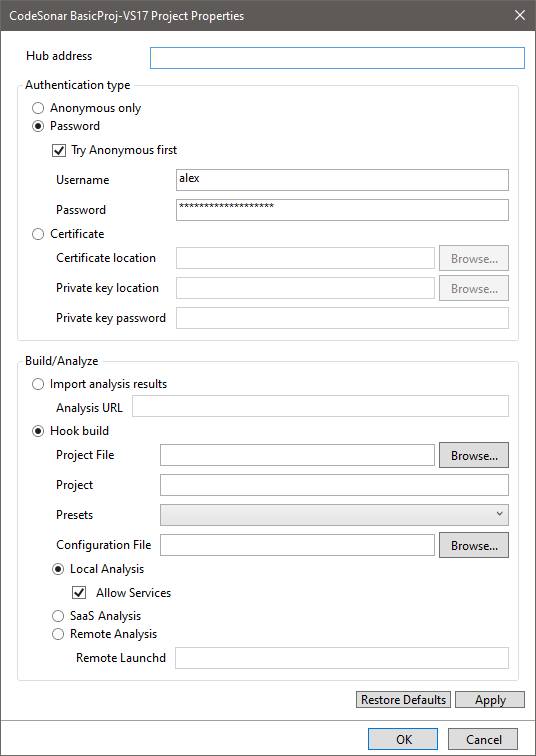
| Hub address | The hub location for the project's current analysis. | ||||||||
|---|---|---|---|---|---|---|---|---|---|
| Authentication type | Anonymous only | CodeSonar will only attempt to authorize the build/analysis
as special
user Anonymous. (Corresponds to command line -auth anonymous.) |
|||||||
| Password |
CodeSonar will attempt to authenticate and authorize the
build/analysis using a hub user account username and
password. (Corresponds to command line -auth default if Try Anonymous first is selected; -auth password otherwise.)
|
||||||||
| Certificate |
CodeSonar will attempt to authenticate and authorize the
operation using a user
certificate. (Corresponds to command line -auth certificate.)
|
||||||||
| Build/Analyze | Import analysis results or Hook build |
The project's analysis mode.
|
|||||||
| Project File |
If you leave this field blank, the locally-stored CodeSonar
project files will have names based on the Visual Studio
project name, and the analysis
directory will be stored in the directory in which the
build is performed.
To specify a different project name, or to use a different directory to store CodeSonar analysis artifacts, specify a file path in this field. path/to/CSOpfiles_nameThen:
|
||||||||
| Project |
Specifies the hub
project
with which this Visual Studio project will be associated, as a
string with one of the following forms.
If you leave this field blank, the hub project name will be determined as follows.
|
||||||||
| Presets | Use the menu to select a configuration preset to apply to the CodeSonar build/analysis for this project. By default, no presets will be applied. | ||||||||
| Configuration File | If you specify a configuration file here it will be applied to the CodeSonar build/analysis as an additional configuration file. | ||||||||
| analysis management |
Specify how the analysis should be managed.
Choose a radio button:
|
||||||||
To modify project properties:
The following sections provide detailed information about installing and using the CodeSonar plug-in for Visual Studio.
To report problems with this documentation, please visit https://support.codesecure.com/.