JavaScript is not currently enabled, but is required for full
CodeSonar manual search and browse functionality.
If you are viewing this file in your hub's Web GUI, enable
JavaScript in your browser: you will also need it for GUI
functionality.
If you opened this file directly from disk, your browser may be
directly suppressing JavaScript functionality: certain browsers
perform this suppression on local files (but not files delivered by
web servers) for security reasons.
-
If you access the manual through the hub's Web GUI, the
functionality will not be suppressed because the hub is a web
server.
-
Alternatively, your browser may allow you to explicitly
disable the security setting that suppresses functionality. See
the CodeSonar
FAQ for more information.
CodeSonar and the Clang Static Analyzer: Examples
This section provides examples of using the CodeSonar SARIF importer to incorporate results
found by the Clang Static Analyzer.
Important: If Clang Static Analyzer
is not already available on your local system, you will need to
install and
configure version 8.0 or later.
Windows Note: Some Windows users
have reported that they cannot run the scan-build command and obtain SARIF output
even independently of CodeSonar. If you are a Windows user having
difficulties completing the exercise below and the general troubleshooting advice does not help
you resolve them, you may need to file a Clang Static Analyzer bug report.
We have provided the following files for these examples.
Note
In this section (and throughout
this manual), $CSONAR indicates the
CodeSonar
installation directory.
- If you have defined environment variable CSONAR to the
location of the CodeSonar installation
directory, you can use $CSONAR directly in
your command lines. On Windows systems, use
%CSONAR% in
place of $CSONAR.
- If you don't want to use environment variables,
replace $CSONAR with the
path to your CodeSonar
installation directory before using the command
lines.
- If the Clang Static Analyzer is not installed on your system,
install and configure version 8.0 or
later now.
- Choose a name for the new CodeSonar project. In the remainder
of these instructions, we will call it SarifTest.
- Create a working directory. The working directory location must
be outside both your CodeSonar installation directory and your hub
directory.
- Save (right-click on the link and select Save Target
As... or equivalent) file1.cpp, file2.cpp, main.cpp, and Makefile to your working directory.
- Create a directory named include within the working directory. Save
header1.h, header2.h, and header3.h to the include subdirectory.
- cd to the working
directory.
- Run the CodeSonar build with a command based on the Clang
Static Analyzer scan-build
command. In many cases, the following will be sufficient.
codesonar build SarifTest /path/to/clang/bin/scan-build
-sarif -enable-checker core make
This will execute CodeSonar, the Clang Static Analyzer, and build
the user's project from the Makefile.
- Run the following command to have CodeSonar load the SARIF
results that were produced by the Clang Static Analyzer into the
CodeSonar hub for the SarifTest
project.
codesonar analyze SarifTest codesonar import_sarif.py
/tmp/scan-build-datetime/*
Where
CodeSonar will analyze the SarifTest project and import the SARIF
results.
- The findings from both static analyzers will be present in the
hub for the SarifTest project.
Open the hub GUI Analysis page for the
analysis and go on to Analysis
Results.
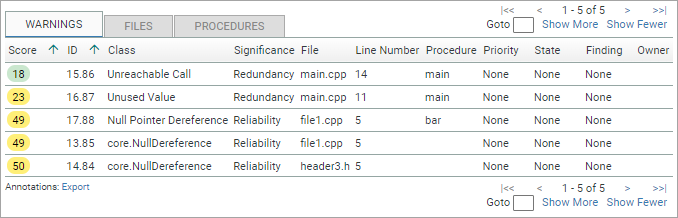
The Analysis:
Warnings tab will list five warnings, as shown in the following
screenshot fragment.
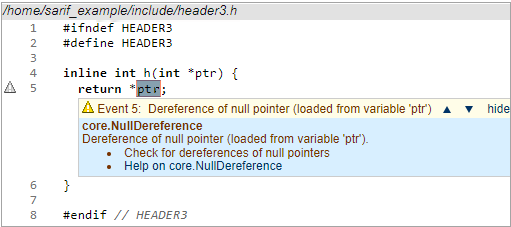
- Click the "core.NullDereference" that occurs in
header3.h to navigate to the
Warning Report.
- Inspect the warning report which describes a null pointer
dereference reported by the Clang Static Analyzer.
- If the Clang Static Analyzer is not installed on your system,
install and configure version 8.0 or
later now.
- Choose a name for the new CodeSonar project. In the remainder
of these instructions, we will call it ExampleTest.
- Create a working directory. The working directory location must
be outside both your CodeSonar installation directory and your hub
directory.
- Save (right-click on the link and select Save Target
As... or equivalent) scratch.m to your working directory.
- cd to the working
directory.
- Run the Clang Static Analyzer and generate .sarif output.
/path/to/clang/bin/scan-build -sarif -o .
/path/to/clang/bin/clang-9 -ObjC -framework Foundation
-isysroot `xcrun --show-sdk-path` -c scratch.m
- Run the following command to have CodeSonar load the SARIF
results that were produced by the Clang Static Analyzer into the
ExampleTest project, along with
source file scratch.m.
codesonar analyze ExampleTest [other codesonar options]
\
codesonar import_sarif.py
/tmp/scan-build-datetime/* -include-sources
scratch.m
Where
CodeSonar will finalize the ExampleTest project and send the results to
the hub.
- Open the hub GUI Analysis page for the
analysis and go on to Analysis
Results.
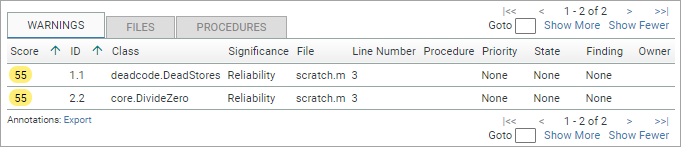
The Analysis:
Warnings tab will list two warnings, as shown in the following
screenshot fragment.
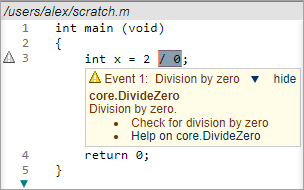
- Click the "core.DivideZero" that occurs in
scratch.m to navigate to the
Warning Report.
- Inspect the warning report which describes a division by zero
warning reported by the Clang Static Analyzer.
If your Analysis page is not showing any results from the Clang
Static Analyzer (that is, any warnings of class
"core.NullDereference" or "core.DivideZero" in
the examples above), check the following.
| A. You have a sufficiently recent version of
Clang Static Analyzer. |
The CodeSonar integration requires Clang Static Analyzer v8.0
or later. |
| B. The scan-build command runs correctly in
isolation. |
- Run make clean
to ensure you will be fully rebuilding the project.
make clean
- Run the scan-build
command in isolation.
/path/to/clang/bin/scan-build -sarif
-enable-checker core make
- Check the following.
If the answer to any of these questions is "no",
the problem is within scan-build and is independent of
CodeSonar.
- Consult the scan-build
documentation for help in diagnosing and resolving
your problem.
- If you still cannot run scan-build in isolation, file a Clang Static Analyzer bug
report.
|
| C. Your codesonar
analyze command line has no typos. |
Double-check to make sure your codesonar analyze command line contains
all the required elements.
In particular, make sure you have specified the correct path
to the directory where scan-build wrote its SARIF files. This
will be different every time you run scan-build.
|