JavaScript is not currently enabled, but is required for full
CodeSonar manual search and browse functionality.
If you are viewing this file in your hub's Web GUI, enable
JavaScript in your browser: you will also need it for GUI
functionality.
If you opened this file directly from disk, your browser may be
directly suppressing JavaScript functionality: certain browsers
perform this suppression on local files (but not files delivered by
web servers) for security reasons.
-
If you access the manual through the hub's Web GUI, the
functionality will not be suppressed because the hub is a web
server.
-
Alternatively, your browser may allow you to explicitly
disable the security setting that suppresses functionality. See
the CodeSonar
FAQ for more information.
More Warnings
We take a brief look at the other warnings issued by the
analysis.
Tainted Path Warning
The example code prompts the user for a file name, then uses the
resulting name to open a file and write a value into it. This could
cause significant problems if, for example, a malicious user provided
the name of an important system file such as /etc/passwd.
CodeSonar can detect the flow of information from a tainted source
(such as user input or an untrusted database) and identify cases
where that information is used in a context where values must be
trustworthy. In this particular case, CodeSonar detects that the
program using user input in a context where a trusted file path is
required, so it issues a Tainted Path
(C#) warning.
- Click the cs-BasicProj analysis 1 link in the page
breadcrumbs.
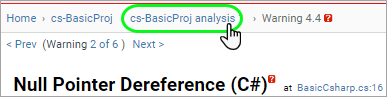
The Analysis page will open.
- Click the table entry for the "Tainted Path (C#)"
warning.
- The Warning Report will open.
It has the same general structure as the Null Pointer
Dereference (C#) warning that you have just looked at.
- Expand the warning details section.
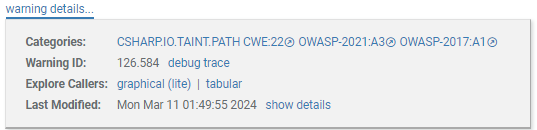
The "Tainted Path (C#)" warning class is associated
with entries in the OWASP Top Ten Application
Security Risks in both the most recent (2021) and previous
(2017) versions.
- If you are interested, click on the OWASP-2021:A3 link
to read the corresponding entry on the OWASP website. The entry
will open in a new tab, and includes:
- an overview of the dangers of data injection and tainted
data,
- example attack scenarios, and
- prevention guidelines.
- Click the Jump to warning location ↓ link or scroll down
(if necessary) to view the warning description box.

The warning description box identifies the key elements of the
issue:
- The tainted value arises from a call to Console.ReadLine() (line 20).
- The dangerous use of the tainted value is in a call to
File.Createtext (line
21).
- The problem is that the tainted value is being used in a
context where a trusted path is expected.
Two Condition Warnings
BasicCsharp.cs contains two
different examples of warnings about IF statement conditions. These
warnings could indicate mistaken assumptions by the programmer, logic
errors in the program, or both.
- Click the cs-BasicProj analysis 1 link to navigate back
to the Analysis page.
- Click the table entry for the "Empty Branch Statement
(C#)" warning.
- Navigate or scroll to the warning description box.

The issue here is that line 11 represents a complete IF
statement: if (args.length >
0);
Both branches of this IF statement are empty, so it has no
effect on the program outcome. Its presence in the program is
therefore at best useless, and at worst actively misleading. In
particular, the indentation on line 12 encourages readers to
regard this line as the TRUE branch of an IF statement governed
by the condition on line 11.
The programmer probably did not intend to write the program
this way. There are two likely cases.
- If the IF statement is intended to include line 12 as its
TRUE branch, delete the semicolon (;) at the end of line
11.
- If the IF statement really is useless, remove it.
- Click the cs-BasicProj analysis 1 link to navigate back
to the Analysis page.
- Click the table entry for the "Redundant Condition
(C#)" warning.
- Navigate or scroll to the warning description box.

The problem here is that the IF statement condition always
evaluates to TRUE: two distinct objects will always compare
unequal with !=. This means that
the program outcome would be exactly the same if we removed the
IF header on line 16 and left the assignment on line 17.
Redundant condition warnings typically indicate one of the
following.
- The programmer believes that the program contains at least
one path where the condition is TRUE and at least one path
where the condition is FALSE, and this belief may not be
accurate.
For example, the operator comparison objA!=objB may suggest that the programmer
believes there is a path where these pointers end up referring
to the same object at this point and a path where they
don't. In this example we can see easily that they will
always be different, but in real code it can be much harder for
a human to make this determination.
- The programmer made an error in constructing the test
condition, and the condition is not what they intended.
For example, the operator comparison objA!=objB may have been intended to be a
method comparison !objA.Equals(objB). In this case the two
are equivalent, since the code does not override Object.Equals(), but they are not
necessarily equivalent in general.
Debug Warning
The last of the warnings in BasicCsharp.cs is an instance of "Deug
Warning (C#)".
- Click the cs-BasicProj analysis 1 link to navigate back
to the Analysis page.
- Click the table entry for the "Debug Warning (C#)"
warning.
- Navigate or scroll to the warning description box on line 23.

This warning suggests that the call to Console.WriteLine() be replaced with a
logging method.
Replacing with a logging method isn't quite the right
resolution here: the code is using Console.WriteLine() to prompt the user for
input rather than to perform some other task (such as print-based
debugging). We have a number of potential resolution options.
- If we are happy with this specific use of Console.WriteLine() and no longer want to
see the warning, we can use the Change Warning form at
the bottom of the warning report to change its Priority
to Suppressed. The warning will still be issued by
future analyses of the same code, but will not usually be shown
on the Analysis page or in other lists of warnings.
For more information, see the information about the visibility
filter in GUI Reference:
The Standard Header.
- If we don't care about any instances where code
writes to the console or similar, we can disable all
"Debug Warning (C#)" warnings. To do this, see
"Enabling" in the Debug
Warning (C#): Properties table. When a warning class is
disabled, analyses will not submit any warnings of that class
to the hub, even if such warnings are detected.
- If our local coding guidelines require that we avoid
writing to the console, we will need to change the code to
prompt the user in a different way, for example by showing a
dialog.
Next