JavaScript is not currently enabled, but is required for full
CodeSonar manual search and browse functionality.
If you are viewing this file in your hub's Web GUI, enable
JavaScript in your browser: you will also need it for GUI
functionality.
If you opened this file directly from disk, your browser may be
directly suppressing JavaScript functionality: certain browsers
perform this suppression on local files (but not files delivered by
web servers) for security reasons.
-
If you access the manual through the hub's Web GUI, the
functionality will not be suppressed because the hub is a web
server.
-
Alternatively, your browser may allow you to explicitly
disable the security setting that suppresses functionality. See
the CodeSonar
FAQ for more information.
Source Files
On occasion, you may want to see a source file in its entirety.
- You may want to see a warning in a wider context than is
provided by the warning report.
- You may be interested in seeing all of the file's
warnings at once.
The CodeSonar analysis caches copies of project source files for
the most recent analysis of each project. The GUI
Source Listing pages
display source files with syntax coloring, hyperlinks, and
highlighted endpoints.
Viewing a Source File
There are several ways to navigate to project source files. Since
you are currently viewing a warning report, it will be most
convenient to navigate from there.
- Do one of the following.
- Click the source file name, your\save\directory\BasicJava.java,
at the top of the source excerpt. This will take you to the top
of the Source Listing page. (On Windows systems, the file name
will be downcased to basicjava.java.)
- Click any line number in the source excerpt. This will take
you to the corresponding line of the Source Listing page.
- If necessary, scroll up to the top of the page you have
navigated to.
Source File Page
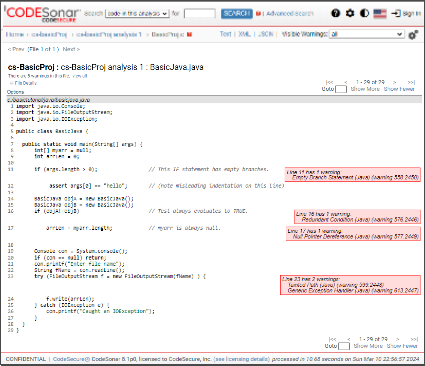
You should see a page that looks (something) like this:
Summary Information
- Click File Details at the top
of the Source Listing to view additional information about the
file.
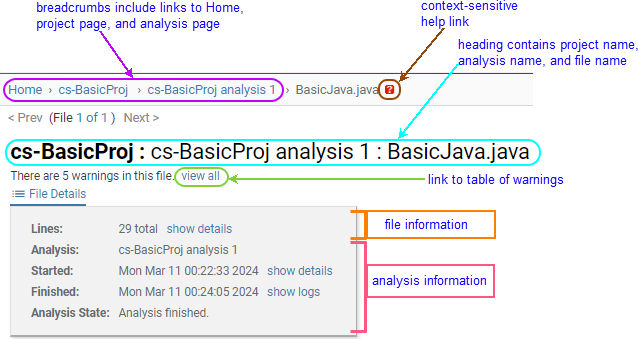
- The page breadcrumbs provide links to the main pages
for the current analysis and the project.
- A context-sensitive help link opens the Source Listing reference
page in this manual.
- The page heading contains the names of the file, the
analysis in which it was analyzed, and the project to which it
belongs.
- Below the heading is a line specifying how many warnings
are present in the file, with a link to a Warning Search
Results page listing those warnings.
- Some basic information about the analysis is displayed: its
name, start and finish times, and current state.
- Basic information about the file is also displayed:
the number of lines in the file.
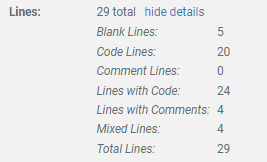
The Lines field can be expanded
by clicking on its show details
link.
- Click show details next to the
Lines count to view more detailed
line count figures.
- The line directly under the page heading includes a link to a
Warning Search Results page listing all warnings issued in the
file.
Click view all to view the list of
warnings.
- Use your browser's Back
button to return to the BasicJava.java file listing.
Every warning location in the file is indicated with a warning
annotation specifying how many warnings were issued at that
location, and listing the classes and ID numbers of those warnings
with links to the corresponding warning reports.

- Click on a link in a warning annotation to navigate to the
associated warning report.
This is the end of the Basic Tutorial. If you like, you can
go to the tutorial index and
choose another tutorial exercise.